
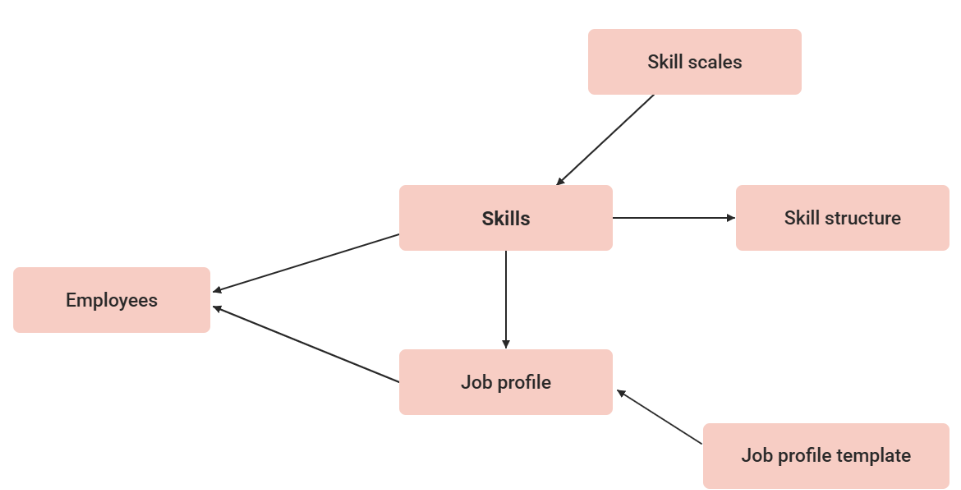
Skill scales serve to allow evaluation of skills with pre-defined levels and are managed centrally which enables simultaneous use in multiple skills. Any number of intervals between 1 and 100 can be created in a skill ranking; However, the levels of all numerical values must lie between 1 and 100. The following skill scale could be used for all foreign-language skills, for instance:
-
1-25 points: Basic understanding
-
26-50 points: Intermediate
-
51-75 points: Fluent in writing
-
76-100 points: Fluent in writing and speaking
The use of skill scales not only saves time when creating skills, but it also provides the possibility to directly compare multiple skills in the system.
This function is only available with the imc Learning Suite licence or the add-on component "Competency Management."
Functions of the Skill Scales Manager
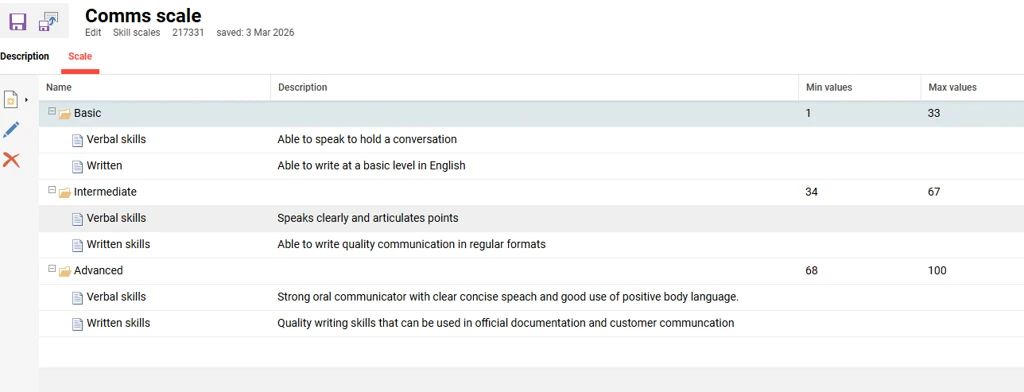
When creating a Skill level, there are two tabs: "Description," used to name the scale in each system language, and "Scale," which defines the levels. A tree structure helps organize and manage Skill Levels and Skill Competency Statements within the Skill Scale tab.
Within the skill scale tab, the creation structure includes two items:
-
Level: Each level of the scale can be named and described in detail, which is essential as the level descriptions are visible to all users throughout the system. When defining the scales, it is important that the Min and Max values sequentially go from 1 to 100 without skipping any numbers to save.
-
Competency: Competency statements can be added to each skill level, allowing optional descriptions and support for multiple languages. The Competency Statements can only be used in combination with the “Confirmation by Competency Evaluation” confirmation mode, which must be selected at the skill level.
New
Edit
Delete
Clearances
Hints and Tips
Skill Scales
-
Although Skill scales can be directly created in the "Scale" tab of a skill, it is recommended to make them independently in the "Skill scales" function, so the scale is reusable.
-
When using the Skill import, assign skills, the scale level order number is used rather than a number within the Min/Max level range; E.g., in the above example, skill scale, a "1" would represent "Basic understanding" and a "3" for "Fluent in writing".
-
When using the REST API to assign skills via POST or PUT, the confirmedValue is a number within the desired level range; e.g., in the above example skill scale, a "20" would represent "Basic understanding" and a "60" for "Fluent in writing".
-
If Skill scales are to be usable by other administrators when they create Skills, ensure they have at least "Execute" clearance.
Competency Statements
Specific rules help ensure data consistency and completeness when configuring Levels and Competency Statements within a skill to fulfill the Competency Evaluation workflow.
-
If multiple Levels are created (e.g., 3), each Level must have at least one Competency to save. Otherwise, a warning appears: "All Scales need to have at least one competency assigned."
-
A maximum of 6 competencies per Level is allowed. Once reached, a message appears: "You reached the max. number per level."
-
Only skills with the same confirmation mode applied can be assigned to a job profile.
-
Individual skill-level results are combined into overall skill evaluations, with configurable logic determining how many competencies are required to achieve a given skill level.
Global Functions and Related Topics