
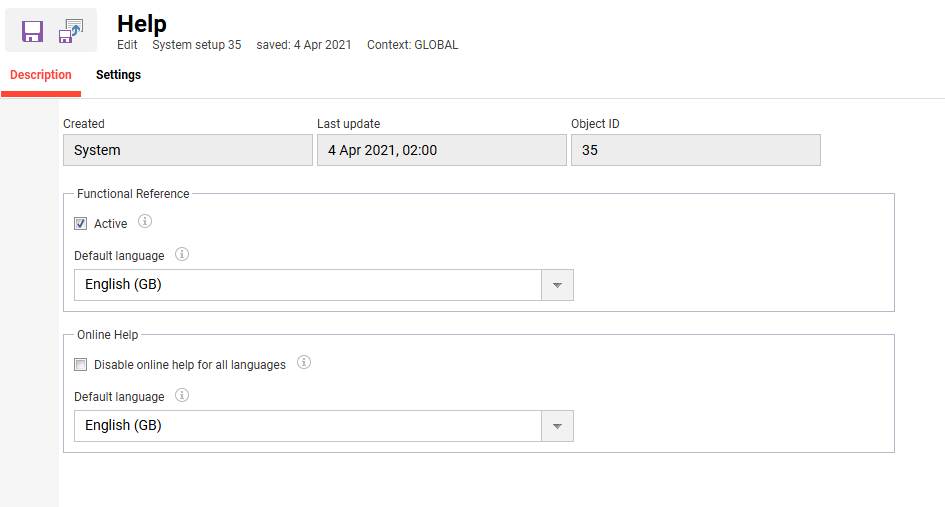
The Help menu defines the default language for the Functional Reference and for the Operating instructions ('i' icon), each set separately. Where that default isn't suitable for a given platform language, it can instead be mapped to one of six available languages: German, English GB, English US, Spanish, French or Italian
Description
|
Setting |
What does the setting do? |
|---|---|
|
Functional reference |
|
|
Active |
If active, the help button to access the functional reference is available in the ILS. |
|
Default language |
Specifies the language of the function reference if the appropriate language is not available. |
|
Online Help |
|
|
Disable online help for all languages |
True/Ticked: The operating instructions will not be displayed in any configured platform language. This setting only applies if an Online Help Language or a Default Online Help Language has been configured in the “Online help languages” tab. False/Unticked: The operating instructions are displayed for active platform languages according to the configuration in the “Online help languages” tab. |
|
Default language |
This setting defines the language in which the operating instructions are displayed if no operating instructions are available in a selected platform language. |
Settings
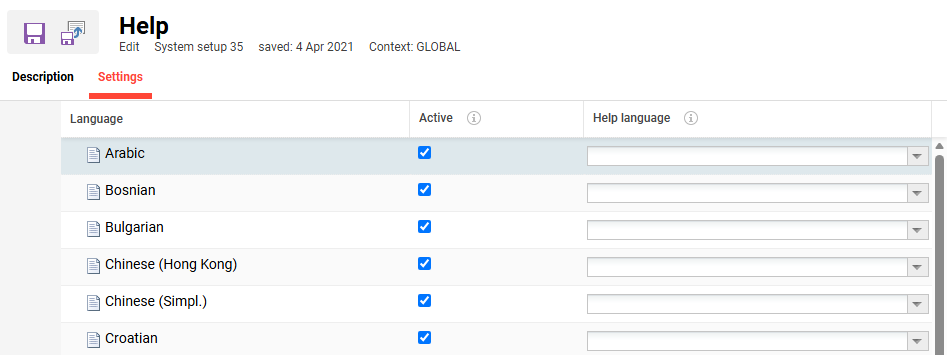
The Settings tab configures, for each platform language, whether operating instructions are shown and in which language.
Active: Takes effect only when 'Disable online help' on the Description tab is unticked. Unticking Active turns the operating instructions off for that language only.
Help language: Selects one of six languages, English GB, German, English US, French, Italian or Spanish, in which the operating instructions are shown. If not set, the Default Online Help Language on the Description tab is used instead.