
When a course is opened in preview mode by an administrator or tutor, the course and its components should be viewable as they are for learners, enabling quality assurance and verification of the learner view.
-
News preview is visible in the course to check if there are errors and to check the design
-
Participants and tutors are visible in preview
-
Library should be visible and show the assigned contents with possibility to open them
-
Forum are visible and the assigned contents are shown with possibility to open them
-
Skills, assigned to the course, are visible
-
Rating can be opened, but not rated
-
Calender
-
Simplified course room
-
Description and Prerequisite tab can be previewed. Missing prerequisites chip wont be shown as it is user-specific information however on the prerequisites tab, it would be checked which prerequisites are missing for the administrator/tutor for the course to simulate the scenario so that user can check if the catalogue is opening or not.
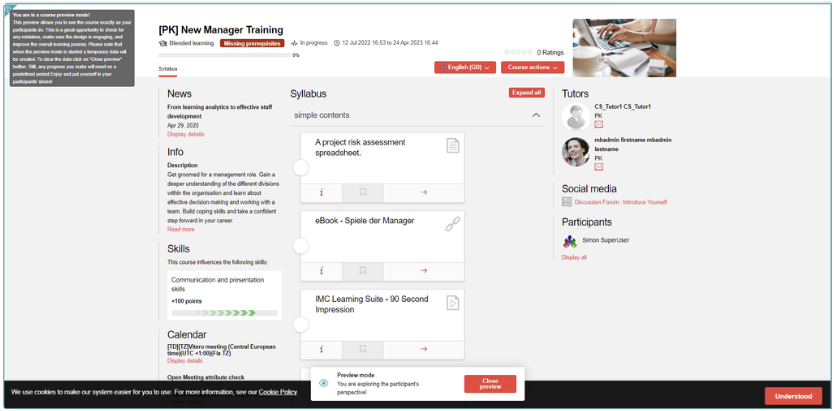
The syllabus of this course has the following functions:
-
Folders are visible and expandable/collapsable
-
Following elements assigned to the course can be opened
-
Files can be opened in order to examine whether correct file was assigned
-
Link
-
Multimedia file
-
Events: check event information (e.g. start/end dates)
-
Activity
-
External content
-
Video
-
GoToMeeting
-
Adobe connect meeting
-
LinkedIn Learning
-
MS Teams meeting
-
OJT
-
WBT
-
SCORM WBTs
-
xAPI/Tin Can WBTs
-
Tests
-
Feedbacks
-
-
Course room actions are disabled because no actions are available
-
Scheduling of the components is visible, but components won’t be locked
-
Learning logic check is ignored
-
All media settings (embed, popup and tab) are functional
It is recommended for the course administrator or tutor to close the preview with the “Close Preview“ button when also participating in the course; otherwise, preview mode would remain active until the scheduled job runs to clean the preview entries.
-
The scheduled cron job “CleanUpPreviewEntries” needs to be configured per client to clean preview information for the user.
Out of Scope
Preview is not supported for courses with planning status “Cancelled“.
The following components are not supported for preview:
-
Collaborative Group Work in OJT is not supported as identification of group is required and is not possible for an administrator/tutor
-
External LTI 1.1
-
External LTI 1.3
-
GoToWebinar
-
Openmeeting
-
Adobe connect recording
-
Vitreo meeting
-
Webex meeting
-
Sub-courses
-
AICC WBTs
-
AU
-
SCO