
Two distinct scenarios are available for learners within the easy course creation process. When both navigation options are configured, learners can record training courses completed outside the organization and submit requests for upcoming courses, whether internal or external.
Record External Course
This function allows recording of training completed outside the organization. Depending on the configuration, the process either begins directly with course creation or requires selecting from a list of templates. Details for each available course template can be viewed by selecting the arrow for the template. A maximum of 10 course templates are displayed initially, but more can be displayed using the "More" button. A search option is available for searching for a particular template.
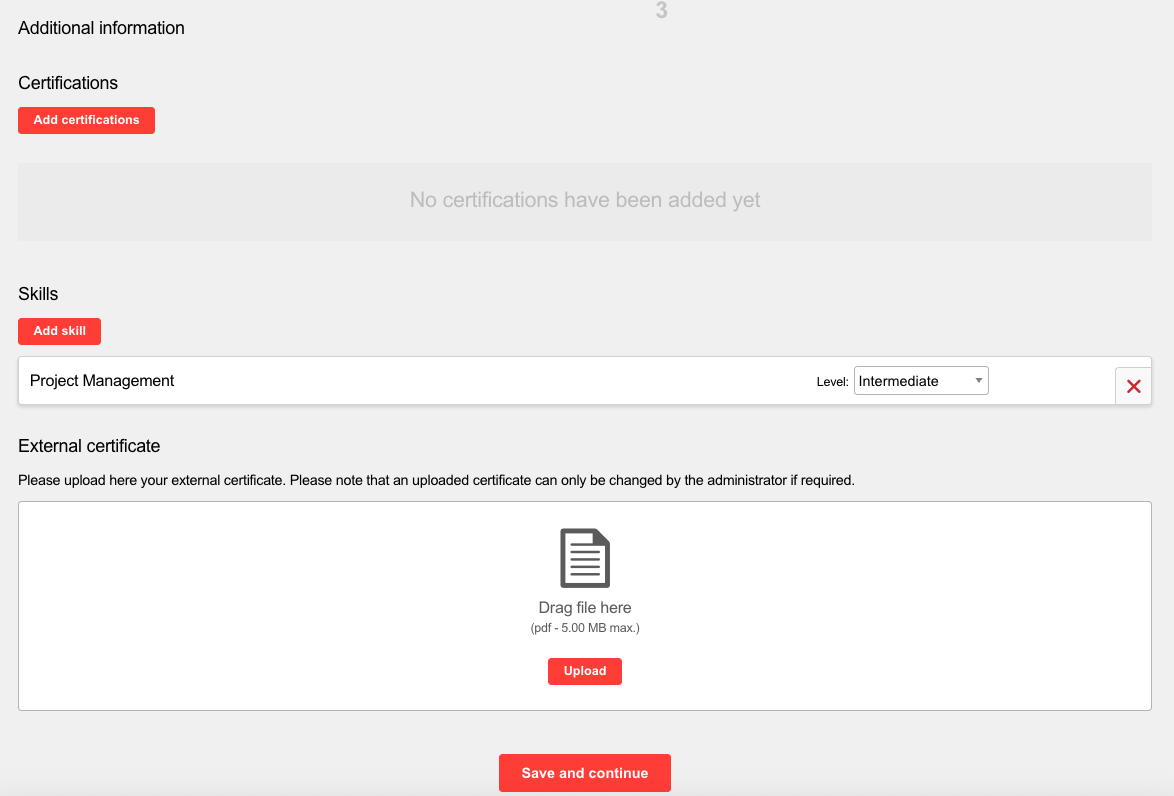
The initial step involves entering the course details. Since the course has already been completed, only past dates can be selected. In a subsequent step—if enabled by the administrator—additional information can be provided. When the full functionality is available, skills, certifications, and a certificate can also be specified.
Certifications and skills can be entered for the course once acquired. The certifications and skills are displayed based on the clearances. An externally gained certificate can also be uploaded. Certification and skills are credited to the user after the participation status for the course has been set to completed.
It is possible that a tutor step is displayed before the course overview step. The desired tutor can be entered there, provided this has been created in the system.
Finally, the details entered are displayed again in the course overview. If something is not correct, it is possible to go back in the workflow and edit the information.
Depending on the configuration, confirmation must then be given by the supervisor afterwards.
Request External Course
Internal or external training courses can be requested when requesting a course. If an internal proposal is made, the course is still recorded as an external course.
A possible scenario could be that an interesting training has been found in the catalog, but the dates are not suitable. This function could be used to submit a request for the course and suggest a more suitable date. Suggestions for external training courses can also be entered.
As these are suggestions for courses that are to take place in the future, only dates in the future can be selected.
Depending on the configuration, the process either begins directly with course creation or requires selecting from a list of templates. Details for each available course template can be viewed by selecting the arrow for the template. A maximum of 10 course templates are displayed initially, but more can be displayed using the "More" button. A search option is available for searching for a particular template.
It is possible that a tutor step is displayed before the course overview step. The desired tutor can be entered there, provided this has been created in the system.
Finally, the details entered are displayed again in the course overview. If something is not correct, it is possible to go back in the workflow and edit the information.