
Some courses and course templates are planned several months before course participation or pre-booking. For specific courses, learning paths, and course or learning path templates, some requirements have to be met before participating in the actual training or pre-booking. When planning in advance, booking should be possible if the prerequisite course has "started".
Viewable prerequisites on courses and course templates in the catalogue prior to enrolment were enhanced in 14.10.
Details
Consideration of learning status for prerequisites
-
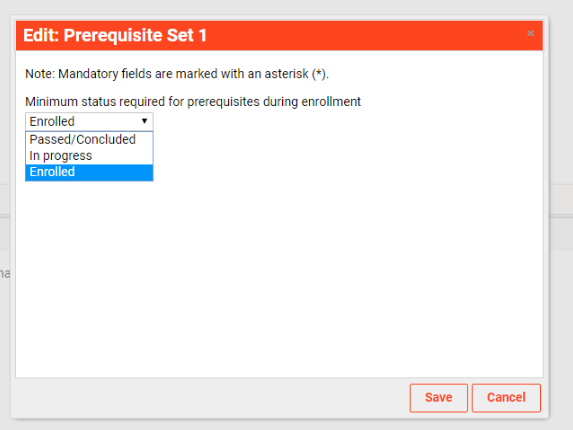
When setting up the course/course template prerequisite conditions, it is possible to define which is the minimum required status that the learner must have on the prerequisites, in order to be allowed to enrol to the course or pre-book to the course template.
-
The minimum status is only relevant for mandatory prerequisites. Recommended prerequisites will continue to be evaluated with status Completed when determining whether they are met or not.
-
The setting is available at the pre-requisite set and sub-set level in a form of a selection list with the possibility to select a single value. The list contains the possible course statuses: Booked, Started, Completed, Requested, Waiting List, etc
-
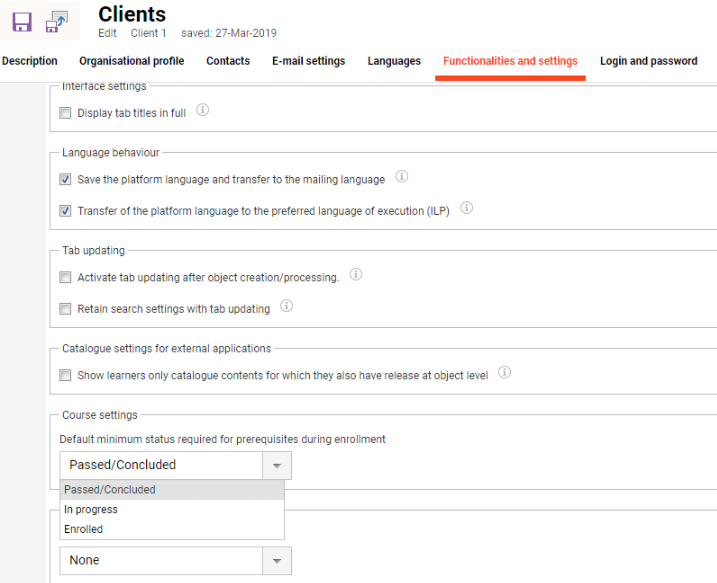
The default value for the required status is Completed.
-
The following statuses can be selected: Enrolled, In Progress, Passed/Complete
-
The hierarchy is Enrolled < In progress < Passed/Completed
If the learner has a status higher than the minimum required, booking is allowed, but the prerequisite will still be marked as partially fulfilled if its status is not COMPLETED/PASSED.
-
Since the user can have another status on the pre-requisite course than the ones defined in the list of options available per set, the rule will be:
-
Any other status is considered as the equivalent of not fulfilling the prerequisite.
The default can be changed at the client level:
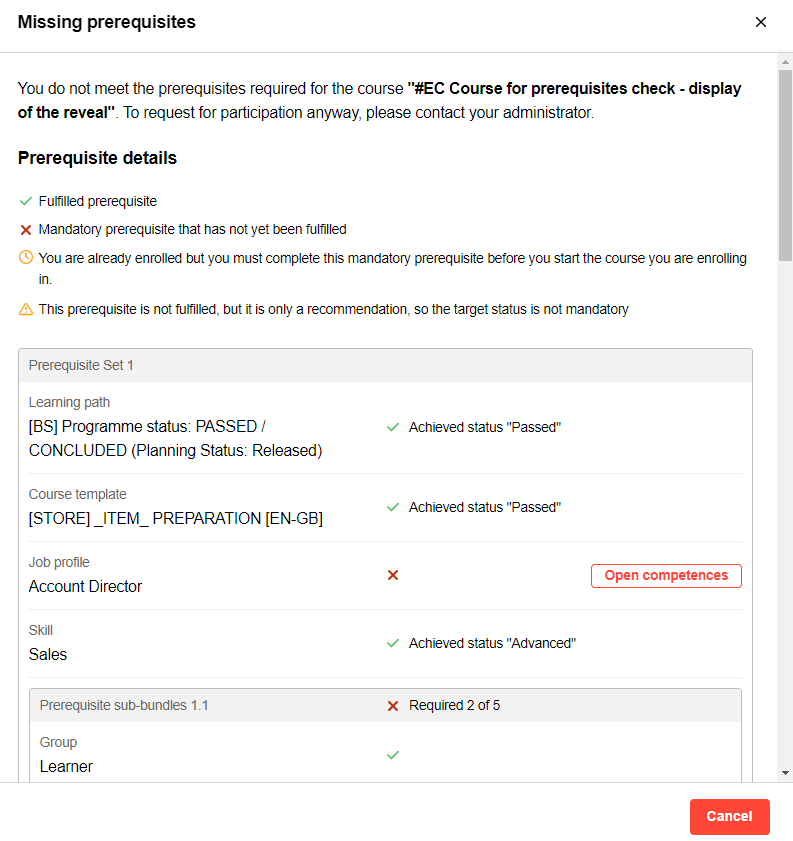
The text displayed in the prerequisites Header:
If at least one of the not met prerequisites in a set is mandatory and not fulfilled at all
-
EN: The prerequisites required for the course have not been met "{Name course}”. To request for participation anyway, please contact your administrator.
If all of the not met prerequisites in a set are mandatory but are partially fulfilled:
-
EN: You partially fulfill the required prerequisites for this course.
-
DE: Sie erfüllen teilweise die erforderlichen Voraussetzungen für diesen Kurs.
If the only unfulfilled prerequisites are recommended:
-
EN: You do not fulfill the recommended prerequisites for this course. Would you still like to enroll in this course?
-
DE: Sie erfüllen nicht die empfohlenen Voraussetzungen für diesen Kurs. Möchten Sie sich dennoch für diesen Kurs anmelden?
Linking unfulfilled prerequisite courses
-
During the booking/ pre-booking process, if the learner attempts to enrol to a course or pre-book to a course template with such a pre-requisite rule or if the organizational unit attempts to enrol or pre-book the employee, a pre-requisite check is performed.
-
The already available pre-requisite check information is enhanced with the additional information regarding the pre-requisite that must be fulfilled in the future.
-
For the courses, course templates and learning paths which are not at all assigned to the learner and have the planning status set to released, a button is available to allow that the course details page is accessed. The button will open a new tab and the course details page or the course template details page is shown where the learner can enrol himself or the supervisor can enrol a learner.
-
For skills a search in catalogue button is provided which opens the catalogue in a new tab with a filter on the corresponding skill.
-
For clusters a search in the catalogue button is provided which opens the catalogue in a new tab with a filter on the corresponding classification.
-
Both the learner and the supervisor see these buttons.
-
The learner also sees in addition, for courses which he has already enrolled, a button to access the course room, which will be opened in a new tab.
-
When the enrolment is done by the supervisor, the user context is available.
-
The prerequisites check overlay is enhanced also when doing a booking request approval from the booking request panel.
-
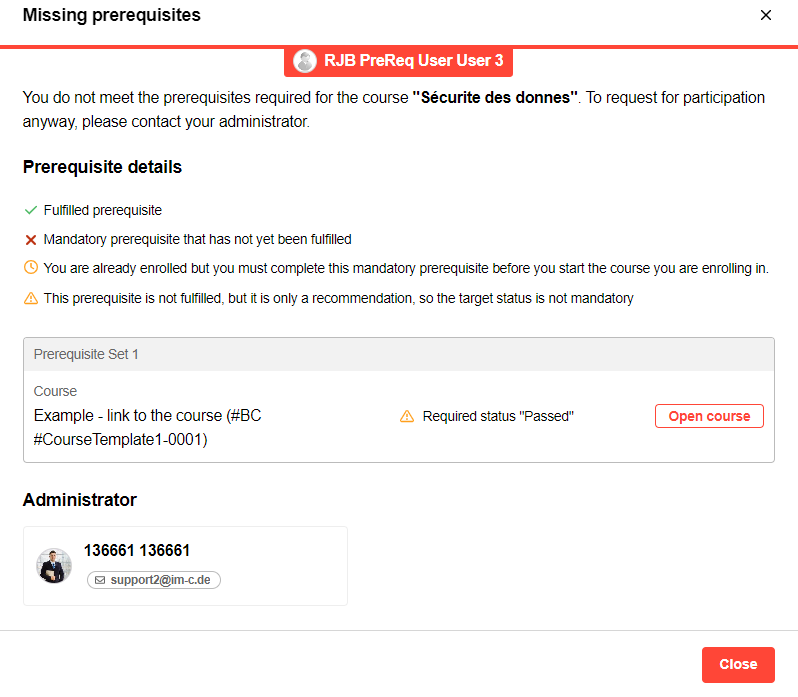
The “minimum required status” set on the administrative backend is visible on the prerequisite modal as a requirement or as an achievement.
Overview of the Due Date for Partially Fulfilled Prerequisites
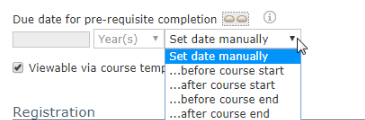
At the course level, via a course meta tag, a deadline can be defined for fulfilling the prerequisites. The deadline can be either a specific date or a dynamic rule, e.g. 3 days prior to the course start.
-
The prerequisite overlay provides information about the due date for completing the prerequisites if partially fulfilled prerequisites are present in the list
-
The partially fulfilled prerequisites are displayed with the required states
-
The overlay displayed current status, then the mandatory/optional icon, then the needed status
-
The due date is only displayed if the partially fulfilled prerequisites are mandatory
-
The due date is applied on the course where the user is attempting to book, not on the prerequisite course
-
Bundle in ILP: EN: "Note: Due date for completing the partially fulfilled <icon for partially fulfilled> prerequisites.
-
DE: Hinweis: Fälligkeitsdatum für die Erfüllung der teilweise geleisteten <icon for partially fulfilled> Voraussetzungen.
-
-
Prerequisite status display
-
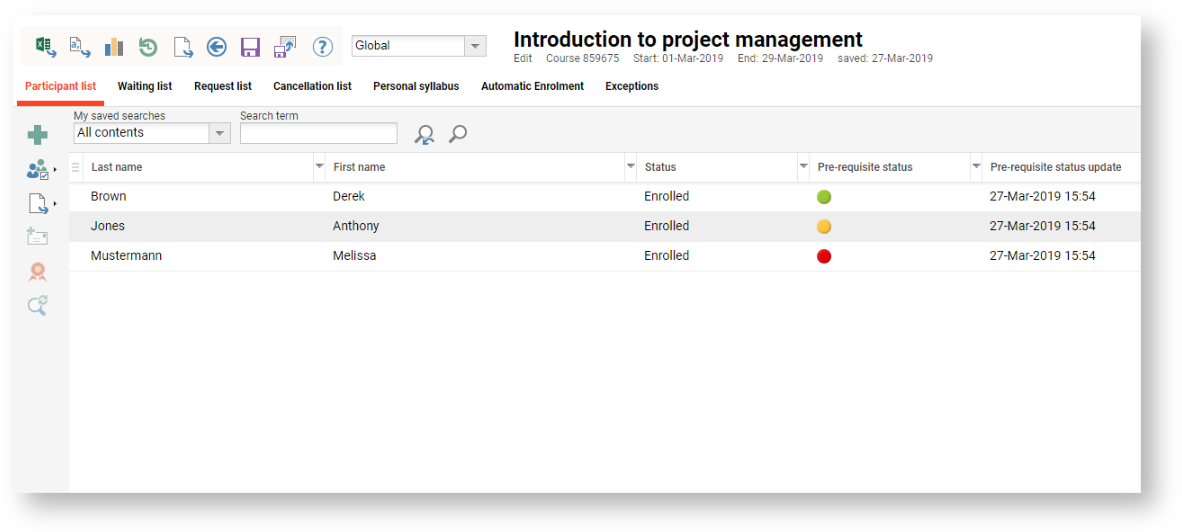
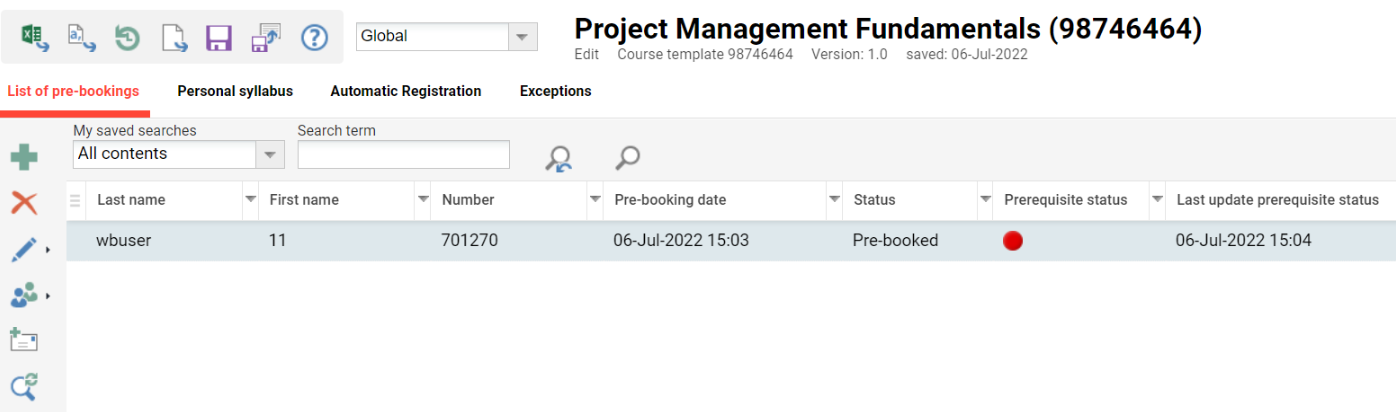
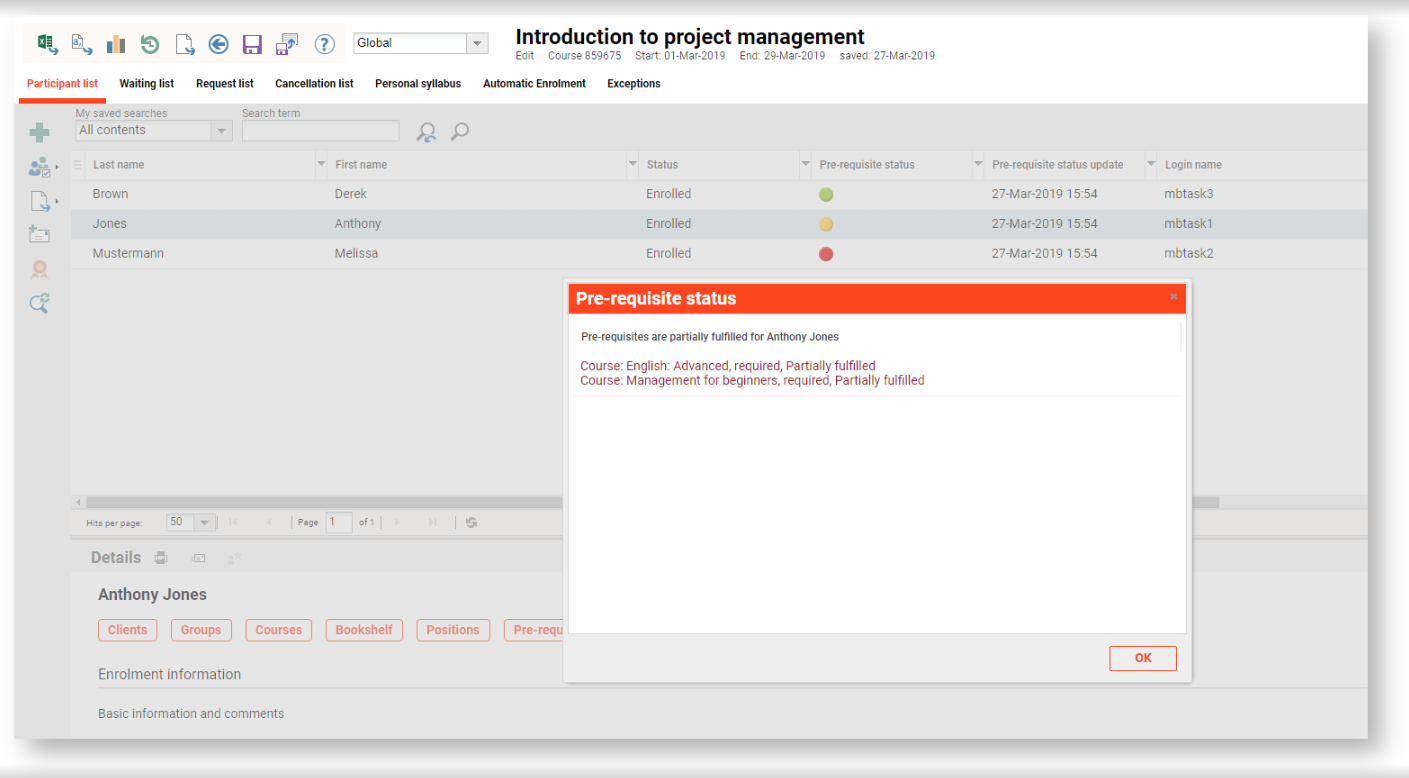
In the participant administration of a course/course template, it is possible to see at a glance who has met the prerequisites and who has not.
-
The prerequisite status is reflected in a traffic light with green, yellow and red markers
-
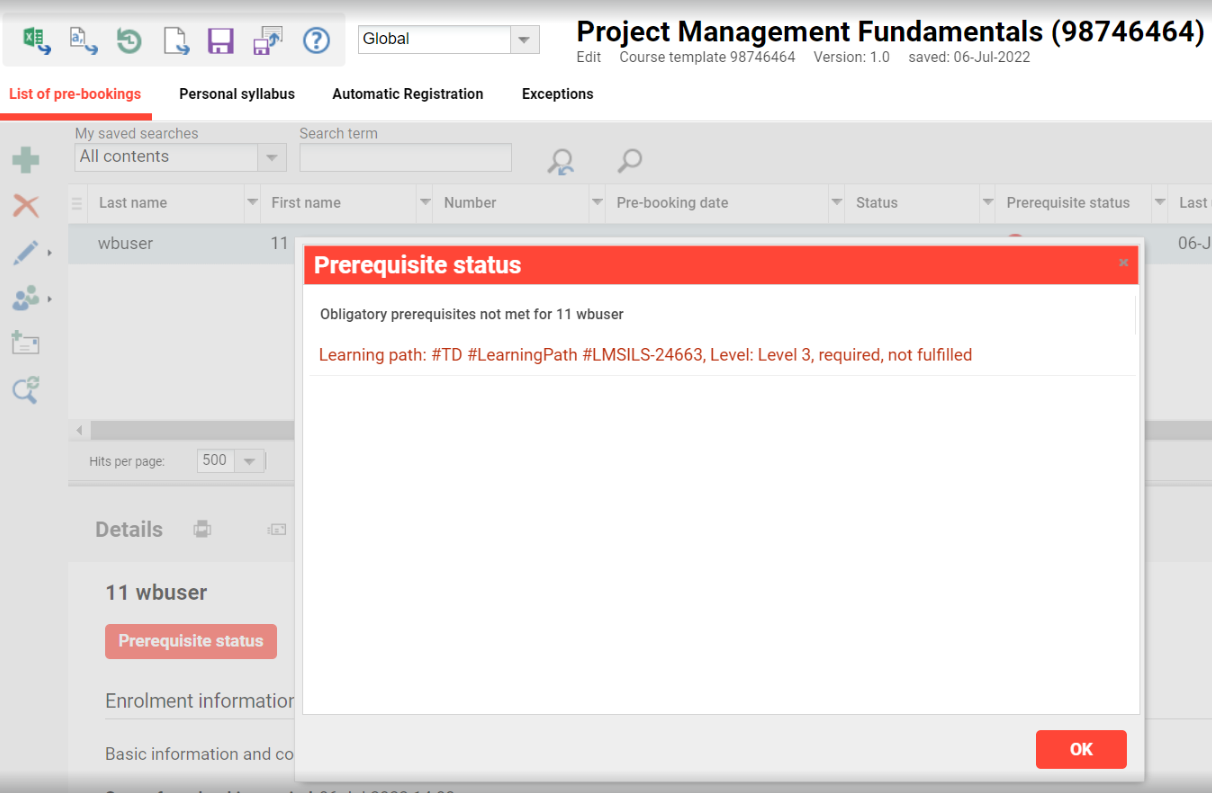
Red: The user does not fulfill the prerequisites at all (ex: he does not have the required course assigned to him in any status)
-
Yellow: The user partially fulfills the prerequisites (ex: the user is booked to the prerequisite course but has not yet completed it)
-
Green: The user fully meets the prerequisites
-
Grey: The grey status is the initial status before the prerequisite status is checked
-
-
The prerequisite status is displayed based on the last update, which is triggered based on a cron-job, or manually.
It is possible to add an additional column showing the last updated time for the prerequisite status.
On the Fly Check of Prerequisite Status
-
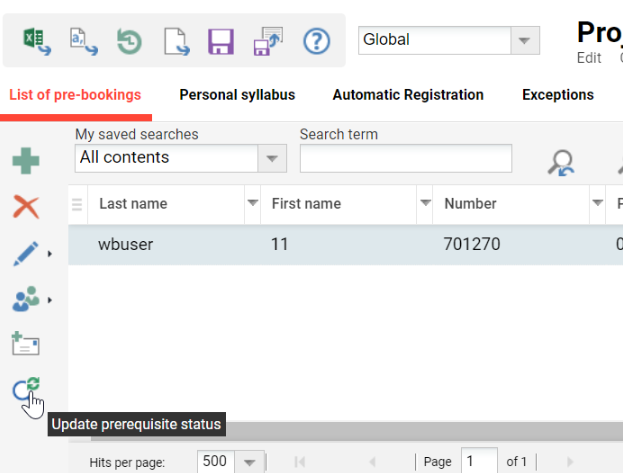
The possibility to perform an on the fly prerequisite update for selected participants is available as an option in the toolbar.
-
Once the button is pressed, the list will refresh once the statuses have been updated for the selected users

Detailed information about prerequisites for a selected user
When an individual user is selected, the details section in the lower part of the screen shows a prerequisites section where a detailed view of the prerequisite status can be accessed.
Activating Prerequisite Check for Course Templates
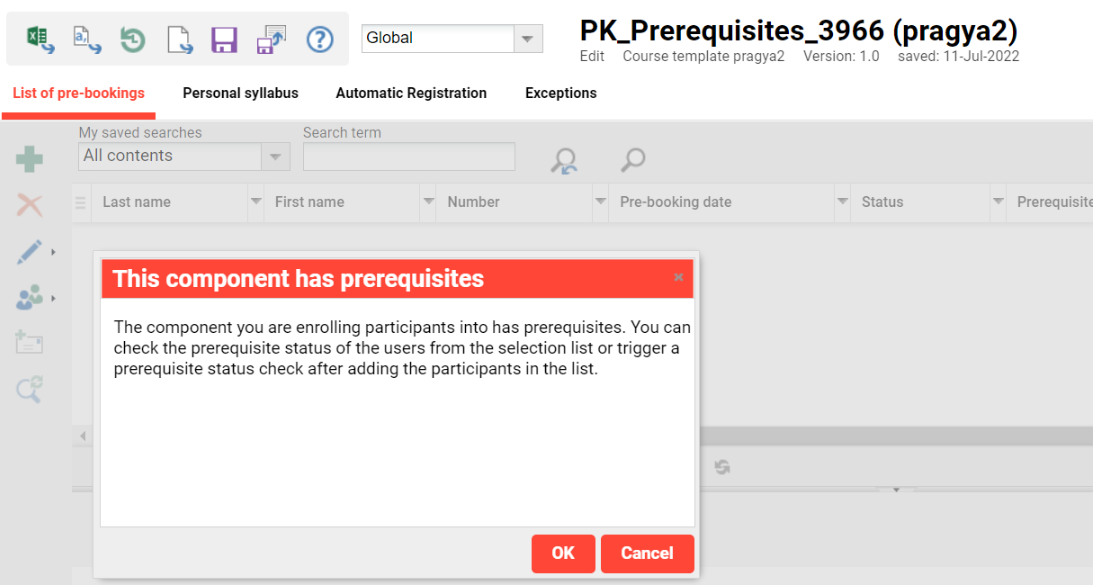
The metatag "Activate prerequisite checks on course template level" (11836) must be selected to activate prerequisite checks for course templates.

If checked, the administrator is notified that the course template has prerequisites when attempting to pre-book the learner from the participant administration manager.
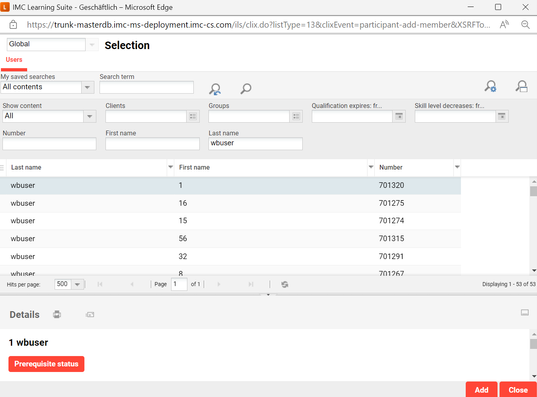
When the administrator adds a user using the "Prerequisite status" button, it can be checked whether the user has fulfilled the prerequisites before enrolment.
Batch Registration
When batch registration is performed from My Staff, the manager is notified whether the employees to be enrolled in a course have fulfilled the prerequisites.
-20250113-110324.png?cb=14baa490777ad161565ed6f0d946f70b)
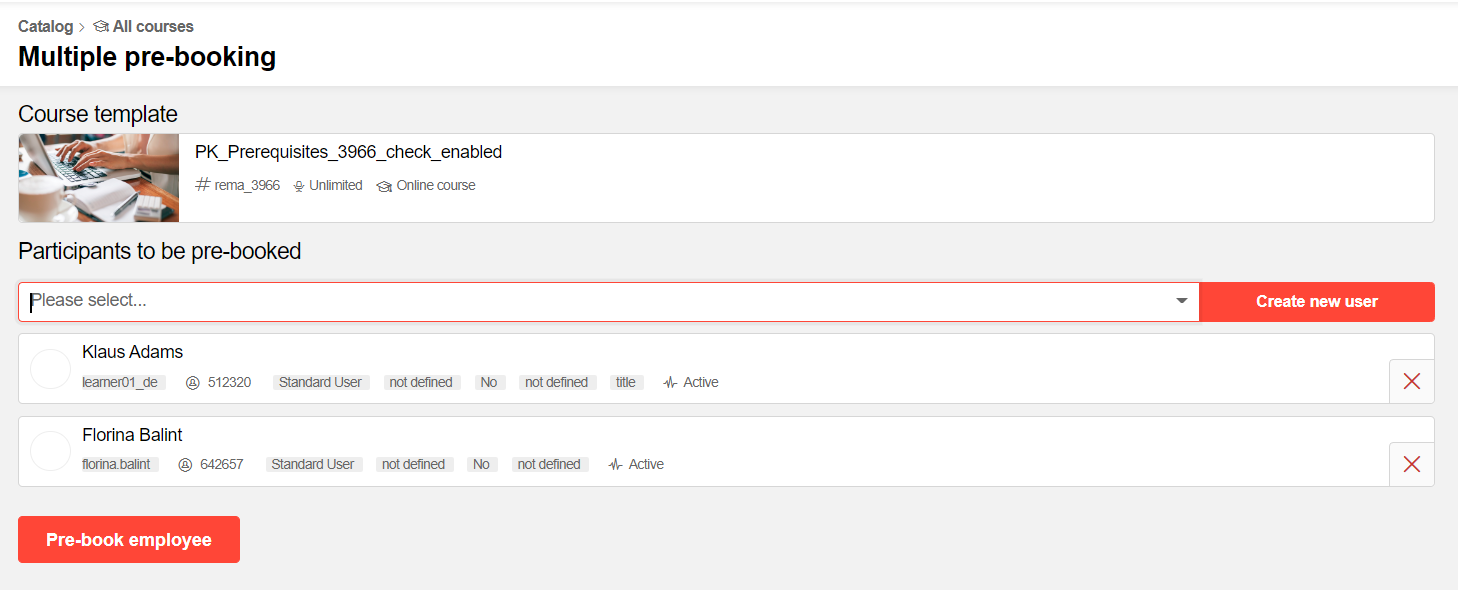
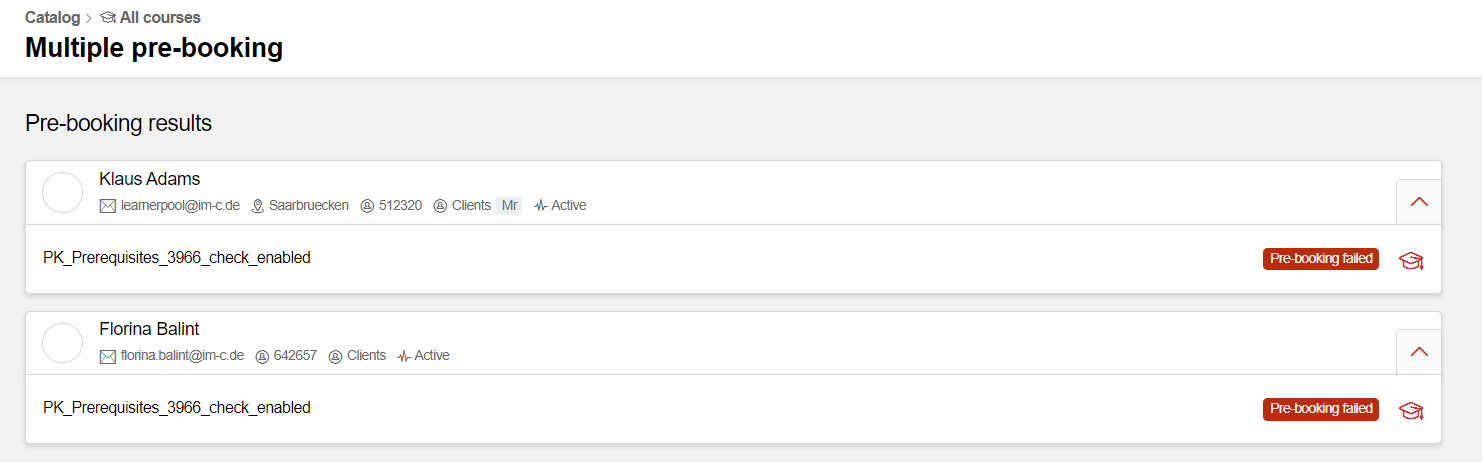
When multiple enrolment is performed from the catalogue, the manager is notified whether the employees to be enrolled in a course or pre-booked on a course template have fulfilled the prerequisites.
Prerequisite Check for Tutors
Tutors can access the prerequisite information of course participants by navigating to Course Overview, selecting the course, and accessing the course instruction.
The information displayed here is the same as that available in the participant administration.
Validation of course prerequisites when cancelled
A check is performed when a user attempts to cancel a course, either for themselves or as a supervisor for a staff member.
The check is based on a new meta tag:
-
Meta tag of type checkbox
-
Title:
-
EN: Restrict cancellation based on prerequisite dependency
-
DE: Einschränkung der Stornierung aufgrund abhängiger Voraussetzungen.
-
-
Description:
-
EN: Enabling the setting will trigger a prerequisite dependency check as soon as a user attempts to cancel a course for himself or for another user and will prevent the cancellation if a mandatory dependency exists.
-
DE: Das Aktivieren dieser Einstellung löst eine Prüfung abhängiger Voraussetzungen aus, sobald ein Nutzer versucht, einen Kurs für sich selbst oder für einen anderen Nutzer zu stornieren, und verhindert die Stornierung, wenn eine verpflichtende Voraussetzung besteht.
-
-
-
If the course for which the cancellation is attempted is a mandatory prerequisite for another course that the user is booked to, a notification is displayed to the user.
-
The notification is only displayed if the course for which the prerequisite dependency exists does not have the prerequisites fulfilled. This means that if I already fulfill the prerequisites with another prerequisite set, I am allowed to cancel the course.
-
The notification provides the following details:
-
Title:
-
EN: Course cancellation not allowed
-
DE: Stornierung des Kurses nicht erlaubt
-
-
Message (when cancellation done by learner):
-
EN: The course <course name> is a mandatory prerequisite of the following courses you are enroled in:
-
DE: Der Kurs <course name> ist eine verpflichtende Voraussetzung für die folgenden Kurse, auf die Sie gebucht sind:
-
EN: The course <course name> is a mandatory prerequisite of the following courses that the employee is enroled in:
-
DE: Der Kurs <course name> ist eine verpflichtende Voraussetzung für die folgenden Kurse, auf die der Mitarbeiter gebucht ist:
-
-
Follow-up message:
-
EN: If cancellation of this course is still required, please contact your administrator.
-
DE: Wenn Sie diesen Kurs dennoch stornieren möchten, wenden Sie sich bitte an Ihren Administrator.
-
Check performed when the Course Cancellation is done by the Admin in the Back-end
-
When a course administrator would like to cancel one or more users from the course in the participant administration, the following checks are performed:
-
Does the course have the meta tag set?
-
Are there any courses for the selected users where the current course is set as a mandatory prerequisite, directly or via the template or cluster?
-
If yes → The message is displayed:
-
EN: Prerequisite dependencies found
-
DE: Voraussetzungsabhängigkeiten gefunden
-
EN: The following courses require <name of current course> as a mandatory prerequisite. Would you like to proceed with the cancellation of the selected users? Yes/No
-
DE: Die folgenden Kurse erfordern <name of current course> als verpflichtende Voraussetzung. Möchten Sie mit der Stornierung fortfahren? Ja/Nein
-
-
If no, there is no message shown and the participants can be cancelled.
-
-
-
Automatic cancellation when prerequisites are not fulfilled
A new meta tag of type checkbox is available for course type, course template, course, and learning path or learning path type. It enables the automatic cancellation of course participants who do not fulfil the mandatory prerequisites by the defined deadline.
-
The meta tag is called:
-
EN: Automatic cancellation based on not fulfilled prerequisites
-
-
The course template and programme type can only be saved if, besides this meta tag, the deadline for prerequisite completion meta tag is also added to the object.
-
If only the Automatic cancellation is available and the user wants to save, a message is displayed:
-
EN: In order to allow the possibility for an automatic cancellation based on not fulfilled prerequisites, the due date for fulfilling the prerequisites must also be available.
-
-
The presence of the deadline meta tag is not dependent on the presence of the cancellation meta tag.
At the cancellation reason level, a new option is added under "Types of cancellation":
-
EN: Automatic cancellation
-
There can be only one reason per provider which has this type of cancellation assigned.
-
If a user attempts to set a new reason with this cancellation type for the same provider, a message will be displayed:
-
EN: There following cancellation reason is already defined for automatic cancellation for the selected provider.
-
Only one reason can be defined for this type of cancellation for each provider.
-
The alert can be closed via the "Close" button
-
The same is the case for cancellation reasons without a provider. There can only be one cancellation reason without a provider set as automatic cancellation.
Cron Job for Automatic Cancellation and Automatic Cancellation Process
When the due date for fulfilling the prerequisites is reached, a cron job performs an automatic cancellation of course or learning path participants who meet the defined cancellation criteria.
-
do not fulfill the mandatory prerequisites or
-
only partially fulfill the mandatory prerequisites
-
and the course/programme has the due date for completion of the mandatory prerequisites set at the date when the cron job is running and
-
the meta tag to enable the automatic cancellation is enabled on the course/programme level.
-
The automatic cancellation will not consider already completed participants.
-
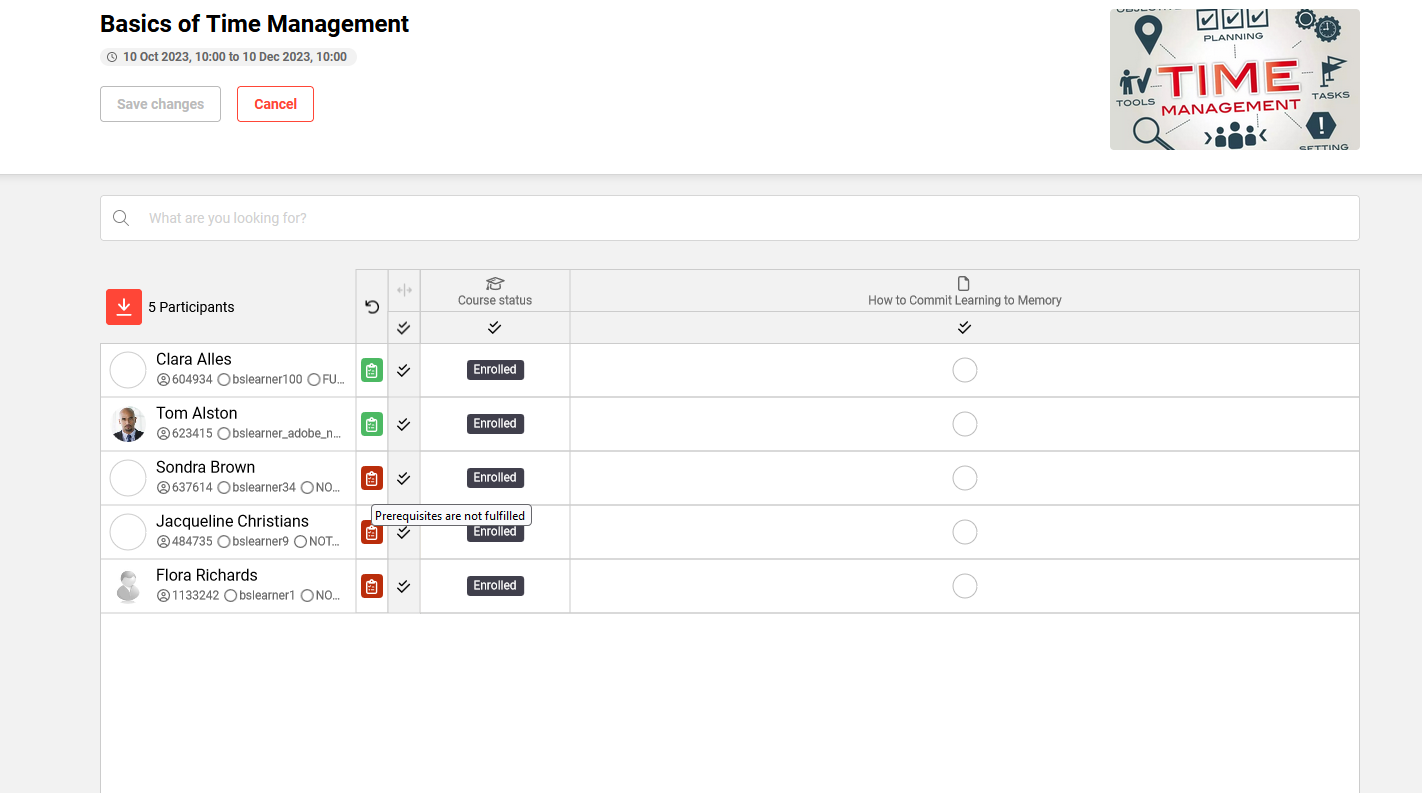
In the attendance tracking the tutor can see the satus of the prerequisites per user
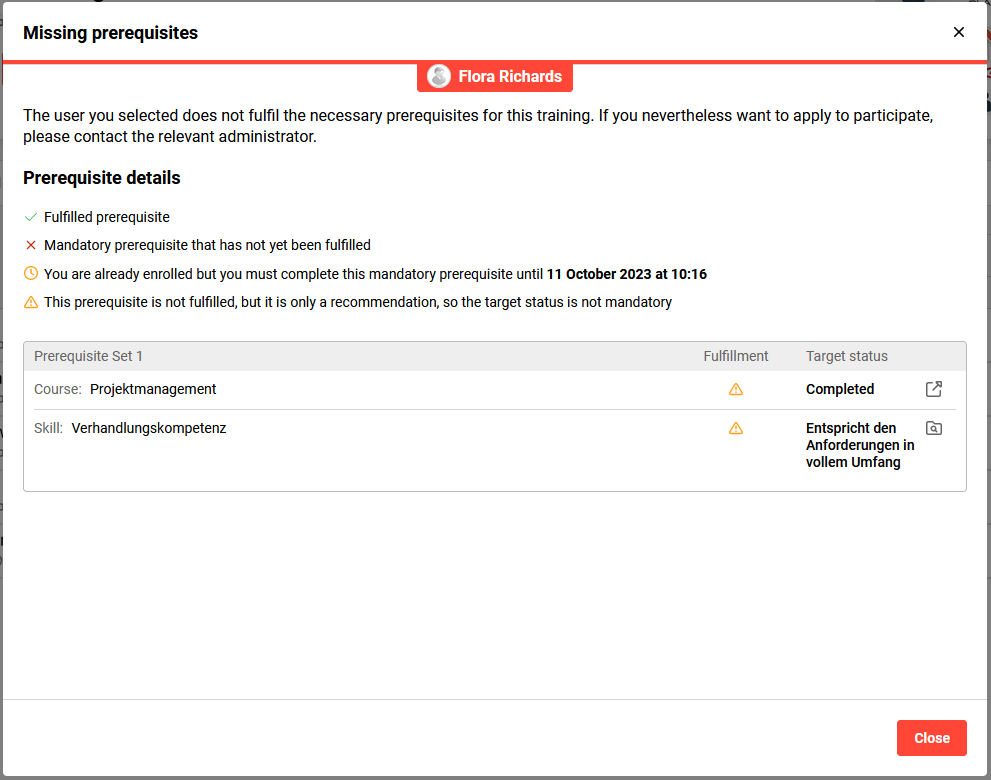
Selecting the icon displays the tutor’s complete prerequisite status:
Notifications
The notification trigger selection list is enhanced with a new option:
-
EN: Automatic cancellation for unfulfilled prerequisites
When a notification is configured with this trigger, the message will be sent to the defined recipients.
Notifications based on the prerequisite fulfilment deadline
A new notification root is created in the notification manager:
-
EN: Notification in case of unfulfilled prerequisites
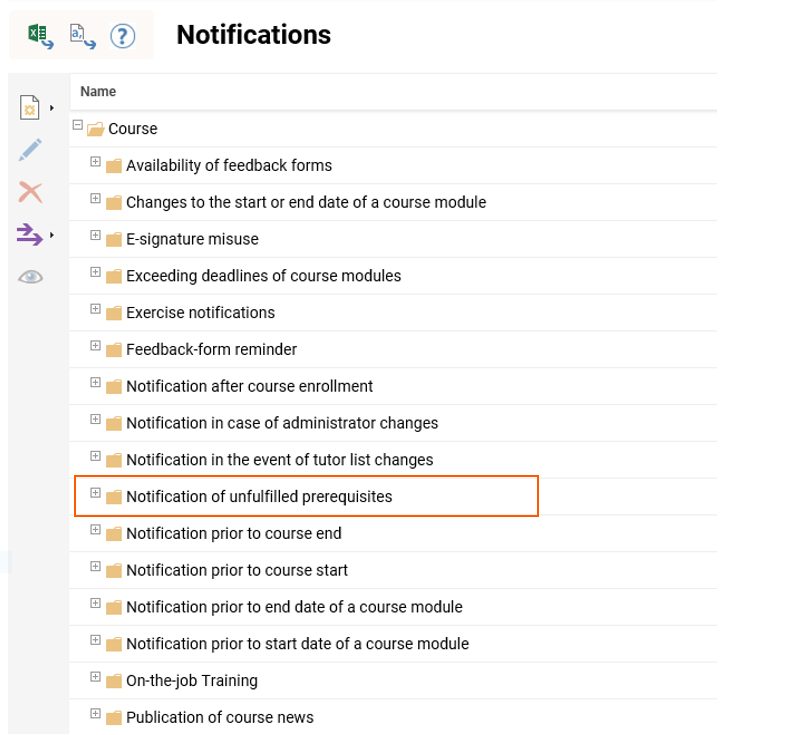
The following three standard notifications are available:

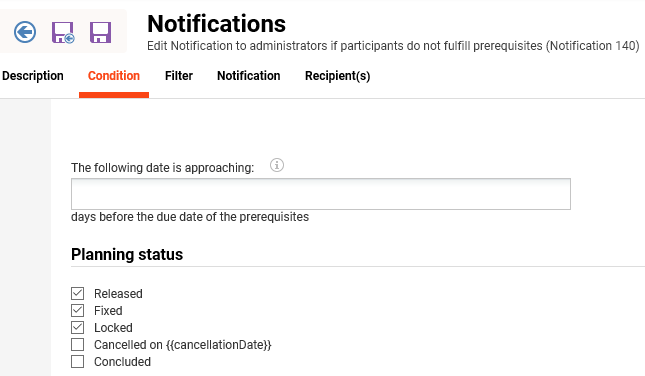
On the condition tab, it is possible to define a number of days before the deadline for prerequisite completion when the notification should be sent.
Prerequisites Viewable on Course/Course Template in Catalogue Prior to Enrolment
Via the course attribute "Enrolment prerequisites", it can be controlled whether prerequisites should be displayed in a separate tab at course or course template level.
Course templates display the prerequisites defined on the course template; therefore, differences can occur if the course and course template are configured differently.
Level of a learning path as a prerequisite for a course, course template, or learning path
A level of a level-based learning path can be selected as a prerequisite for courses, course templates, or learning paths so that the learner does not need to complete the whole learning path but only the required level.
A new option to choose a particular level of a learning path as a prerequisite is now available.
-20250113-110611.png?cb=119a59231cb6a20be3f5cdf4d77a0ff0)
Limitations / Out of scope:
Content-driven learning paths and level-based learning paths with no levels will not show this option.
Prerequisites Viewable when Enrolled and Prerequisites Needs to be Fullfilled at a Specific Date After Enrolment
When the learner is booked on a course where prerequisites must be fulfilled at a certain point in time, the user will otherwise be cancelled. To make this clear, the learner can see this in different areas of the system.
Learning Status:
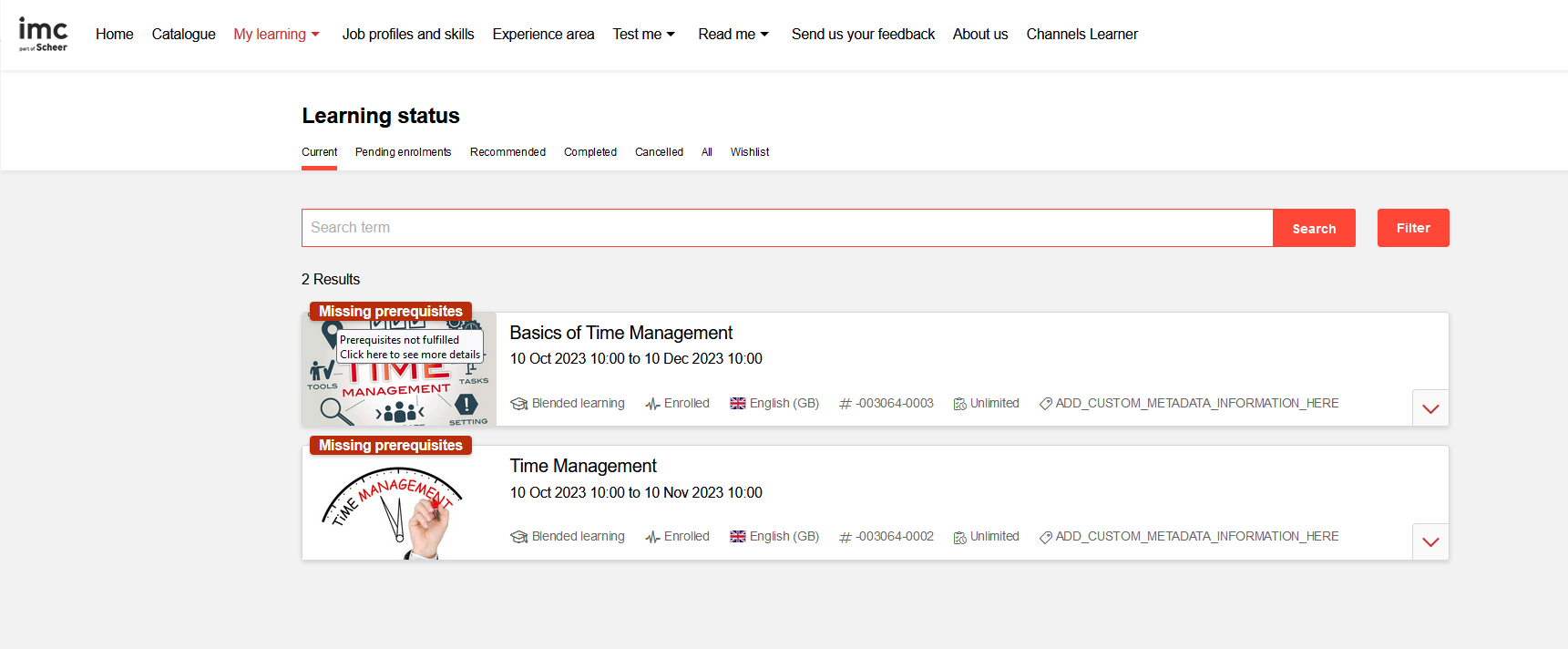
When selecting the "Missing prerequisites" label, the learner can see the details.
When opening the course, the learner will also see the same label on both the description tab and the Syllabus tab. The details of the missing prerequisites can also be viewed there.
Editing Prerequisite Folder Names
Prerequisite set, subset, and alternative set titles can be edited and renamed for various objects, such as Course Templates, Courses, Learning Path Templates, and Learning Paths, in the prerequisite tab. To do so, select the set, use the toolbar function "edit", change the text, and confirm.