
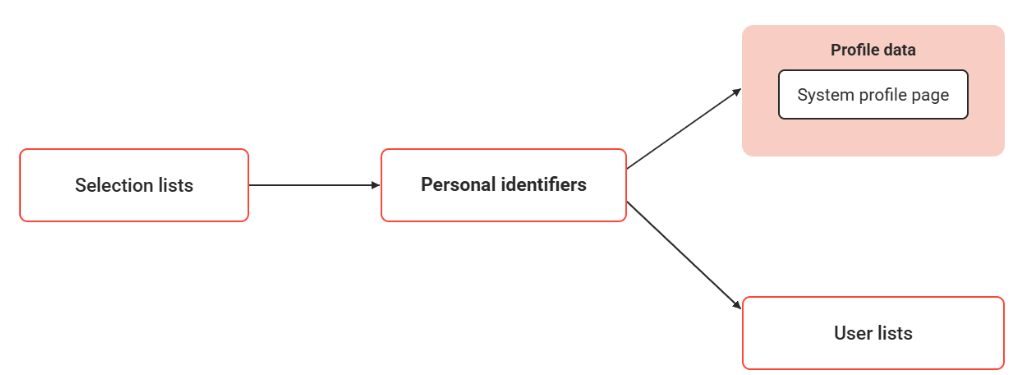
At various points in the learning platform, user lists are employed. Which user-defined search criteria are available for the user search and which spreadsheet columns are used in the search results is determined via the user lists to which the desired personal identifiers were assigned.
In some user searches, further properties that are not managed via personal identifiers, such as the online status or the search criterion "Skills", are available. They cannot be shown or hidden via user lists, but depend on the spreadsheet configuration, as it is applied to non-people searches.
Roughly, user lists are divided into user manager, adding users, tutors, administrators and moderators, and user searches from the learner view.
No personal user lists can be created, but existing ones can be edited. They are linked to various points in the system. If the multi-client context is configured differently, different user lists can be defined for clients.
The profile in the information section of a user list is generally determined by the settings under "Profile information".
Functions of the User List Manager
New
For each user list, it can be determined which personal identifiers are to be provided as spreadsheet columns and search criteria of the advanced search. In the expanded search, any number of criteria can be added. The identifiers can be just sorted, or added or removed. For each added attribute of the expanded search, it can be determined if the attribute is to be available to users by default or if it can be added manually and, for example, can be saved in the framework of a personal search.
For each user list the following can be specified
-
whether the profile image for opening the public user profile is displayed in a user panel
-
whether a button for opening the competence profile is displayed in a user panel
-
which conditions apply to the display of non-users
-
consider supervisor relationship
-
take HR authorizations into account
Edit
Overview of Existing User Lists
|
ID |
Name |
Description |
|---|---|---|
|
1 |
User list, user management |
User manager List of all users in the LMS |
|
2 |
People search |
Deprecated/not configured by default |
|
3 |
List of course participants, course administration |
|
|
4 |
List of course participants, course |
|
|
7 |
My contacts |
Deprecated/not configured by default |
|
8 |
Staff pool |
Staff pool Allows a supervisor (line manager, group manager) to view a list of staff members |
|
9 |
Denial of service list |
Denial of access Allows an administrator to see user who have exceeded login attempts |
|
10 |
User list, Group administration |
Select group > Assign users manually Administration of users in a group. |
|
13 |
Tutor list, Course administration |
|
|
14 |
User list, resource management |
|
|
15 |
User list, Bookshelf manager |
|
|
16 |
User list, Release manager |
User selection in ACL / permission management |
|
20 |
Administrator list, learning path administration |
|
|
21 |
Participant list, My Learning Path |
|
|
22 |
Participant list, Learning record |
AVETMISS-compliant grading of program enrolments |
|
23 |
Tutor centre: search for course participants who may be graded |
Course participant list for tutor grading under AVETMISS |
|
26 |
Administrator list, course administration |
|
|
27 |
List of moderators, media administration |
|
|
30 |
Administrator list, common |
|
|
32 |
Search course participants for the collection of offline tests |
|
|
33 |
Message monitor |
|
|
35 |
Bonus-point administration |
|
|
36 |
Tutor list, catalogue search |
Tutor list in catalogue/course search |
|
39 |
List of tutors and correctors, corrector management |
|
|
41 |
Dynamic Power Trainer and Content Studio User Search |
Participant report in Power WBT / Content Studio |
|
42 |
Staff selection |
|
|
43 |
Staff search, standard view |
Staff member list during group import execution; default fallback in TMS business unit module |
|
44 |
Staff search, supervisor view |
|
|
45 |
Staff search, HR view |
|
|
46 |
Staff |
|
|
47 |
Course progress (supervisor) |
Report |
|
48 |
Test results (supervisor) |
Report |
|
49 |
Course progress (Human Resources) |
Report |
|
50 |
Due date inspection (supervisor) |
Report |
|
51 |
Skills (supervisor) |
Report |
|
52 |
Course progress (administrator) |
Report |
|
53 |
Course enrolment history |
Report |
|
54 |
Course-template enrolment history |
Report |
|
55 |
Learning path enrolment history |
Report |
|
56 |
Course learning history |
Report |
|
57 |
Learning history of learning paths |
Report |
|
58 |
SCO status in courses |
Report |
|
59 |
SCO status in catalogues |
Report |
|
60 |
AU status in courses |
Report |
|
61 |
AU status in catalogues |
Report |
|
62 |
Active users |
Report |
|
63 |
Audit Report |
Report |
|
64 |
User assignments |
Report |
|
66 |
Overall compliance status (Administrator) |
Report |
|
67 |
User compliance status (Admin) |
Report |
|
68 |
Test questions per user |
Report |
|
69 |
On-the-job Training Report |
Report |
|
70 |
History of experience points |
Report |
|
71 |
Job profile – overview report |
Report |
|
72 |
List of participants |
Report |
|
73 |
Employee competencies (HR) |
Report |
|
74 |
Employee competencies (supervisor) |
Report |
|
75 |
IDD course evaluation per employee (administrator) |
Report |
|
76 |
IDD status per employee (administrator) |
Report |
|
77 |
Personal syllabus and pre-booking (Administrator) |
Report |
|
78 |
Personal syllabus and pre-booking (HR) |
Report |
|
79 |
Personal syllabus and pre-booking (Superior) |
Report |
|
80 |
IDD educational content analysis per employee (Administrator) |
Report |
|
81 |
Educational content edited by users |
Learner list for resetting / changing bookshelf media status |
|
82 |
Experience points per user |
|
|
83 |
Certification courses (supervisor) |
|
|
84 |
Certification status (superior) |
|
|
85 |
Certification courses (HR) |
|
|
86 |
Certification status (HR) |
|
|
87 |
Certification courses (administrator) |
|
|
88 |
Certification status (administrator) |
|
|
89 |
Course reservation confirmation |
|
|
90 |
Learning path overview (administrator) |
|
|
91 |
Learning path overview (supervisor) |
|
|
92 |
Learning path status report - level-based (Administrator) |
|
|
93 |
Learning path status report - level-based (Supervisor) |
|
|
94 |
Learning path courses (administrator) |
|
|
95 |
Learning path courses (supervisor) |
|
|
96 |
Job profile requests |
|
|
97 |
Learning path status - Content driven (Supervisor) |
|
|
98 |
Learning path status - Content driven (Administrator) |
|
|
99 |
Status of the effectiveness check |
Report: pending effectiveness check status across users |
|
100 |
Certification media (HR) |
|
|
101 |
Certification media (supervisor) |
|
|
102 |
Certification media (administrator) |
|
|
103 |
xAPI WBT report (administrator) |
|
|
104 |
Detailed xAPI WBT report (administrator) |
|
|
105 |
List of course participants, attendance tracking |
|
|
106 |
Certification Set status (HR) |
|
|
107 |
Certification Set status (supervisor) |
|
|
108 |
Certification Set status (administrator) |
|
|
109 |
Registration request |
Sub-search panel in enrolment request management |
|
110 |
Staff Enrolment |
|
|
111 |
Assignment import log (Course date update) |
|
|
112 |
Assignment import log (General) |
|
|
113 |
List of course participants, easy course creation |
|