
imc Learning Analytics comes with a wide range of out-of-the-box dashboards and reports. They are provided as a starting point for assignment to target groups in their delivered form, but can also be adapted and tailored to specific requirements by Scheer IMC on demand. All dashboards and reports included in imc Learning Suite out of the box are described below. It should be noted that each dashboard is shown only in its overall default layout, as the KPIs displayed are described in detail in the corresponding report from which they are pinned.
imc Learning Analytics Landing Page
imc Learning Analytics can be flexibly integrated into the navigation menu. By default, it is configured as a main navigation item that can be flexibly assigned to the already defined user roles. The general layout of the landing page is shown in the following figure.
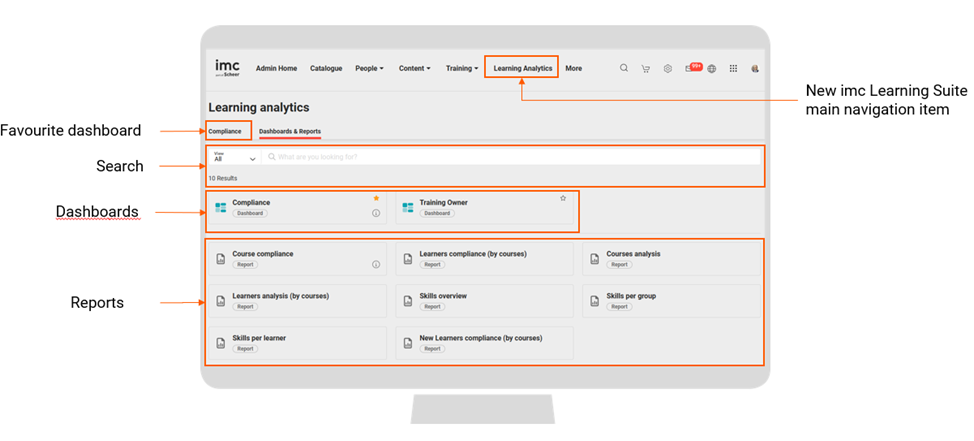
The landing page provides the following sections:
-
Direct access to a dashboard which is defined as the user favourite
-
Search for dashboard and report titles
-
Dashboards assigned to the report user
-
Reports assigned to the report user
imc Learning Analytics Dashboards
imc Learning Analytics supports the integration of Microsoft Power BI dashboards. Dashboards consist of a preselection of report visuals that are pinned to the dashboard for brief visualisation. An example of a dashboard is shown in the following figure.
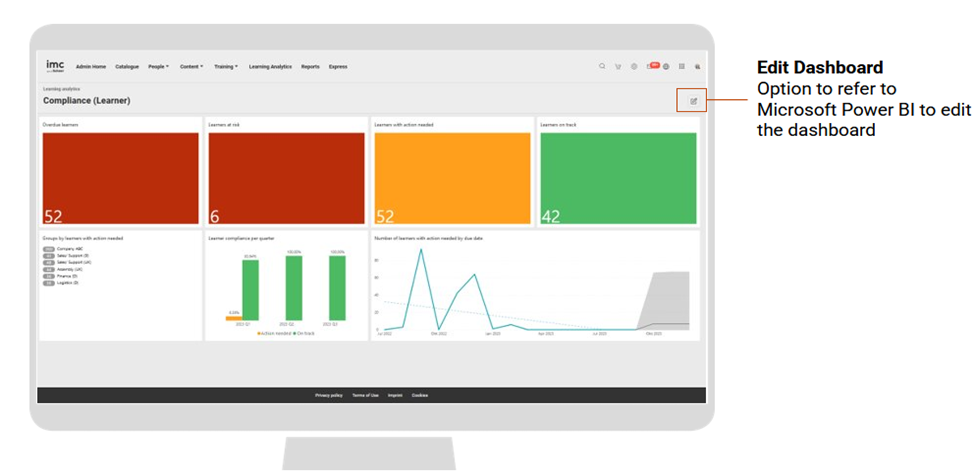
Dashboards can be edited in Microsoft Power BI by a user with corresponding access rights. When a dashboard visual is selected, the underlying report is loaded for a drill-down.