
Since the configuration of the LTI tool is provider-specific, it cannot be described in a general manner here. Even though LTI is a standard there may be variations depending on the LTI provider. For questions about this, the LTI tool provider should be contacted directly. Once the configuration has been completed, the LTI Tool Provider will store the configuration on their side. When learners launch the tool later, the tool provider will detect the configuration and display the tool as configured.
Some tools might not require any kind of configuration, e.g. if the LTI Provider deploys a single tool only. In that case, set up the LTI 1.3 provider with correct values, create LTI media with that provider and launch the media as a learner.
Grading configuration
For grading configuration and automatic status change to in progress/failed/passed two meta tags are relevant “Accept grades, points of external LTI content provider” (11425) and “Mastery score (11426)”. The following table shows the different configuration options.
|
Accept Grades |
Mastery Score |
Learner's Score |
Resulting Status |
Explanation |
|---|---|---|---|---|
|
Enabled |
Empty (= value from LTI provider e.g. 60.0) |
90% |
Passed |
Passed as it is above 60%. |
|
Enabled |
Empty (= value from LTI provider e.g. 60.0) |
30% |
Failed |
30 is below the mastery score of 100. |
|
Disabled |
Empty (= value from LTI provider e.g. 60.0) |
90% |
In Progress |
The score is ignored; the learner can mark the medium as completed manually (if allowed). |
|
Enabled |
20.0 |
30% |
Passed |
30 is above the mastery score of 20. |
Note
-
The score that is sent by the LTI provider to the LMS are used for calculation in the background and not displayed.
-
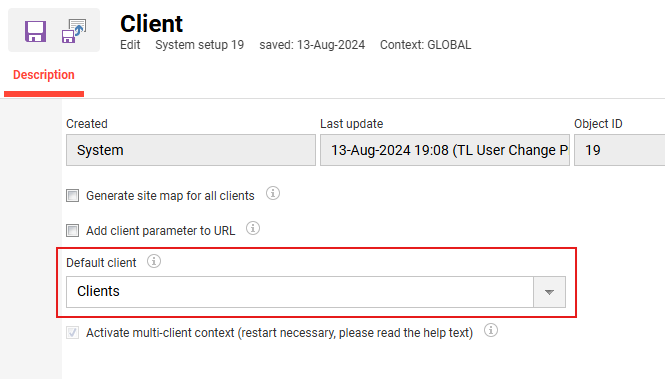
In case LTI 1.3 is being configured with grading it is important to make sure that there is a value in the Default client field in the client settings. Otherwise an error may occur.
Some tools can also be configured interactively on the first access. Therefore, after the creation, each tool should be accessed once by a tutor.