
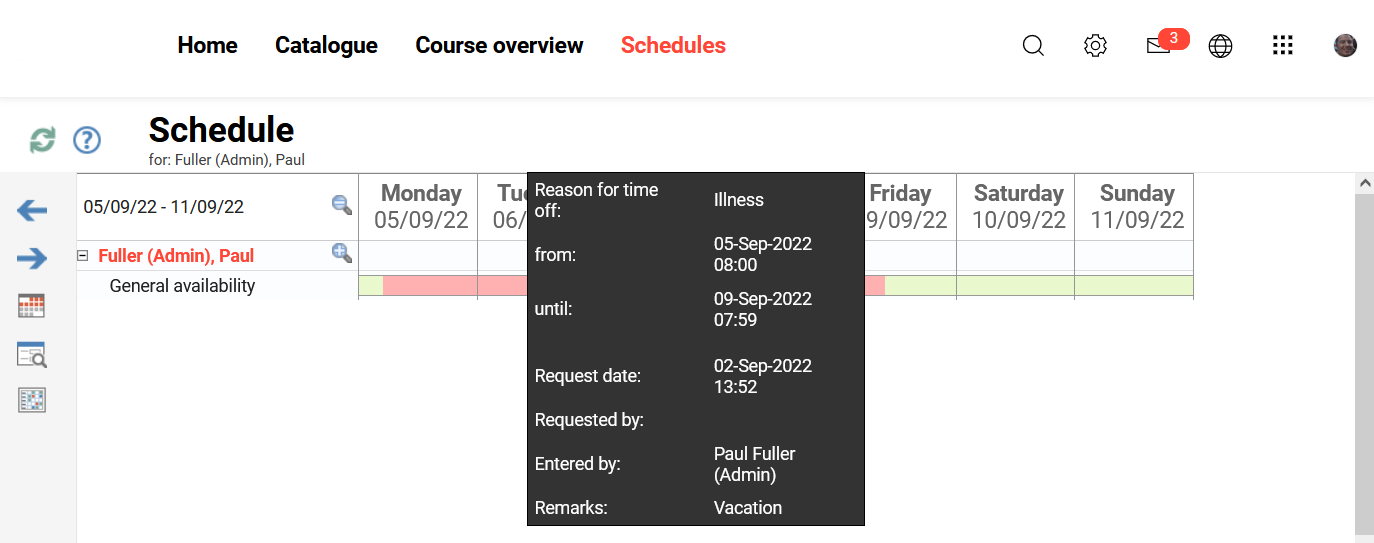
The "Schedule" function links to the "Resources" functionality for "Person"-type resources, which are commonly Trainers. This feature enables Tutors whose user accounts are linked to a "Person" resource to view their course-supervision schedules, set their availability, and plan holiday blackout periods. A calendar view marks availability periods in green, downtime periods in red, and displays all bookings that can be selected to launch.
Functions of Scheduling
Operative Schedule
If a Tutor account is linked to a "Person" resource, the Tutor can be booked administratively as a resource on courses and training components such as events or virtual meetings. The calendar view shows courses and component booking time periods for which prior bookings exist. The displayed time period can be varied through viewing options in the user profile. During scheduling, toggling between "Sooner" or "Latter" date ranges is possible, and a specific date can be searched for via the "View" icon.
Availability and Downtimes
The availability periods for Tutors are defined in the linked "Person" resource and displayed in the calendar. In the event of a scheduled interruption to the availability period, downtimes can be entered here for items such as illness or vacation days. These downtime interruptions can cover specific periods in their entirety or occur at intervals, e.g. every Wednesday afternoon.
Downtime options can be configured under Configuration Manager- Resources
Timetable
Weekly schedules that also include the Tutors' times can be printed. In addition, notification of any new or upcoming resource bookings is sent to the Tutor via email.