
ID=164
This panel displays courses from the Shopping cart. It is used on the internal dashboard page in the Learning Portal's default configuration. The panel is configured the same way as the Panel - Current Courses panel.splayed, for example only mandatory courses, can be defined via the course's enrolment identifier, see Configuration Manager - Enrolment | Enrolment identifiers.
Panel Settings
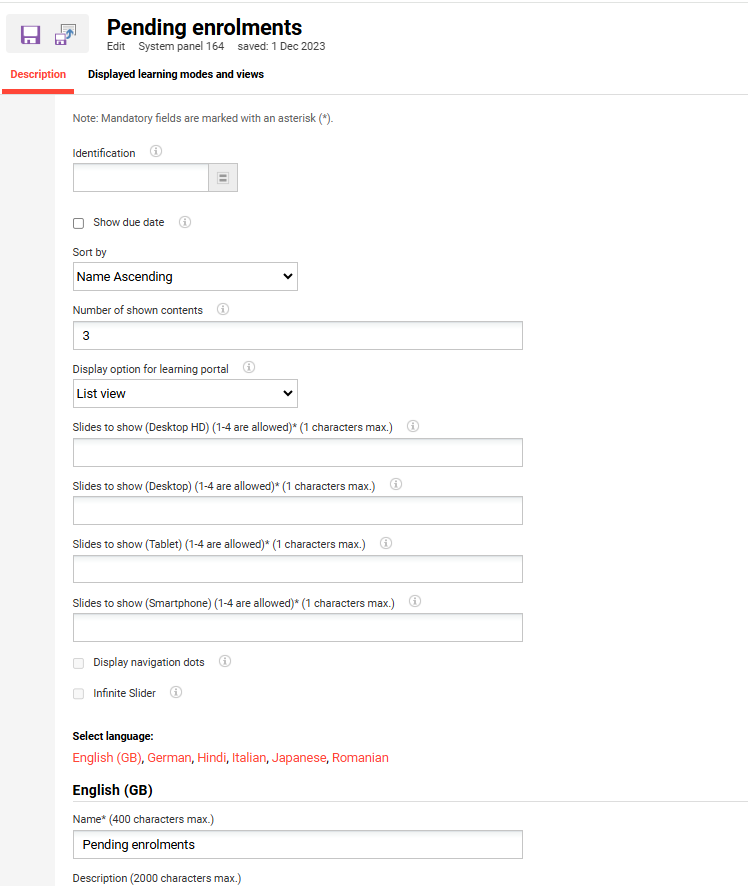
|
Setting |
What does this setting do |
|---|---|
|
Identification |
Selecting one or more identifiers limits which content is displayed in the panel. For example, only compulsory courses are displayed. Available identifiers:
|
Number of Shown Contents
With the help of this option, you can limit how much content is displayed in the panel. If additional content is available, a link to all content (e.g. all current courses) will be displayed. If the field is empty, all available content will be displayed.
The Carousel view display content has additional configurations that can be made for the panel contents in order to display different views in the Learning Portal.
Based on the type screens we can configure up to 4 tiles for the content to be displayed in the Learning portal and 1 character maximum in each section. There are 4 types of screens: Desktop HD, Desktop, Tablet, Smartphone.
Moreover, the Carousel view content display provides 2 more options which can be selected based on the preferred content view: Display navigation dots and Infinite slider.
For learning paths, this option is only available when using content-driven paths in the panel. For level-based learning paths, a single type of display is supported, therefore this setting is shown as disabled.
|
Setting |
What does this setting do |
|---|---|
|
Display option for learning portal |
Panel contents can be displayed in different views in the Learning Portal. There are several options available for this. Either the map view or list view can be used. Alternatively, there is the option to display a slider with either one or multiple tiles in focus, while other tiles can be controlled using buttons or swiping on a touchscreen. |
|
Show due date |
If the check box is ticked, the due date of the courses is displayed in the panel. |
|
Slides to show(1-4 are allowed) (1 characters max.) |
Defines how many slides are shown per breakpoint, Desktop HD, Desktop, Tablet, and Smartphone, when Carousel view is used. Between 1 and 4 slides are allowed per breakpoint, and a value is required for each of the four fields |
|
Display navigation dots |
Allows the display of the navigation dots below the panel when the carousel layout type is used. |
|
Infinite slider |
Displays an arrow-based navigation at the top of the carousel. The navigation will be continuous, starting again from the beginning when reaching the end of the list. |
Displayed learning modes and views
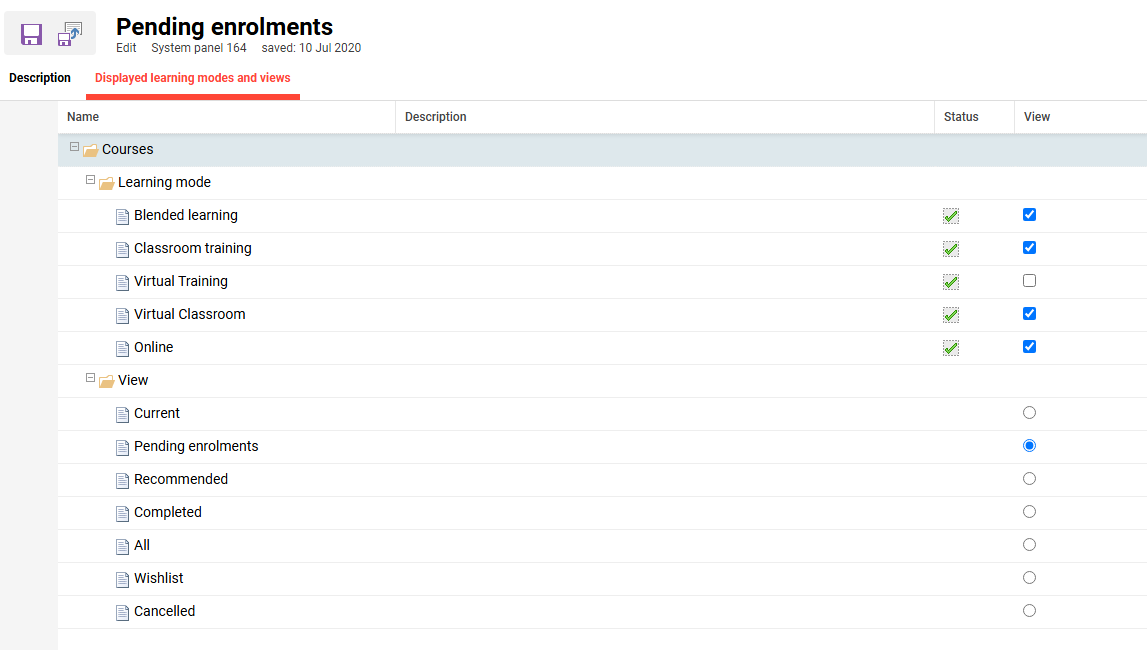
On this tab, it can be defined which course learning modes and which status are considered for display in the panel.
Learning mode
Lists the available course learning modes: Blended learning, Classroom training, Virtual Training, Virtual Classroom, and Online. Each learning mode has two indicators:
-
Status: shows whether the learning mode is active in the system. This is a read-only indicator and cannot be changed on this tab.
-
View: determines whether courses of that learning mode are included in the panel. Only learning modes with View enabled are displayed.
View
Defines which status is used to determine the content shown in the panel. Only one status can be selected at a time: Current, Pending enrolments, Recommended, Completed, All, Wishlist, Cancelled.
Related Functions
Configuration Manager - Enrolment | Enrolment identifiers
Catalogue Manager
Panels
Dashboard Administration