
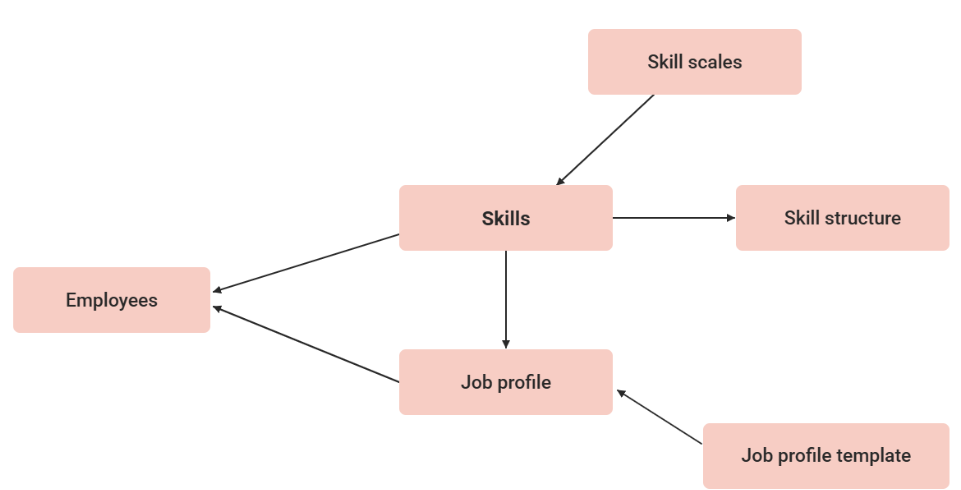
Job Profiles represent a cluster of skills needed for a specific role or position in the company. The job profile is assigned to the user, while specific skills are assigned to the content. The content needed to fulfil requirements for a certain job position can then be identified. Skills in a job profile can be grouped with skill structures.
Job profiles do not describe positions at a company, but merely job descriptions. Therefore, any number of staff members can have the same job profile. In addition, several profiles can be assigned to one job.
Note: Job Profiles can only be added to users, not to groups.
Job profiles are created from job-profile templates.
Customisable identifiers and skills, which can partly be adopted from the template used when creating the profile, are available for the advanced description of the job profile.
This function is only available with the licence or the add-on component "Competency Management."
Description
On the description tab the following settings are available beside Name, Description, Job description, Area of Responsibility, Profile requirements, Key Qualifications. Those fields are available for multilangauge usage.
|
Setting |
Description |
|---|---|
|
External ID |
Unique identifier assigned to a specific record or object within an external third-party system |
|
External system ID |
Identifier or code that designates the source system or integration instance itself |
|
Displayed skill structure |
Subordinate folders of the selected job profile structure are displayed in the learner’s job profile up to a maximum of the second level. Please note that skills assigned to multiple folders are displayed at the top level. |
|
Confirmation mode |
If a staff adds a job profile, the confirmation status of the job profile depends on this status.
|
|
Skill display |
2 options available:
|
|
Allow self-assignment |
If the option is not activated, this job profile can only be assigned by the administrator or supervisor. If the employees can assign the job profile to themselves, the option must be selected. |
|
Evaluate all skills prior to confirmation |
If this setting is active the job profile can only be approved if every skill was assessed. |
|
Show completion rate |
If enabled, a progress bar is displayed to the user, showing the completion of the skills in percent. |
|
Percentage of required skill target levels to fulfill the job profile |
Sets the percentage of required skill targets that must be met to auto‑confirm the job profile. Applies only with “Confirmation by skill target achievements”. |
Functions of the Job Profile Manager
New
Every job profile is based on a job-profile template. The title and a description are determined. Tasks, job descriptions, responsibilities, profile requirements and key qualifications can be defined. A minimum requirement in the shape of an educational degree can be entered. Every job profile can be integrated into a career group (e.g. a wage group).
Skills can be assigned to each job profile, equipped with a minimum requirement, weighed and marked as mandatory skills.
Skills with emphasis 0 will not influence the progress calculation of the job profile and marked with “optional“ in case the “required skill” setting is set to “no“.
The skill emphasis can be viewed in a separate column in the competencies manager of “all staff”.
Description
On the description tab the following settings are available beside Name, Description, Job description, Area of Responsibility, Profile requirements, Key Qualifications. Those fields are available for multilangauge usage.
|
Setting |
Description |
|---|---|
|
External ID |
Unique identifier assigned to a specific record or object within an external third-party system |
|
External system ID |
Identifier or code that designates the source system or integration instance itself |
|
Displayed skill structure |
Subordinate folders of the selected job profile structure are displayed in the learner’s job profile up to a maximum of the second level. Please note that skills assigned to multiple folders are displayed at the top level. |
|
Confirmation mode |
If a staff adds a job profile, the confirmation status of the job profile depends on this status.
|
|
Skill display |
2 options available:
|
|
Allow self-assignment |
If the option is not activated, this job profile can only be assigned by the administrator or supervisor. If the employees can assign the job profile to themselves, the option must be selected. |
|
Evaluate all skills prior to confirmation |
If this setting is active the job profile can only be approved if every skill was assessed. |
|
Show completion rate |
If enabled, a progress bar is displayed to the user, showing the completion of the skills in percent. |
|
Percentage of required skill target levels to fulfill the job profile |
Sets the percentage of required skill targets that must be met to auto‑confirm the job profile. Applies only with “Confirmation by skill target achievements”. |
Notes
Skills with the confirmation-through-competency evaluation mode can only be assigned to a job profile that includes skills with the same confirmation mode. The system blocks saving if any skill lacks the “Confirmation by Competency Evaluation” mode. In such cases, an error message appears, instructing users to ensure all skills use the same confirmation mode when confirmation from both the learner and supervisor is required for a skill level.
When combined with the confirmation mode “Confirmation by skill target achievements,” a configuration within the job profile can specify the percentage of a job profile's total skills that must reach their target levels for the profile to be considered confirmed. This feature does not alter how skills are confirmed, how job profiles utilize skills, or how progress percentages are calculated. It adds an optional automation step to the existing job-profile completion logic.
Details:
-
If the calculated percentage is at least the required percentage, the job profile is automatically confirmed.
-
No supervisor or admin approval is needed.
-
Auto-confirmation should only consider skills confirmed through competency evaluation.
-
-
If the percentage is below the required threshold, the job profile remains unconfirmed. For example, if 100% is entered, all required skill-level targets for all skills must be achieved for the job profile to be confirmation
-
If even one skill is below the target, confirmation does not occur.
-
-
Skill levels may decrease over time (e.g. expiration)
-
If a skill level later falls below the target, the job profile confirmation remains locked.
-
-
Skills marked as Mandatory or Optional are not considered