
If a user completes a course based on a course template in which the user is enrolled for recertification, the status display for this person in the course template changes to "Successfully completed". If the follow-up course is created based on the course template manually or automatically, the system checks whether the user has the status "Successfully completed" on the course template and is a member of a group for which recertification is activated.
When calculating the next due date for any possible group setup, the core objective is to avoid gaps in the validity of the achieved certification. The next due dates are calculated with the aim of making the best use of the validity period of the
When entering the recertification cycle with the second course, the next due date calculation differs from the calculation when the learner is already in the cycle. There are two ways to calculate the next due date based on the chosen “Deadline type”. Possible deadline types are “Due date based on conclusion” as well as “Always valid on DD/MM”. Details of both are described below.
Next Due Date calculation for deadline type ”Due date based on conclusion”
If the next due date is to be calculated based on the date of conclusion, this is done using the following formula:
"Next due date" = "Date of most recent completion" + "Recertification interval"
Example
Recertification interval 12 Months
Date of conclusion course 1: 31.08.2025
Next due date: 31.08.2026
Date of conclusion course 2: 15.07.2026
Next due date course 3: 15.07.2027
--> This means that over the years, the due date always falls on a different day, depending on the conclusion date of the previous course.
If no courses in the template have yet been completed, no next due date is set. To handle this case and enable the learner to continue the recertification cycle, the following settings must be configured accordingly:
-
“Automatic status change after due date” with “Days for status change after due date” (in days)
-
“Change status to” (selection of status: passed, failed or cancelled).
-
“Re-enrol cancelled and failed users”, if “Automatic status change after due date” is selected.
Next due date calculation based on deadline type “Always valid on DD/MM”
Calculating the next due date based on the deadline type “Always valid on DD/MM” ensures that the certification is renewed within the defined recertification interval relative to the last due date.
For recertification intervals < 12 months
The following graphic visualises an example of next due date calculation in the case of a recertification interval of 6 months:
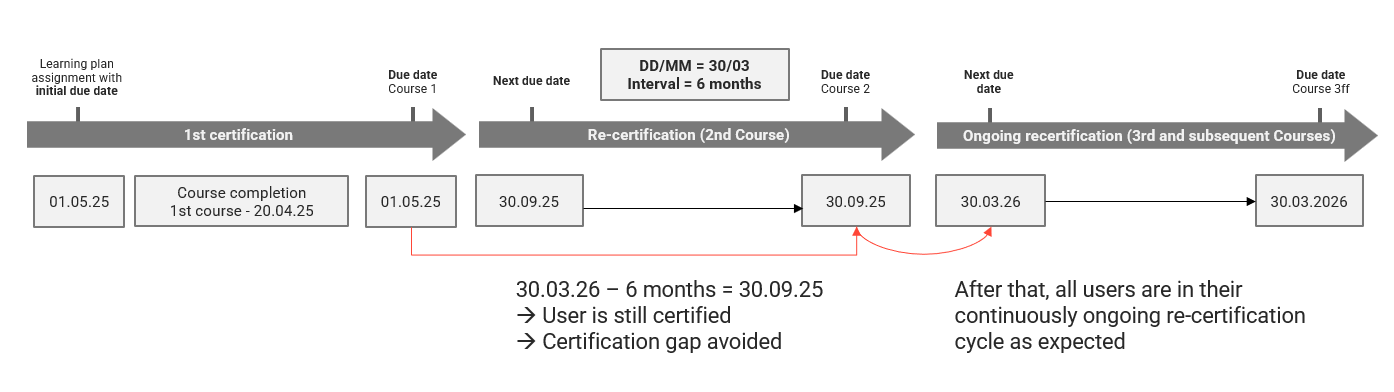
The next due date for the 2nd course already takes the 6-month interval into account, as do the 3rd and any subsequent courses in the recertification cycle. At the same time, it is ensured that each user reaches the defined DD/MM either with the following course.
For the illustrated example, the calculation process is as follows:
-
After the completion of the first course on 20.04.25, the next due date is calculated.
-
It finds the defined DD/MM which is in the future and after the due date of the first course (01.05.25). The date is 30.03.26.
-
The system checks whether 30.03.26 is at a maximum, and the defined recertification interval of 6 months in the future to avoid certification gaps.
-
As 30.03.26 is 10 months after the initial due date, this would cause a certification gap of 4 months in the illustrated case.
-
The system incrementally calculates back from the expected DD/MM the defined interval. In the given cases, it subtracts 6 months from 30.03.26 to come to 30.09.25 and checks again whether that date is at a maximum the defined recertification interval of 6 months in the future to avoid certification gaps. As this 30.09.25 - 1.5.25 is less than 6 months, this date is taken as the next due date for the users as it does not cause any certification gaps and still ensures that the users can after the next course completion, land on the defined DD/MM 30.03. for the following course as expected.
For recertification intervals equal 12 months
The following graphic visualises an example of next due date calculation in the case of a recertification interval of 12 months:
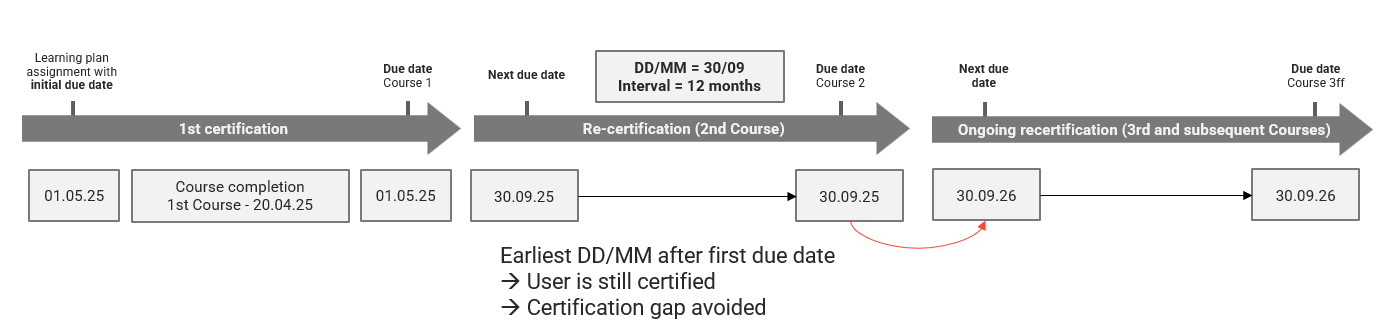
The next due date for the 2nd course already takes the 12-month interval into account, as do the 3rd and any subsequent courses in the recertification cycle. This ensures that each user reaches the defined DD/MM with the next course.
For the illustrated example, the calculation process is as follows:
-
After the completion of the first course on 20.04.25, the next due date is calculated.
-
It finds the defined DD/MM which is in the future and after the due date of the first course (01.05.25). The date is 30.09.25.
-
For a chosen interval of 12 months, that date will always be at a maximum of the defined recertification interval of 12 months in the future.
-
The system will therefore take that determined date 30.09.25 as the next due date for the user as any later date with further 12 months in the future would cause certification gaps.
-
Please note that there is no automation to manage users who are overdue in the course completed before.
For recertification intervals > 12 months
The following graphic visualises an example of next due date calculation in the case of a recertification interval of 24 months:
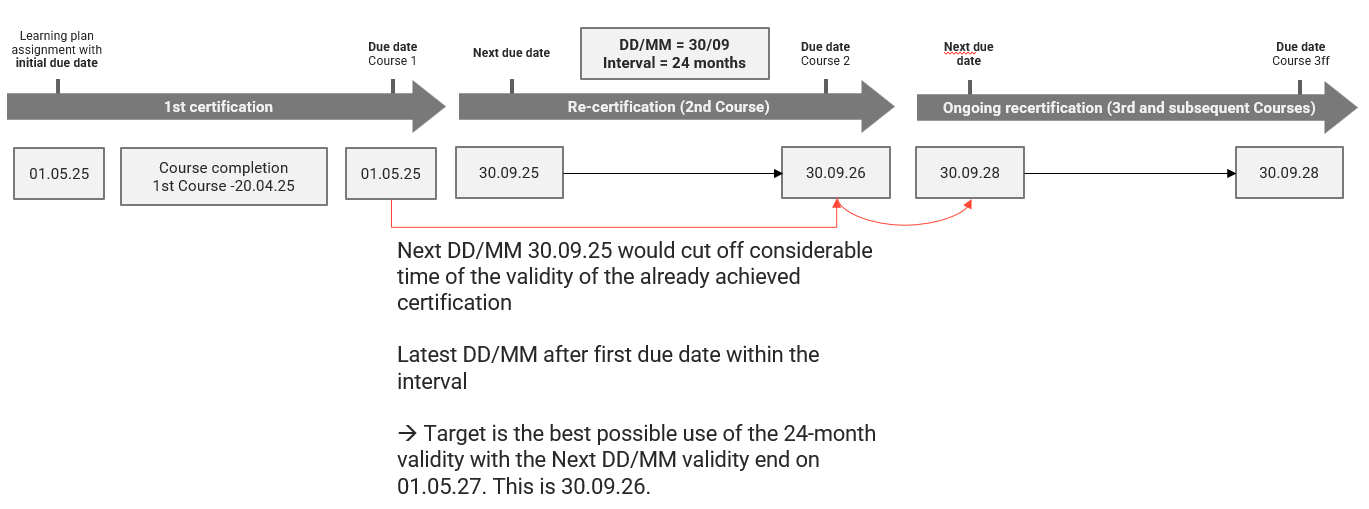
The next due date for the 2nd course already takes the 24-month interval into account, as do the 3rd and any subsequent courses in the recertification cycle. At the same time, it is ensured that each user reaches the defined DD/MM with the next course.
For the illustrated example, the calculation process is as follows:
-
After course completion of the first course on 20.04.25, the next due date is calculated.
-
The system adds the defined interval of 24 months to the initial due date and calculates 1.5.27 as the latest date the user must complete the following course.
-
To fulfil the demand that the next due date should land on the defined DD/MM 30.09. The system finds the DD/MM which is nearest to the calculated latest next completion date 01.05.27 which is the 30.09. the year before, concretely the 30.09.26. This date ensures both allowing the user the longest possible time before a next course completion is needed as well as ensuring the users next due date is landing on the defined DD/MM and not causing a certification gap.
Next due date calculation when entering the recertification cycle for DD/MM (2nd course)
If the conclusion date of the first course is before DD/MM of the same year → the next due date is DD/MM of the same year.
If the conclusion date of the first course is after DD/MM of the same year → the next due date is DD/MM of the next year
Example:
If the next due date is calculated based on DD/MM.
Recertification Settings:
Deadline type: Always valid on DD/MM
Deadline 31/12
Recertification Interval: 12 Months
Date of Assignment: 01/04/2025
Initial Due date: 01.05.2025
Conclusion of Course 1: 20.04.2025
Calculated next due date: 31/12/2025
--> This means that for the second course, because the initial due date was on 1 May, the next due date will be 31 December of the same year, even if the recertification cycle is 12 months. This applies only to the second course because, if the next due date were in the following year, a gap would result: the period between the initial due date and the next due date would be 20 months rather than the 12 months specified in the settings. To enter the cycle when the initial deadline DD/MM and the recertification deadline type differ, a short period between the first and second courses is taken into account. From the 3rd course onward, the cycle is always correctly set to 12 months as configured.
Next due date calculation when the learner is already in the recertification cycle for DD/MM
The next due date is then calculated for the user. This is done depending on the type of deadline:
"Always valid on DD/MM":
"Next due date" = “Deadline in DD/MM” + "Recertification interval"
Calculation of next due date when there is no initial due date
It is possible to configure the recertification so that no initial due date is set. This can be done by entering 0 as the number of days to finish, in combination with the initial due date based on “Fixed due date” or “Due date based on DD/MM”.
The next due date is calculated as follows:
If the recertification is based on DD/MM, the next due date is determined based on when the learner completed the initial course.
Example 1
Recertification is always due on DD/MM 31/09
Recertification interval: 12 months
Initial course has no due date
Learner 1 completes the initial course on 15 July; the next due date is therefore set to 31 September of the same year.
Learner 2 completes the initial course on 15 October; the next due date is therefore set to 31 September of the following year.
This is based on the rule that the 12-month interval should not be exceeded.
Example 2
Recertification is based on conclusion
Recertification interval: 12 months
Initial course has no due date
Learner 1 completes the initial course on 15 July; the next due date is therefore set to 15 July of the following year.
Learner 2 completes the initial course on 15 October; the next due date is therefore set to 15 October of the following year.
Calculation of next due date, enrolment date and due date
The recertification cycle is explained in more detail here:

“Later date applies” approach
To ensure that users always have at least the minimum number of “days to finish” available between course enrolment and the course due date, a general “later date applies” approach compares the initial or next due date with the date calculated as the enrolment date plus days to finish at the moment of enrolment. The later date is set as the (initial) course due date for the user. This approach is applied when calculating the initial due date, the course due date for the first course, and all course due dates for subsequent courses. It is not applied when calculating the next due date. See the following table for details.
|
What |
When |
Later date applies? |
Comment |
|---|---|---|---|
|
Initial due date |
„Due Date“ is shown on template level after the first job run after the group assignment |
Yes |
If a fixed or relative due date has been set, this date will be compared to the date calculated by enrolment date plus days to finish at the moment of enrolment. The later date will be set as course due date for the user. |
|
Course due date
|
On the assignment or activation date if a course is available. Else as soon as a course gets available |
Yes |
Might still differ to initial due date in cases a course gets available too short before initial due date |
|
Next due date
|
After course completion of the former course |
No |
It is calculated based on deadline type and recertification interval without consideration of days to finish. |
|
Course due date
|
When enrolment is due by NDD – days to finish – buffer days = today or later and course is available |
Yes |
Might differ to next due date in cases the enrolment date plus days to finish is later than the Next Due date (e.g. because no course was available or a user rejoins too short before NDD) |