
The import of groups, positions, and user data is crucial for managing organisational structures. As mass data is to be updated regularly, e.g. once a week, manual updating would not be practicable for larger organisations.
The import needs to be configured in the Configuration Manager.
Basic Priciple
Groups contain users and positions, positions contain users. Therefore the whole organisational structure import process should be scheduled in the following way:
User import (existing) > Position import (new) → Group import (new) This order will minimize the number of invalid object assignments.
This depends on the job configuration and is not an implementation task.
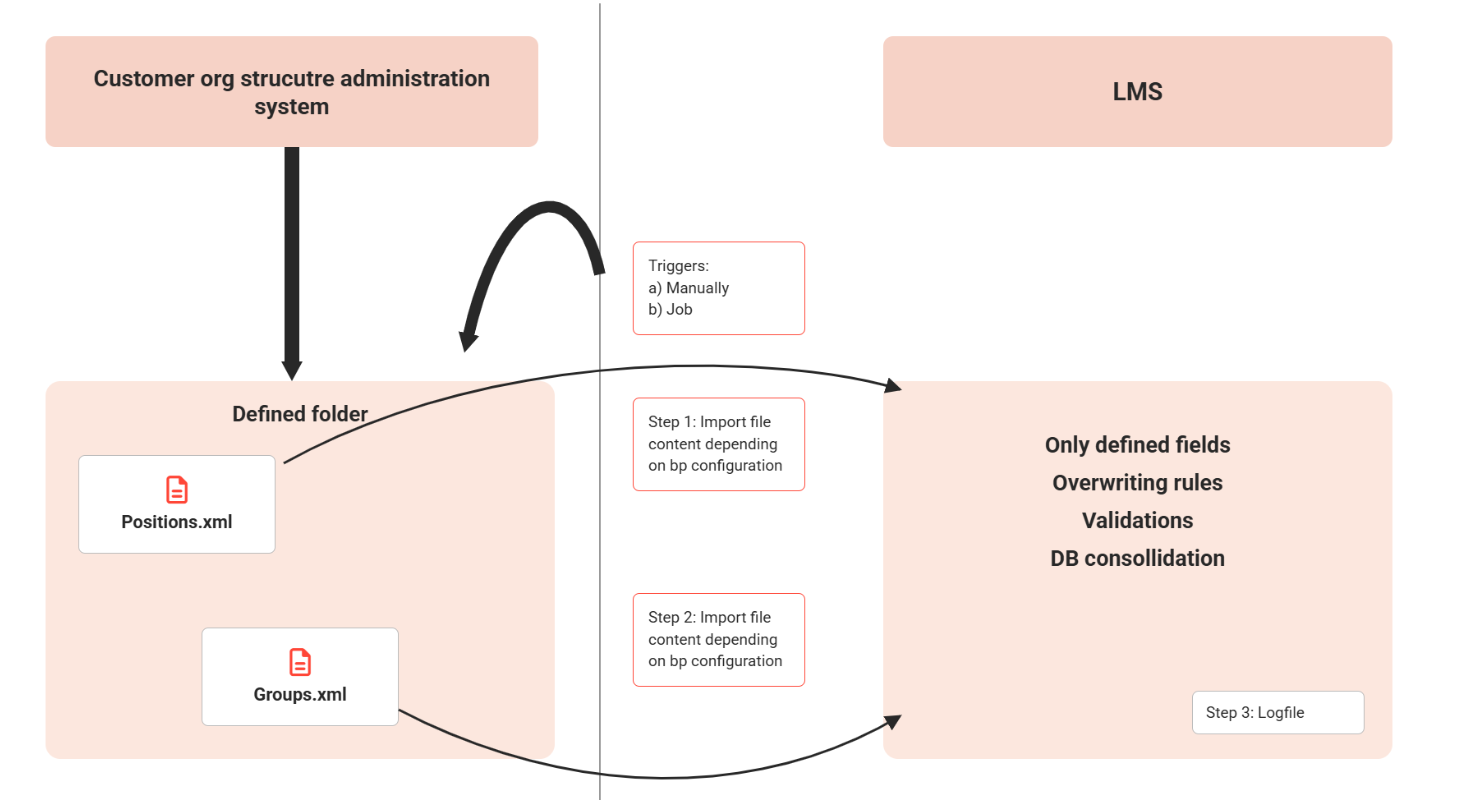
The XML structure is defined by Scheer IMC as a standard structure. Customers are responsible for creating a valid XML file.
The import is triggered by a job. In the GUI, it can also be triggered manually in addition to this job. This can be done separately for positions and groups.
The import starts by loading and validating the current XML file. If the validation is successful, the database update starts.
Group Import
The main purpose of the group import concerning talent management is to create or update an organisational structure. New groups are created during import, and existing groups are updated. The update includes relocations and deletions within the group structure.
The new group import does not replace the existing LDAP import. It supports organisational unit and standard group import but is not enhanced in functional scope.
imc Learning Suite expects an XML file to process its data into the existing organisational structure. Customers are responsible for generating this XML file.
The import always expects an XML file containing the entire structure of a defined main group. Groups that are not integrated into the XML file are removed from the database.
All attributes and their values included in the XML file are imported. If the values are changed in imc Learning Suite, the next import overwrites these changes.
To make attributes read-only in imc Learning Suite, they must be configured accordingly so that the corresponding field in imc Learning Suite becomes read-only.
Import Specifications
-
The import will ignore if an imported object is locked in the LMS, because edited by another user. There will be a mechanism which will forbid the user to save his changes.
-
The import will be restricted to one main group by configuration. If a customer wants to import several main groups he has to configure separate imports for this.
-
The main group folder must be created manually in the LMS. When it is updated by import the first time it receives an external ID and can no longer be administered like a not-imported object.
-
It can be specified if the import of an empty field will ignore or delete an existing entry.
-
If groups are created, the clearances of the direct parent group are written to the new group. If not possible: write standard ACL rights.
-
If a group is deleted in source system, the corresponding group is also deleted in imc Learning Suite after the import of the updated xml-file. Child groups of the deleted groups should also be deleted in DB if not moved to another parent based on the structure update. Remark: No influence on reporting, because data from the past come from history table copies.
-
If the creator of a new group (creator by configuration) is not allowed to create groups on GUI, no special action is to be performed. The group will be created with him as creator.
-
Group attribute fields can contain HTML strings. The import exchange format (xml) must handle this correctly.
-
Note for later functional specifications: Depending on data history mechanism it should be avoided that each import update causes a history table entry, even if there is nothing changed for the group.
Validation Steps
If the XML file does not contain valid data, imc Learning Suite must not start the import into the database without a prior check. Otherwise, parts of the structure could be updated while others are not because the update was cancelled. This could lead to major data inconsistencies.
Therefore, when imc Learning Suite receives an XML file, the following validations are necessary:
|
Step |
Message |
Description |
|
Step 1:
|
|
General tests |
|
|
|
Cancel import; Logfile: CONFIGURATION NOT VALID. |
|
|
|
Cancel import; Logfile: CONFIGURATION NOT VALID. |
|
|
Another group import is running for the same main folder |
Cancel import; Logfile: ANOTHER GROUP IMPORT Running for main group 12345. |
|
|
XML file not in folder |
Cancel import; Logfile: SOURCE FILE NOT FOUND (path/filename). |
|
|
Folder not found |
Cancel import; Logfile: SOURCE FILE NOT FOUND (path/filename). |
|
Step 2:
|
|
|
|
|
XML structure not valid |
Cancel import; Logfile: INVALID XML STRUCTURE |
|
|
XML structure doesn’t contain user assignment attribute definition |
The xml file must contain the name of the user attribute which is used to identify assigned users. E.g. <xml> <userAssignment attribute=”USER_ID”/> (structure) </xml>
If this information is missing, the import is interrupted and an error message is written to logfile: INVALID USER ASSIGNMENT ATTRIBUTE. Or: USER ASSIGNMENT ATTRIBUTE MISSING IN FILE.
Allowed user attributes: LOGIN PERSON_ID EXT_ID_CSV EXT_ID_LDAP EXTERNAL_ID EXTERNAL_SYSTEM_ID EXT_SHIB_UID EXT_SHIB_ENTITY_ID |
|
|
The target main group contains not-imported subgroups |
Cancel import; Logfile: INVALID TARGET GROUP STRUCTURE |
|
|
The creator does not exist in imc Learning Suite |
The xml file must define a creator. When a new group is created by import, the creator will be written to the DB.
Cancel import; Logfile: CREATOR UNKNOWN IN TARGET SYSTEM. |
|
Step 3:
|
|
|
|
|
There is not exactly one main group. |
Cancel import; Logfile: INVALID SOURCE GROUP STRUCTURE. |
|
|
Not all external IDs of the remaining groups are unique in imc Learning Suite |
Cancel import; Logfile: EXTERNAL IDs NOT UNIQUE IN TARGET SYSTEM. |
|
|
After import each group will have a valid parent group |
…except the main group. This check must regard re-arrangement and deletion of groups. Cancel import; Logfile: INVALID SOURCE GROUP STRUCTURE. |
|
|
Position assigned several times |
After import the position assignments must be unique for the whole LEARNING SUITE DB. Cancel import, Logfile: POSITION ASSIGNMENT NOT UNIQUE (POSITION 1234). |
|
Step 4:
|
|
Some mandatory settings must be checked which can cause invalid data structure. Other settings are not checked in this check, because there is a fall-back handling for them (see next chapter). |
|
|
Any group doesn’t have an external ID or name |
Cancel import, Logfile: MANDATORY FIELDS MISSING (GROUP 3254235423). |
|
|
A group has the same user assignment into the fields SUPERVISOR, DEPUTY1 or DEPUTY 2 |
Cancel import, Logfile: GROUP 1234: ASSIGNMENT OF SUPERVISORS AND DEPUTIES NOT UNIQUE FOR GROUP. |
Table 1: Pre-validation for group import