
Enrolment forms allow to request detailed information during the booking process of a course or learning path. Those forms can be configured very flexibly in the UI so they can be adapted to various use cases. After creation, they can be assigned to courses, course templates, and learning paths and learners or supervisors can fill out the required data before enrolling.
Functions of the Enrolment Form Manager
New
Four different types of enrolment are supported for enrolment forms:
-
Enrolment by learner
-
Enrolment of the learner by the supervisor, enrolment agent, or HR administrator
-
Approval by supervisor, admin, or multi-approval
-
Pre-Booking
For each type, different headers and sections can be defined. For the header information like for example location and time frame can be displayed. Sections can be moved variably within the form and allow a very flexible configuration. The following sections are supported:
Instruction
An instruction text can be defined which will be displayed to the learner while filling out the enrolment form
Training data
The following meta data can be configured to be shown in the enrolment form:
-
Display time frame
-
Display location
-
Display time zone
-
Display price
Participant profile
This is a very special type of section with the possibility to create a folder structure with a title and description to add personal attributes, those attributes can be marked as mandatory and it can be defined e.g. if the form should be already prefilled with existing data.
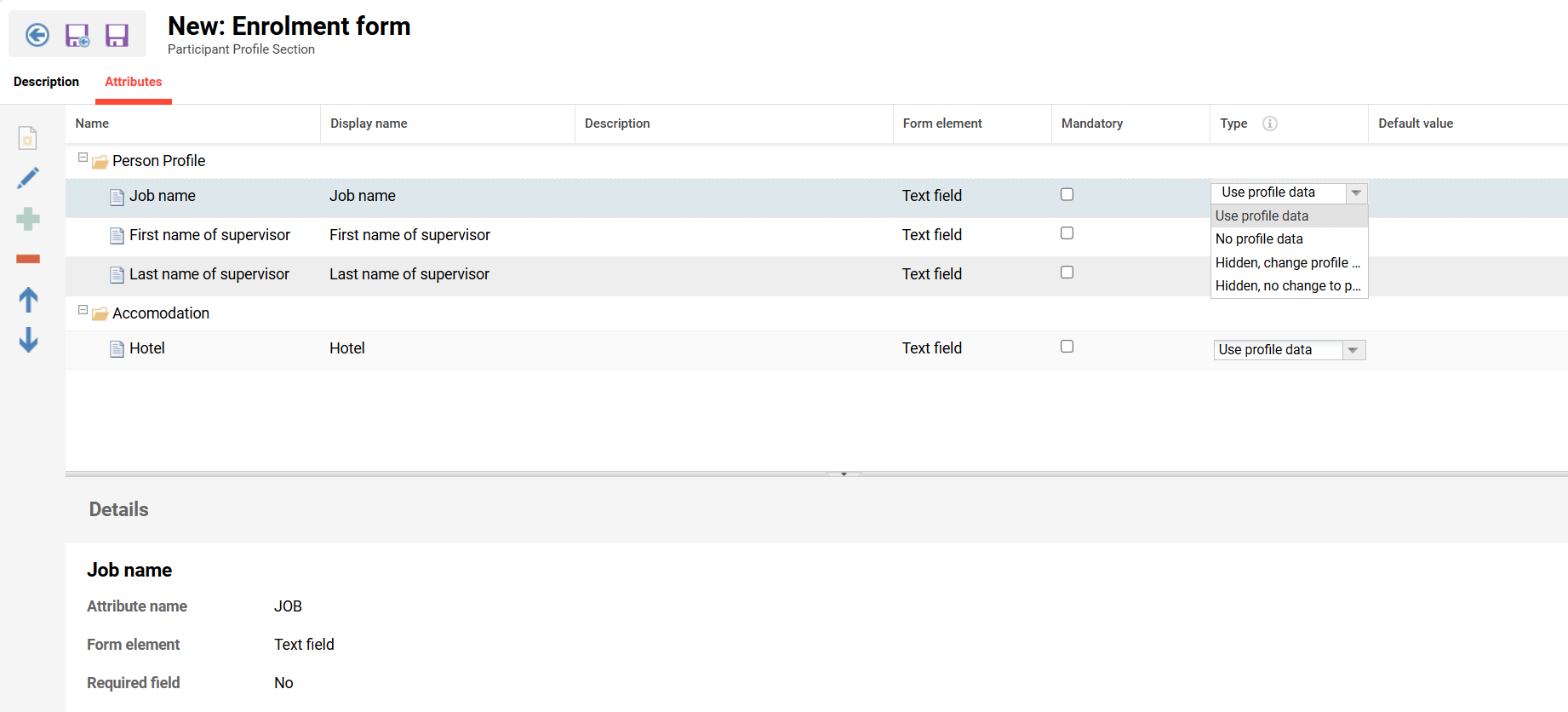
Per attribute in the column “Type” the following setting can be chosen:
-
Use profile data: The field will be prefilled with profile data, can be edited and the change will be saved in the personal profile.
-
No profile data: The field will be empty if no default value is set, can be edited.
-
Hidden, change profile data: The field will not be shown but data from profile and order data will be overwritten with a default value.
-
Hidden, no change to profile data: The field will not be shown, data will not be changed in the profile but will be shown in the booking data. If a default value is entered, this one will also not be overtaken.
Some peroan attributes are not allowed:
-
PASSWORD
-
CLIENT_ID
-
USER_TYPE
-
NUMBER
-
SET (Attribute set)
-
JOB_PROFILES
-
JOB_PROFILE_COMPLETION
-
SKILL_REQUESTS
-
SKILLS
-
STAFF_MEMBERS
-
USER (User selection)
-
IMAGES / Uploads - not allowed due to secure data data protection policies.
Comments
If a comment section is added a free text field is shown in the enrolment form. The user can add a comment concerning his enrolment.
Supervisor data
The Superior Data Section displays the supervisor's details to the participant during the enrolment process. Here's what it covers:
It automatically pulls and displays the following four attributes of the participant's supervisor (hard-coded, cannot be changed or extended):
-
Title
-
First name
-
Last name
-
E-mail address
Key configuration options:
-
Filtering by enrolment type — restrict when the section appears, for example only for self-enrolments that require supervisor approval rather than for all enrolment types.
-
Editable supervisor details — optionally allow participants to edit their supervisor’s details from their profile during enrolment. Note: this is a temporary change; if a user data interface (for example an HR system) provisions supervisor data into the Learning Suite, those values will be overwritten by the interface.
Preferences (only for pre-booking available)
In the preferences section the user can enter the start and end of the pre-booking period, indicating when they want to enrol on a course based on the template for which they pre-booked.
Terms of use
Used to provide training terms and conditions via plain text or via a web-link (can be an LMS dashboard) and a checkbox that can be forced to tick to enrol.