
Technical updates to underlying architecture and security features are listed below:
Technical Updates
Service Registry
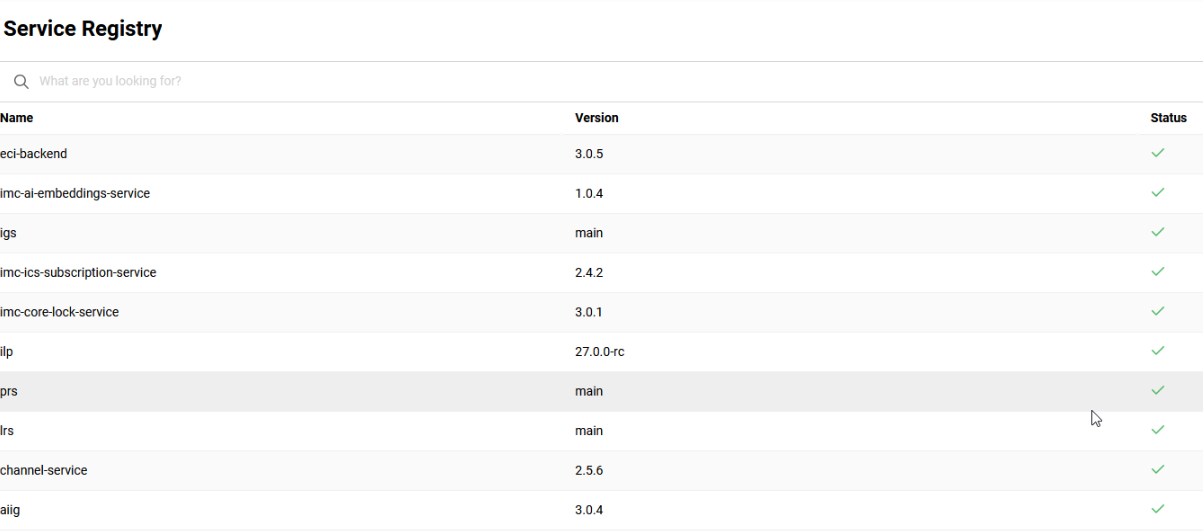
Overview: The Service Registry function is a new information page that is the final piece of a long-term project. This page lists all the deployed Learning Suite services and their current statuses. The page connects to the Service Registry, resolving registered services by application name to display the base URL, actuator refresh endpoint, health status, and info endpoint.
-
The list shows the current status of the services using traffic light colouring (//health endpoint for Spring Boot services available with a 200 code) in the file, but are not registered in Service Registry, will display a red warning symbol.
-
Services that are contained in the file and are registered show a green checkmark.
Benefits and Use Cases: The single page displaying current statuses of the connected Learning Suite services. This overview provides Super administrators and IMC Engineers with valuable information required for troubleshooting; e.g. to check if the Channels service is running in the case of an error.
Audience: Super administrators and Scheer IMC Engineers
Setup & Access: Super administrators can access the Service Registry function via the direct link $systemurl$/ui/services. This link could be configured as a menu in the Navigation function by creating a new Menu with type External link. Access rights would then be granted to the Super Administrator group.
Considerations & Limitations: Standard feature for systems on Kubernetes micro-service architecture. Further limitations include:
-
Access is currently only possible for Super administrators via a direct link.
Non-Super administrators attempting access will receive an ‘Access forbidden’ message. -
Restart of services not possible - this is only in the responsibility of Hosting Engineers.
Testing: As a Super administrator, access the directly link via $systemurl$/ui/services.
Risk rating: Low
Data Connector Option to Execute Now
Overview: The Data Connector function has been updated to include an Execute now button. This button has been added to the Jobs tab and enables indexing jobs to be processed on demand. Clicking the Execute now button will execute the selected job immediately, irrespective of a “Scheduled” status. This means even if the job is paused, the job can be executed immediately if the administrator clicks on Execute now button.

This update has required a new API version to allow starting a job without losing the configurations - making a PATCH request to /api/v2/jobs/:jobId will start the job immediately.
Another update sees the Data Connector function columns improved to enable manual adjustment, horizontal scrolling and auto-width setting of columns.
Benefits and Use Cases: Enables data connector administrators to trigger jobs instantaneously as required. The addition of the Execute now button means there is no need to manually change existing scheduling (e.g. 1 minute ahead) to perform ad hoc processing. Scheduling for existing jobs will not be impacted. This means manual execution of a scheduled job will not prevent the scheduled job from processing.
Audience: System administrators
Setup & Access: The new Execute now button will be automatically added to existing jobs in the Data Connector function.
Considerations & Limitations: The Data Connector function is for Kubernetes architecture.
Testing: This function is intended for Scheer IMC Technical Administrators and Technical Administrators. Testing can simply be achieved by accessing the Data Connector function, highlighting a connector and seeing the Execute now button is available.
Risk rating: Low
Data Connector Option to Download Log
Overview: A new option in the Data Connector function Jobs tab enables direct access to log files. The inclusion of a Download log file button to retrieve the available log files for investigation in case of errors.

Benefits and Use Cases: The update provides Data Connector administrators with the following benefits:
-
Ease of Monitoring: The ability to download log files directly facilitates quick access to important execution data, improving investigation and resolution times for any errors.
-
Control by user: The new functionalities empower administrators with enhanced control over job executions and monitoring without disrupting existing schedules.
Audience: System administrators
Setup & Access: The new Download log file button is automatically available in the Data Connector function Jobs tab.
Considerations & Limitations: The Data Connector function is for Kubernetes architecture. This is not configured in the navigation by default as it’s only used by specific functions.
Testing: Testing requires that the Data Connector function is configured,. If so, go to the Jobs tab, highlight a connector and view the Download button. When clicked, this will download the latest log file.
Risk rating: Low
Open Graph Update to Prevent 500 Errors
Overview: A small update has been implemented to resolve a potential issue with local testing of the Open Graph service. This fix prevents a 500 error that could hinder development and debugging. The update improves service naming consistency between environments.
Benefits and Use Cases: The resolution improves local testing efficiency and eliminates deployment inconsistencies, enabling smoother development workflows.
Audience: Technical administrators
Setup & Access: Not required
Considerations & Limitations: Open graph is used for integrations such as MS Teams and Power BI.
Testing: Not required
Risk rating: Low
Classification Selection in ECC
Overview: An update to a fetching query has been made for meta tags with type ‘Classifications’. This resolves an issue that prevented regular administrators from selecting classifications in the ECC. The issue would occur despite the administrators having appropriate clearances; while super users could select assigned classifications.
Benefits and Use Cases: Now enables course administrators to select classifications when creating courses in the ECC function. This reduces confusion when the Classification meta tag would display, but no options were presented.
Audience: Course administrators
Setup & Access: The update to fetch logic is applied automatically.
Considerations & Limitations: Each Classification meta tag is configured independently to define the available classifications for selection. If a Classification meta tag is created without any classifications assigned, this will still result in no classifications displaying. The parent classification must also be enabled for use in courses.
Testing: Before testing, ensure that:
-
The ECC functions are configured.
-
A Classification meta tag exists with classifications assigned.
Clearance for classifications also granted to administrator groups. -
A Course template is published with the Classification meta tag assigned and the Usable for course creation workflow checkbox ticked.
Providing the above points are configured, testing is possible by:
-
Log in as a regular Administrator (non-Super administrator).
-
Go to the ECC function to create a course.
-
Select the Course template where the Classification meta tag is assigned.
-
In the Course details step, locate the Classification meta tag and click to add a classification.
Risk rating: Low
System-wide Updates
Functional Reference '?' Update
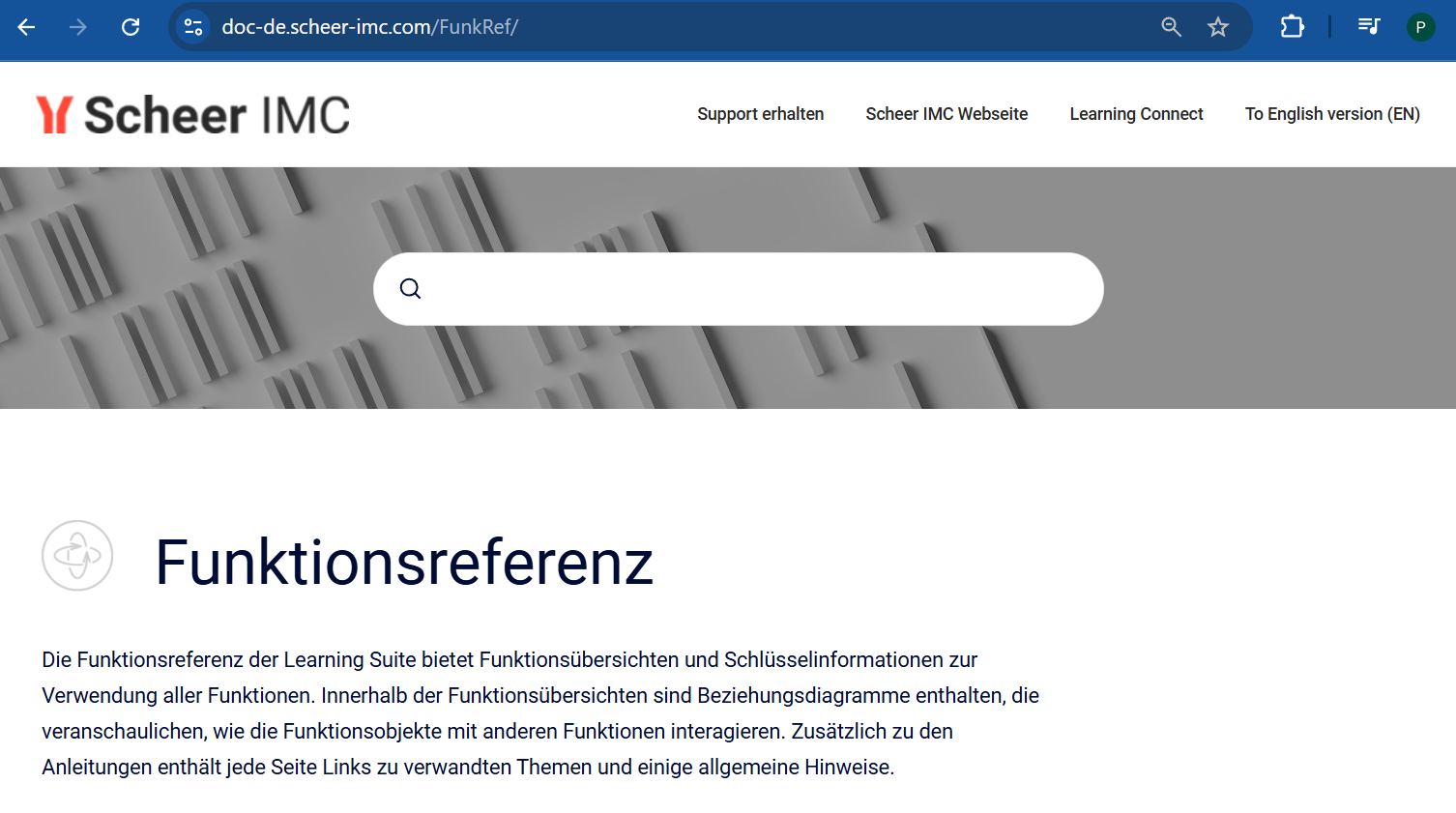
Overview: The ? icons within backend functions have been updated to link to the new Functional Reference. The new Functional Reference is directly available in English and German at the following locations:

Functions that were missing the ? link have also been updated including:
-
Multi Approval workflow
-
Easy Course Creation Workflow
-
Enrolment forms
-
Enrolment form sets
Benefits and Use Cases: All administrators can directly access the corresponding page in the online Functional Reference. The update fills missing page links and ensures access is always to the latest information. Having a central location for the Functional Reference enables Scheer IMC to deliver documentation updates more efficiently.
Audience: Administrative users
Setup & Access: The ? icon links will be updated automatically to the new Functional Reference. The ? icons can be enabled/disabled globally in the Configuration function Help menu.
Considerations & Limitations: The ? icons if enabled is available for all activated backend functions. The Functional Reference is now central and is the same for all customers; irrespective of patch version. The Functional Reference will be maintained for the latest innovation patch level.
Testing: The specific functions mentioned in the Overview section will now contain the ? icon. All ? icons in all backend function link to the new Functional Reference in the Scheer IMC Customer Documentation space.
Risk rating: Low
Client-Specific User Interface
Overview: Client‑specific UI design switching is now possible at function level within the same session. The update enables learners to see the matching branding for certain functions (e.g. Catalogues) without logging out and then back in. Pages possible to update with the change include:
-
ILP pages (Examples: Catalogue Search, Course room, Competencies, ECC)
-
Microservices (Example: Description pages, Dashboards)
-
Monorepo (Example: My experience, Learning status, Inbox, My staff, Channels)
Benefits and Use Cases: This update is intended for customers with multi-client setups where different designs per client are required. The benefit is really for users that are either assigned to multiple clients, or can access navigation entries of multiple clients.
-
Access design switching for functions without logging out/in.
-
Clear brand differentiation across catalogues and dashboards
-
Seamless learner experience with consistent design inheritance
-
Scalable for future clients/brands
Audience: System administrators, Learners and Supervisors
Setup & Access: A new Design field will be visible in the Navigation function when editing select Menu type entries. The dropdown will enable selection of a custom or ‘default’ design. The ‘default’ displays that of the client for the logged in session and this will also be the default.
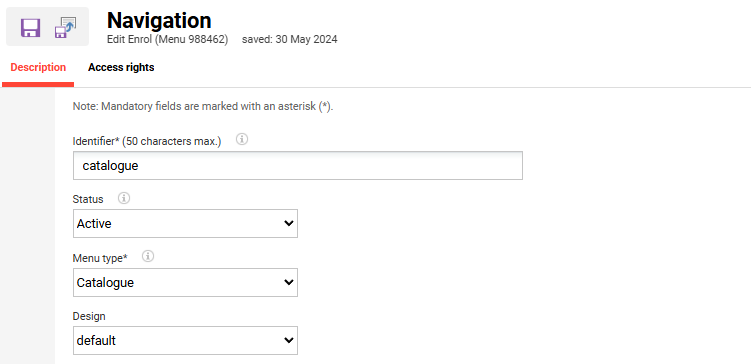
The following navigation Menu types can be updated:
Menu Type
-
Catalogue
-
Dashboard
-
Default Menu
-
My Learning (Learning status)
-
Training Calendar (learner and supervisor)
-
Experience Area (Experience Tracks, Badges)
-
Job Profile and Skills
-
Channels - Learner
-
My Staff
-
-
Special Function
-
Profile
-
Messages
-
Considerations & Limitations: Standard function requiring Kubernetes architecture
-
Only designs where the ‘Activate the new navigation’ checkbox is ticked will be taken into consideration.
-
This will work only when menuid is present in URL.
-
Backend ILS manager pages are not supported.
Testing: Requires that the system is configured with at least two clients that utilise different designs. As a System administrator, go the Navigation function and edit any of menu types listed above (e.g. Catalogue, Dashboard). The new Design field will be available to select a specific design. Testing can be completed by configuring at least two navigation entries with different designs. Log in with a user that has access rights to the updated navigation entries. Switch between the navigation entries and the design will change on page load.
Risk rating: Medium
Pop-up Window Adjustments
Overview: Improvements have been made to various pop-up windows in the backend to improve UI. Adjustments to the following default pop-up window sizes have been made:
-
Courses function → Participant administration icon → Participant list tab & Cancellation list tab
-
1024 x 768 min system resolution supported
-
Window size: w600px / h500px
-
-
Media function → Details area → Assignments button → Pop-up
-
1024 x 768 min system resolution supported
-
Window size: w600px / h400px
-
-
Users function → Select user → Details area → Courses button → Pop-up
Adjustments have also been made to the line height for all information 'i' icons to 1.3px.
Benefits and Use Cases: The updates enhance administrator experience through better presentation of initial information.
-
Enhanced Information Display: Adjustments to line height for information icons ensure better readability and visual consistency across the platform.
-
Optimised Table Behavior: When using pagination, tables now automatically reset to the top, making it easier for users to view the first entry on the new page without unnecessary scrolling. Columns containing IDs that have set length will now display the full ID to ensure easier copying if required.
Audience: Administrators
Setup & Access: Not required, changes are applied automatically.
Considerations & Limitations: None
Testing: As an administrator, open any of the listed pop-up windows to see the default size changes. To view the information i icon pop-up positioning changes, simply click on any information i icon.
Risk rating: Low
Align Navigation Entry to Page Names
Overview: The naming of various pages have been updated to reflect the name of the navigation menu name. This update has been completed as there were some pages in the system where naming was fixed and did not reflect navigation naming. For example:
-
Navigation entry: Experience area
-
Name of the page: My Experience
The following areas and pages have been updated:
-
Monorepo:
-
ui/learn/current
-
(redirects from ILP)
-
/pages/service_learner.jsf -> /channels/learn/feed
-
/pages/service_manager.jsf -> /channels/manage
-
/pages/myinbox.jsf -> /inbox
-
/pages/my-staff.jsf -> /staff
-
/pages/myexperiences.jsf -> /experiences
-
/pages/user-profile-personal.jsf -> /profile/personal
-
/pages/user-profile-policy.jsf -> /profile/policy
-
/pages/user-profile-password.jsf -> /profile/password
-
/pages/user-profile-delete.jsf -> /profile/delete
-
/pages/user-profile-signup.jsf -> /profile/register
-
/pages/user-profile-view.jsf -> /profile/<userId>/view
-
-
ILP:
-
/pages/imprint.jsf
-
/pages/termsofservice.jsf
-
/pages/competencies.jsf
-
/pages/ojt-training-overview.jsf
-
/pages/personalarea.jsf → ui/learn/current
-
-
Microservices:
-
/pages/feedback.jsf
-
-
Page Service:
-
/pages/training-calendar.jsf
-
/pages/manager-training-calendar.jsf
-
/pages/mentored-ojt.jsf
-
-
Analytics Frontend:
-
/pages/learning-analytics.jsf/reports
-
/pages/learning-analytics.jsf/dashboards
-
Benefits and Use Cases: The update ensures users are directed to expected pages when selecting a menu option from the navigation.
Audience: All users
Setup & Access: Changes are applied automatically.
Considerations & Limitations: Standard update
Testing: When opening pages from the navigation check that the page name matches the navigation.
Risk rating: Low
Security Findings (Other)
The following updates for Innovation Pack 14.27 are to improve security:
Java Compiler Switch to Java 17
Overview: A switch Java compiler to Java 17 has been completed for imc-ils-igs-services.
Setup & Access: Change will be automatically applied with patch installation.
Testing: Not required
Risk rating: Low
IDM Spring Boot Update
Overview: Spring Boot has been updated to Spring Boot 3.5.7 and spring security 6.5.6.
Benefits and Use Cases: Enables LMS users to login with different authentication methods requiring IDM. This security update prevents attacks to bypass security checks and access unauthorised files/directories. The update replaces deprecated methods with equivalents in preparation for future Spring Boot 4.x updates.
Audience: Technical administrators
Setup & Access: This IDM change needs to be tested carefully on customer Test systems before introducing to the Production system.
Considerations & Limitations: PKCE only works with SHA-256. The signing algorithm for SAML tenant metadata is RSA-SHA256. This is the default supported by spring. If additional signing algorithms are needed, additional implementations will be required.
Testing: This IDM change needs to be tested carefully on customer systems before introducing to Production to ensure required authentication methods work as expected.
Risk rating: Medium