
Integration Updates
No major updates for IP26.
Connector Updates
Connector updates are listed below:
MS Teams Administrative Options
Overview: Media types for MS Teams meetings can now be configured with additional administrative settings via meta tags. These settings enable control over participant permissions and meeting behavior, such as chat functionality, camera and microphone usage, and lobby bypass rules. The configuration is available per media type and follows the existing meta tag based configuration approach.
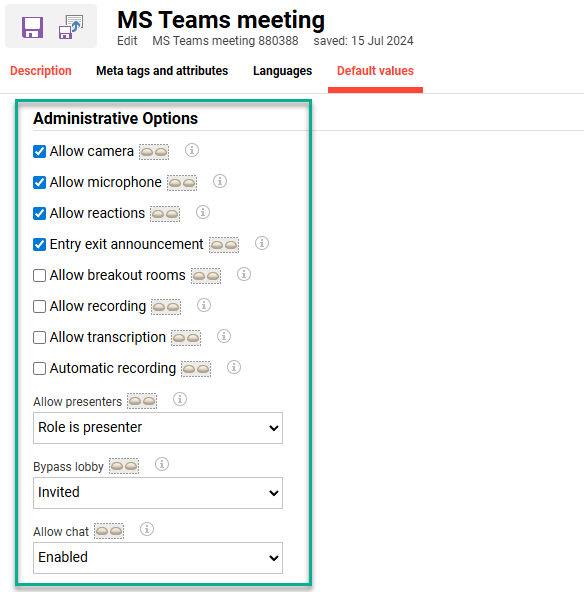
The following settings are now available as checkbox meta tags:
-
Allow camera
-
Allow microphone
-
Allow reactions
-
Entry exit announcement
-
Allow breakout rooms
-
Allow recording
-
Allow transcription
-
Automatic recording
-
Allow presenters
-
Bypass lobby
-
Allow chat
Benefits and Use Cases: Enables customers to predefine meeting settings through consistent configuration logic instead of having to start a meeting first. Multiple MS Teams media types can be defined for different use cases, ensuring flexibility and ease of use.
Audience: Administrators
Setup & Access: The meta tags are added to MS Teams media types and existing MS Teams meetings media by default. No other impact expected as the default values match the previously hardcoded values (as below). Need to configure the values of administrative options via meta tags. The enhancement works only if the Send MS-Teams event meta tag (ID 11882) is ticked (Enabled).
The following default values for the new meta tags apply (similar to hardcoded values used before):
-
Allow camera (ID 11883) = true
-
Allow microphone (ID 11885) = true
-
Allow reactions (ID 11884) = true
-
Entry exit announcement (ID 11887) = true
-
Allow breakout rooms (ID 11893) = true
-
Allow recording (ID 11892) = true
-
Allow transcription (ID 11891) = true
-
Automatic recording (ID 11886) = false
-
Allow presenters (ID 11888) = Role is presenter
-
Bypass lobby (ID 11890) = Invited
-
Allow chat (ID 11889) = Enabled
Considerations & Limitations: Requires the MS Teams connector licence. The enhancement works only if the Send MS-Teams event meta tag is enabled.
On the client side the Azure Policy needs to allow for the values that are set via the meta tags. The Azure policy has a higher priority and can overwrite the values set for LMS created meetings. Moving forward the calendars.readwrite permission will be required for meeting creation. The Broadcast attribute is also no longer supported as it has become deprecated.
Testing: For customers with the MS Teams connector licence, go to the Media types function and edit the MS Teams media type. Check the new settings are adding to the Meta tags and attributes tab. Check the setting values in the Default values tab.
Risk rating: Medium
GoToWebinar Auth API Update
Overview: The Auth API for GoToWebinar has been updated to support the latest version. This update is a result of the announcement in the link below. Essentially the api.getgo.com will be deprecated and will be replaced with authentication.logmeininc.com. This also requires the update of the JAVA SDK to 3.0.0 version.
https://developer.goto.com/guides/Authentication/New_Token_Retrieval_Migration_Guide/
Benefits and Use Cases: The update ensures that the virtual classroom connectors for GoToMeeting and GoTo Webinar continue to function as normal with users directly authenticated.
Audience: GoToMeeting/GoToWebinar hosts and presenters
Setup & Access: No setup required as changes will be directly applied. The api.getgo.com/oauth/v2 API will be replaced with authentication.logmeininc.com/oauth API.
Considerations & Limitations: This updates is for customers using the licenced connector for GoToMeeting and GoToWebinar.
Testing: Requires the GoToMeeting/GoToWebinar connector
Risk rating: Low