
In addition to the featured highlights, there are many more innovations and improvements to discover in the product core. Core updates are listed by their category in the tables below:
Gamification Engine
Badges Panel Updated with React
Overview: The Badges panel has been updated to support the React framework and provide general improvements including:
-
Improved Accessibility
-
Removed the “card flip” interaction, due to screen-reader and keyboard navigation restrictions
-
Introduced a dedicated More info button that opens a popover.
-
-
More Predictable Interaction Patterns
Moving from a flip interaction (a non-standard pattern) to a popover with an explicit trigger aligns with common UI conventions. -
Enhanced Consistency & Professional Visual Design
The cards now appear more uniform, aligned with our new design pattern.

Benefits and Use Cases: In addition to the standard security and design benefits of React; the enhancements deliver the following benefits:
-
Enables customers that use Badges to display the panel on new dashboards
-
Improved accessibility by making additional information discoverable, better supporting screen-readers and keyboard navigation
-
Users now understand exactly how to access more information
-
Consistent behaviour creates a more polished and readable visual experience
Audience: Learners
Setup & Access: Not required, the update is automatically applied to the panel. To view the updated design though does require the panel to be added to a dashboard page where the Opt-in for the new dashboard & panel design checkbox is ticked.
Considerations & Limitations: Requires the Gamification licence and Kubernetes architecture. The updated design will only be displayed when:
-
The dashboard has the Opt-in for the new dashboard & panel design checkbox ticked.
-
All assigned panels have the New design support column as Yes.
Testing: Testing first requires that the Gamification module is active and configured. Then, in the Dashboard pages function edit an internal dashboard and open the Contents tab. Add the Badges panel and the New design support column will now show as Yes. Viewing the new REACT design will require all assigned panels to have the New design support column as Yes and in the Description tab the Opt-in for the new dashboard & panel design checkbox must be ticked. Once done access the updated internal dashboard via the learner view.
Risk rating: Low
Resource and Capacity Management
Resource Database Refactoring
Overview: An update has been made in the Resource Management module to improve database handling for cancelled resource bookings. Cancelled bookings of course tutors/trainers that are linked to people resources will be deleted from the r_booking_entry database table.
Benefits and Use Cases: This addresses occasional cases where resource bookings for tutors are removed from a course, but the corresponding rows in the r_booking_entry database table would remain without an appropriate status. The outcome of the update enables more accurate reporting possibilities.
Audience: Report administrators
Setup & Access: Not required
Considerations & Limitations: Relates to the Resource Management add-on module
Testing: Testing would require custom report queries that return booking data
Risk rating: Low
Skill & Competency Management
Confirmation by Competency Evaluation
Overview: A new confirmation mode allows users to manage Job profile skill completion through a structured, transparent process for evaluating skill-level competency statements. It includes a workflow for creating competency statements, conducting self-assessments by both learners and supervisors, consensus-building, and a mutual approval process for the final assignment of skill levels. The new Confirmation mode setting value Learner and Supervisor will trigger the full competency grid, including the learner column, supervisor column, agreement column, and sign-off button.

Benefits and Use Cases:
-
A clear and transparent assessment guarantees a fair and objective development process
-
Confirmation by both the learner and the supervisor ensures agreement on the skill level.
-
Assessment versioning and detailed reports support compliance and audit requirements.
Audience: Skill administrators
Setup & Access: The new workflow is enabled per skill in the Confirmation mode field by selecting the new Confirmation by Competency Evaluation option. The entry of competency statements is performed within the skill scales to be evaluated.
Considerations & Limitations: Requires the Skill & Competency Management licence and Kubernetes architecture. This update will be available in patch 14.27.1 .
Further limitations are listed below:
-
The new Confirmation mode cannot be used for Skills without Job profile assignment.
-
There is no centralised repository for competency statements.
-
Automatic reminders or deadlines for completing self-assessments are not supported.
-
Learning analytics are not supported.
-
Admin functionalities through the Staff Pool are not accessible.
-
No updates to the Staff Pool, like changes to a user’s Competency History.
-
Skill levels exceeding the target level cannot be assessed.
Testing: Requires patch 14.27.1 and an active Skill & Competency Management licence. Testing requires creating a skill with the Confirmation mode setting value as Confirmation by Competency Evaluation. Competency statements can be created in the Skill scale. The Skill must be assigned to a Job profile to trigger the new matrix workflow.
Risk rating: Low
All Staff Skill Display Update
Overview: The backend All staff function Competencies view has a new Emphasis column. This column essentially displays whether skills within assigned Job profiles are Mandatory or Optional.
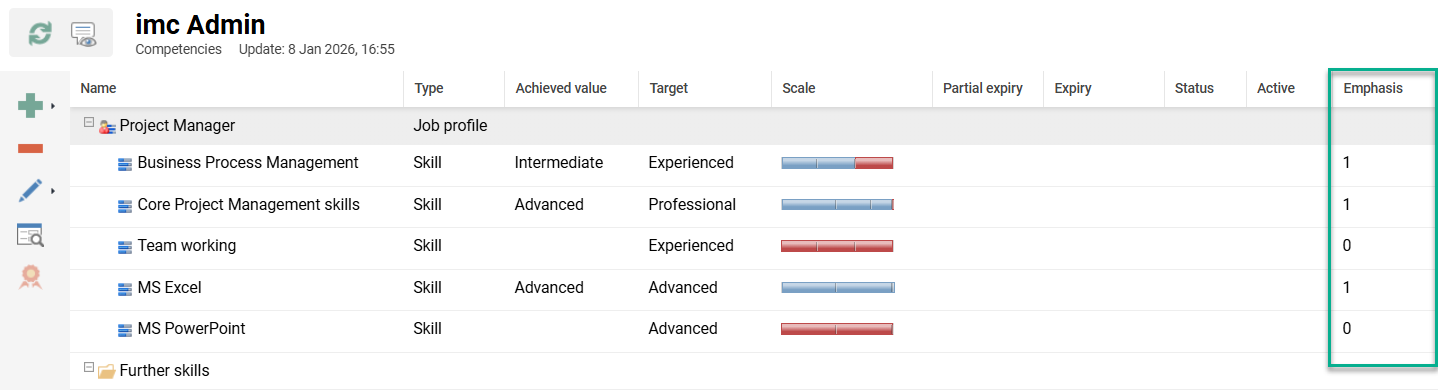
Benefits and Use Cases: The update provides the administrators with the same information that is available to the Learners and Managers. This will enable administrators to better gauge the actual progress a user has towards mandatory skill fulfilment.
Audience: Administrators and HR users
Setup & Access: The column is automatically applied to the All staff function Competencies view of selected users.
Considerations & Limitations: This view requires the Skill & Competency Management licence. Required Skills in Job profiles must have an Emphasis column value greater than 0. However, an optional Skill can also have an Emphasis column value manually set greater than 0.
Testing: If the Skills & Competency Management licence is enabled, as an Administrator, open the All staff function. Highlight a user, click the Competencies icon and select Competencies. In the new tab there will be a new Emphasis column. Providing the user has a Job profile assigned, the Emphasis column will be populated with a value for each skill.
Risk rating: Low
Skills View React Re-implementation
Overview: A large React coding re-implementation was completed for the skill details page. The update improves the Description tab, Assessment tab and History tab. Notable changes include:
-
A more informative display of achievements in the History tab
-
New coloured progress bar for level-based and accumulative skills
-
Editable comment section for learner when the skill Assessment tab is opened
-
Editable comment section for supervisor when the skill Assessment tab is opened
-
Quick navigation between skills

Benefits and Use Cases: The re-implementation from Angular to React coding provides a smoother user experience and improved security. The new skill Assessment tab functionality provides additionally possibilities.
Audience: Learners, Supervisors and Administrators
Setup & Access: The update will be applied automatically to systems using Kubernetes architecture.
Considerations & Limitations: Requires the Skill & Competency Management licence. There is no configuration option to retain the old look.
Testing: Learners can access this view via the My competencies function by clicking on a skill. Managers can access the equivalent view via the My staff function by viewing a user’s Competency profile and clicking on a skill.
Risk rating: Medium