
Identification Code (userdefined ID)
-
The LMS provides the opportunity to use an identification code alongside the object ID and can be created automatically.
-
The Identification Code can be defined at type or template level to uniquely identify a course or learning path generated from it. The Identification Code pattern can be defined using a system-wide configuration in the Configuration Manager.
Benefits
Easily recognize the course, course templates and learning path codes to provide a quicker overview of prerequisites, learning logic and structure of courses/templates and learning paths.
Configuration
To use the Identification Code it has to be first activated in the configuration manager.
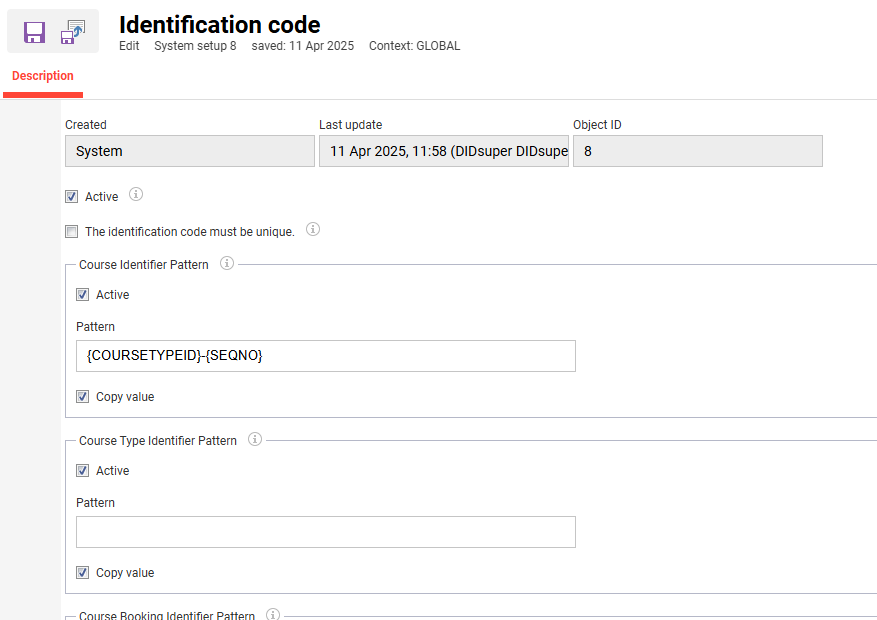
To have the Code displayed in the system check the first “Active” box.
To ensure that you always have unique IDs make sure to check the box “The identification code must be unique”. This way you will see an error message making it unable to save a course/learning path (template) with an ID that is not unique.
For a pattern to be used you have to check the respective “Active” box. Otherwise the pattern will not be applied as if you have not entered a pattern in the first place. By activating the pattern the user will get automatically generated codes. These pattern generated codes can not be further changed by the user.
Possible patterns - note that for a unique pattern a combination with a number may be needed
-
General: PROVIDER, LANG, CLIXID, EXTID, SEQNO, YYYY, MM, DD
-
courseBookingIdentifierPattern: PORTFOLIOID, USERDEFID, USERID, PARTLOGIN, PARTCLIXID
-
courseIdentifierPattern: COURSETYPEID, TYPEID, EXTTYPEID
-
courseTypeIdentifierPattern: TYPEID, EXTTYPEID, TYPESEQNO
-
locationIdentifierPattern: INTID, EXTID, CLIXID
-
programIdentifierPattern: PROGRAMSEQNO

Additional configuration that can influence the Identification Code.
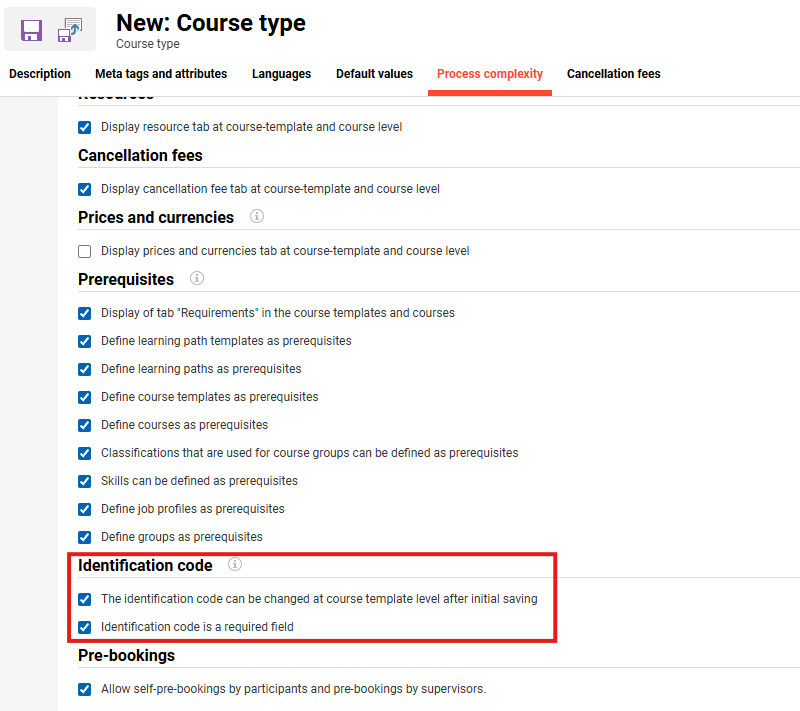
Places the Identification Code can be displayed
-
in Courses overview
-
in Courses Template overview
-
in Learning Path overview
-
in learning paths syllabus
-
in learning logic, e.g. completion conditions or access restrictions
-
Learning Path > Syllabus > Edit > Learning Logic > Define Logic > Completion condition
-
Learning Path > Syllabus > Edit > Learning Logic > Define Logic > Access Restriction
-
Learning Path > Syllabus > Edit > Learning Logic > Define Logic > Completion condition > Add > Components
-
-
and in learning paths, course templates, and courses for prerequisites
-
Learning Path > Prerequisites
-
Learning Path > Prerequisites > Add > Courses
-
Learning Path > Prerequisites > Add > Courses Templates
-
Course Templates > Prerequisites
-
Courses > Prerequisites
-
Deployment considerations
-
Some customers may use a customer specific wording for this ID
-
the ID may be influenced by the search.xml file customers use to customize their search