
The "Multiple Choice: x of n" test question type selects one or more out of multiple possible answers.
How It Is Built
The "Multiple Choice: x of n" type is configured through a tabbed structure covering the question's description, its available languages, the question content itself, the list of possible answers, and their arrangement.
Description
Holds the question's basic metadata.
|
Setting |
Description |
|---|---|
|
Name |
The administrative name will be used during the management of the question and when selecting questions during the creation of a test or feedback. It is based on the name shown to the learner when opening the test/feedback. |
|
Description |
The administrative description will be used during the management of the question and when selecting questions during the creation of a test or feedback. It is based on the name shown to the learners when opening the test/feedback. |
|
Keywords |
Search terms associated with the question, used to find it in the question pool. |
|
Test Mode |
The test mode describes the purpose of a test or test question. When adding questions to a test, a targeted search can be carried out with a specific learning test mode. The test mode saved in each test file includes a reference points indicating which questions should be selected. |
|
Average Processing Time (Seconds) |
The completion for test questions are added together and equate to the total completion times for the test containing these test questions. If “No time limit” is selected here, no time will be planned in for the question when adding up. This option should only be selected if, in principle, no completion time controls will be used in tests. When the test is configured to use the timer per test, this value will be used as a countdown on the question itself.
|
|
Level of Educational Objectives |
The level of educational objectives describes the reason why a question has been included in the test. When adding questions to a test, a targeted search can be carried out with a specific level of educational objectives. The level of educational objectives saved in each test file includes a reference points indicating which questions should be selected. |
|
Active |
If disabled, the question which was in its previous version added to a test or feedback, will be removed as part of the automatic update process, if configured to run. |
Languages
Manages the languages the question is available in. Each language can be flagged as "Administrative", "Basis", or "Default", and its "Language Translation Status" is tracked (for example "Translated").
Question
Holds the content connected with the question itself, entered per language, together with the grading configuration.
|
Setting |
Description |
|---|---|
|
Overall Points for the Question |
A single point value awarded for the whole question, used when grading is not split per answer. |
|
Points for Each Possible Answer |
Awards points individually per possible answer instead of one overall value. |
|
Allocate 0 Points if All Answers Are Marked |
Explicitly awards zero points when every possible answer is selected, guarding against selecting everything to game the question. |
|
Award 0 Points if No Answer Was Checked |
Explicitly awards zero points when nothing is selected, rather than leaving the outcome undefined. |
|
Name |
The displayed name will be managed in several languages and displayed to the learner when they open the question. It is based on the name used for management. |
|
Attachment to Questions |
An optional file uploaded alongside the question. |
|
Question |
The question text as it is presented to the learner. |
|
Instructions for Online Tests |
The text provided here explains to the learner how to process the question if the test is directly accessed in the system, e.g. “Click the box next to the correct answer”. |
|
Instructions for Offline Tests |
The text provided here explains to the learner how to process the question if the test is completed in a printed form, e.g. “Mark the correct answer with an X”. |
|
Response When Answered Correctly |
The text entered here will be displayed to learners after assessing the question if it has been answered correctly. The display of the response depends on the test player’s settings. |
|
Response When Answered Incorrectly |
The text entered here will be displayed to learners after assessing the question if it has been answered incorrectly. The display of the response depends on the test player’s settings. |
Possible Answers
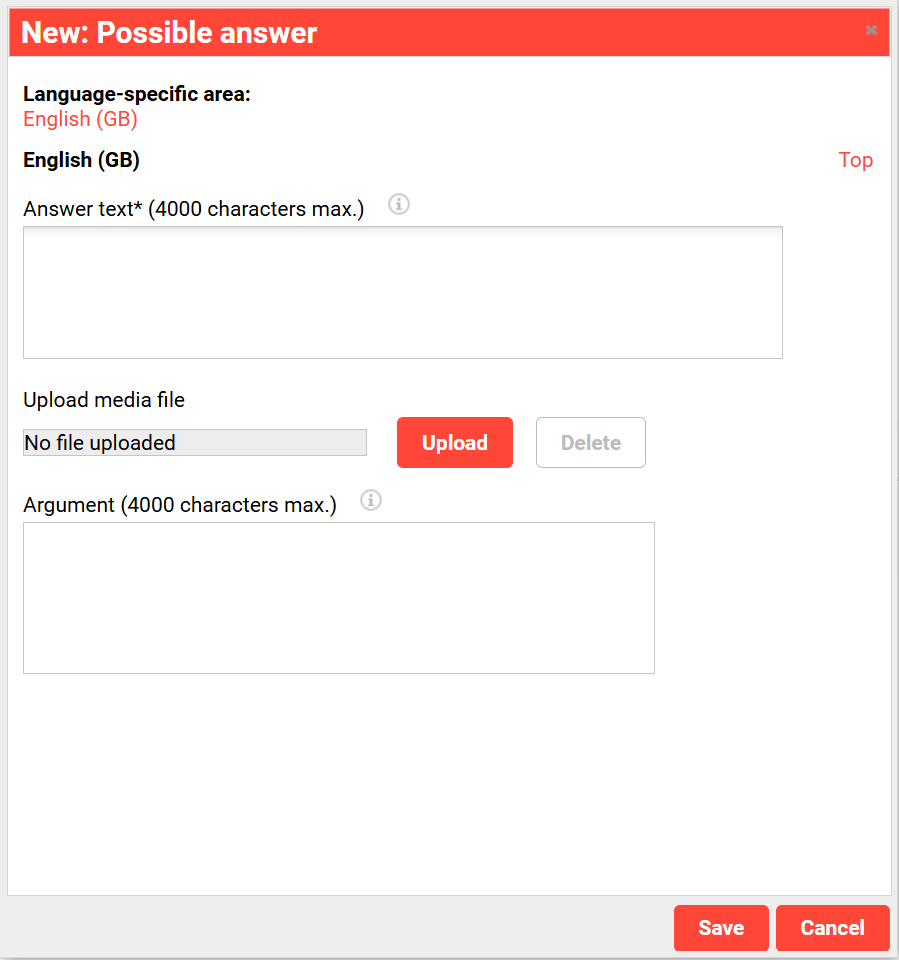
Holds the list of possible answers.
|
Setting |
Description |
|---|---|
|
Answer Text |
The text to be displayed as an answer option for the question is displayed here
|
|
Upload media file |
An optional image uploaded for each possible answer. |
|
Argument |
The text entered here provides more detailed explanations about the sample solution. |
Classifications
Applies classification categories to the question, supporting its selection and management within the wider test framework.
See Classifications
Arrangement
Controls how the question and its answers are laid out.
|
Setting |
Description |
|---|---|
|
Arrangement of Possible Answers |
Presents the answers as selectable checkboxes, in a horizontal or vertical layout, or, for a large number of options, as a selection list (media display is not possible in list mode). |
|
Relating Content to Question |
Positions the answer area to the left of, right of, above, or below the question text. |
|
Placement of Media Element Related to Answer |
Positions an answer's media above, to the left of, or below that answer. |
Creating a Multiple Selection Question
Any number of possible answers can be created. An image can be uploaded for each possible answer. For a large number of options, the answers can be presented as a selection list instead of checkboxes.
Scoring
Points can be awarded either as a single overall value for the question or individually for each possible answer. Selecting all answers can optionally be configured to award zero points, as can selecting none.
Example
"Which of the following mountains are located in the Himalayas?"