-
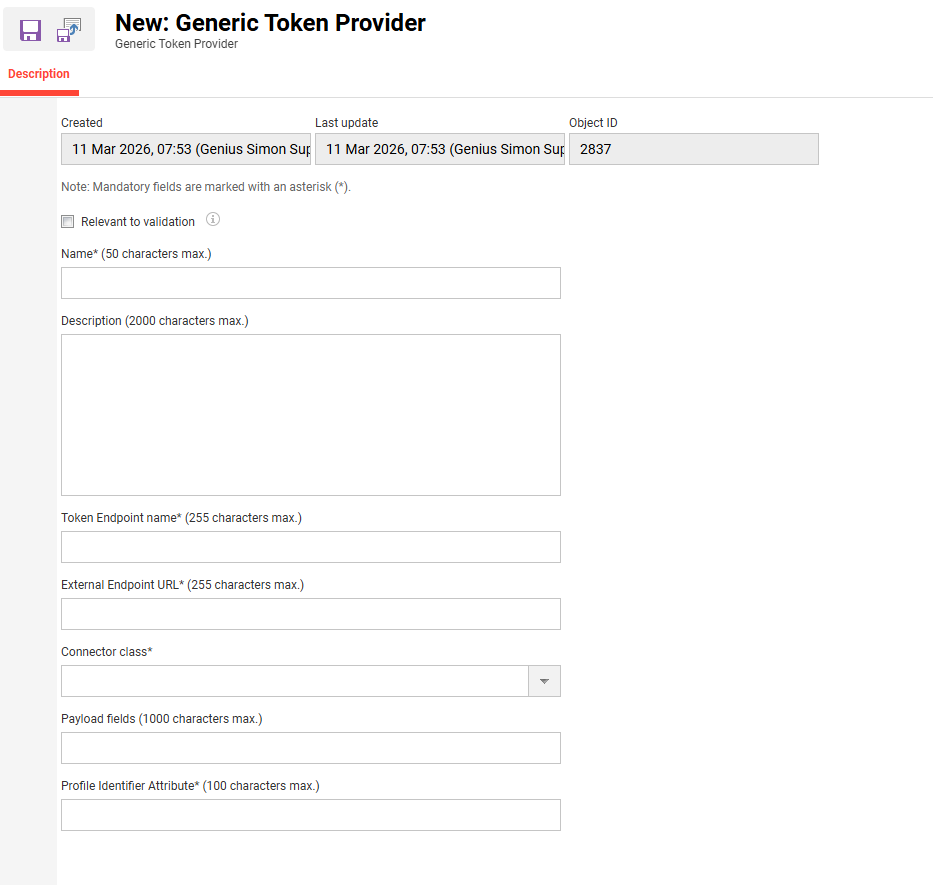
The Generic Token Provider is an external service provider type that retrieves access tokens from an external system and makes them available for protected media calls.
-
On the Description tab, the following configuration fields are displayed:
Name* (50 characters max.)
-
What it is: Internal name of this concrete token provider configuration.
-
Recommendation:
A name that identifies both the target platform and the environment (Prod, Test, Region) should be used.
Description (2000 characters max.)
-
What it is: Optional free‑text description for admins.
-
What to put here:
-
Purpose of the provider (which media types / integrations use it).
-
Links to the external system’s documentation.
-
Any constraints (e.g. token lifetime, rate limits).
-
Token Endpoint name* (255 characters max.)
-
What it is: Logical or technical name of the token endpoint this provider talks to.
This value is stored in thetoken_endpoint_namefield of thegeneric_token_providertable and allows different token services to be distinguished. -
Typical usage:
-
A service ID used by the infrastructure team.
-
Or a descriptive name combining system and endpoint.
-
-
Important:
This field is mandatory. The provider cannot be saved without it.
External Endpoint URL* (255 characters max.)
-
What it is: The actual URL that the LMS calls to retrieve the token from the external system.
-
Examples:
-
https://idp.customer.com/api/token/media
-
-
Guidelines:
-
HTTPS URLs should be used only.
-
The URL of the endpoint that returns the token in the format expected by the connector should be used.
-
If different URLs are used per environment (DEV/QA/PROD), one Generic Token Provider per environment should be created.
-
-
Important:
This field is mandatory. If it is empty, saving will be blocked.
Connector class* (dropdown)
-
What it is: The technical connector implementation that knows how to call the external endpoint and extract the token from the response.
-
Where it comes from:
Connector classes are implemented and deployed by imc / the technical team. One of the available options can be selected. -
How to choose:
-
For any provider, the connector documented for that integration should be selected.
-
-
Important:
This field is mandatory. If no connector is selected, token retrieval cannot work.
Payload fields (1000 characters max.)
-
What it is: Optional list of payload fields that the connector will send to the external endpoint (for example, as query parameters or JSON fields), depending on the connector’s design.
-
Typical content:
-
Comma‑separated field names, e.g.
userId,courseId,sessionId -
A key=value list, if the connector expects that, e.g.
userId={USER_ID};mediaId={MEDIA_ID}
-
-
How to fill this in:
-
The external token service documentation should be checked.
-
The fields that must be sent when requesting a token (such as user identifier, tenant, media identifier) should be identified.
-
The fields should be entered in the format specified for the connector (project documentation should state whether it is CSV, key=value pairs, a JSON template, etc.).
-
-
Note:
If the connector does not need any additional payload fields (for example, it only uses client credentials), this field can be left empty.
Profile Identifier Attribute* (100 characters max.)
-
What it is: The LMS user profile attribute that will be used as “user identifier” when requesting the token.
The connector will typically read this attribute from the current learner and insert it into the payload or request. -
Common examples:
-
userid/user_id -
personnelNumber -
Any other profile attribute that the integration decided to use as primary identifier.
-
-
How to choose:
-
The integration / IdP team should be consulted regarding which LMS attribute the token service expects.
-
That attribute name should be entered exactly as defined in the system.
-
-
Important:
This field is also marked as mandatory in the UI. If required for the connector, leaving it empty will lead to validation errors or runtime failures.