
The "Single Response" feedback form question type selects one out of multiple possible answers.
How It Is Built
The "Single Response" type is configured through the same general tab structure used for feedback form questions, with the "Possible Answers" tab holding the list of options.
Description
Holds the question's basic metadata.
|
Setting |
Description |
|---|---|
|
Individual feedback for resource category |
If the question is a component of the feedback which is used in a course, the question will be set for all resources of the category indicated here. In this way, for instance, with a single feedback question several tutors in the same resource category can be assessed by the course participants each with the same question. |
|
Name |
The administrative name will be used during the management of the question and when selecting questions during the creation of a test or feedback. It is based on the name shown to the learner when opening the test/feedback. |
|
Description |
The administrative description will be used during the management of the question and when selecting questions during the creation of a test or feedback. It is based on the name shown to the learners when opening the test/feedback. |
|
Keywords |
Search terms associated with the question, used to find it in the question pool. |
|
Active |
If disabled, the question which was in its previous version added to a test or feedback, will be removed as part of the automatic update process, if configured to run. |
Languages
Manages the languages the question is available in. Each language can be flagged as "Administrative", "Basis", or "Default", and its "Language Translation Status" is tracked (for example "Translated").
Question
Holds the content connected with the question itself, entered per language.
|
Setting |
Description |
|---|---|
|
Name |
The displayed name will be managed in several languages and displayed to the learner when they open the question. It is based on the name used for management. |
|
Attachment to Questions |
An optional file uploaded alongside the question. |
|
Question |
It is possible to define placeholders reffering to a course meta tag Id, attribute or person attribute, which allows that at the time when the user loads the feedback form question, the placeholder is replaced with the content of the course meta tag, attribute or person attribute. The format of the placeholder is metatag_Id, order_Attributename or person_attributename. For example metatag_10014 or order_PERSONAL_LEARNING_GOALS. Only text field and text are meta tag and attribute types are supported as placeholders. |
|
Instructions for Online Feedback |
The text provided here explains to the learner how to process the question if the feedback form is directly accessed in the system, e.g. “Click the box next to your assessment”. |
|
Instructions for Offline Feedback |
The text provided here explains to the learner how to process the question if the feedback form is completed in a printed form, e.g. “Mark the statement which most closely reflects you opinion with an X”. |
Possible Answers
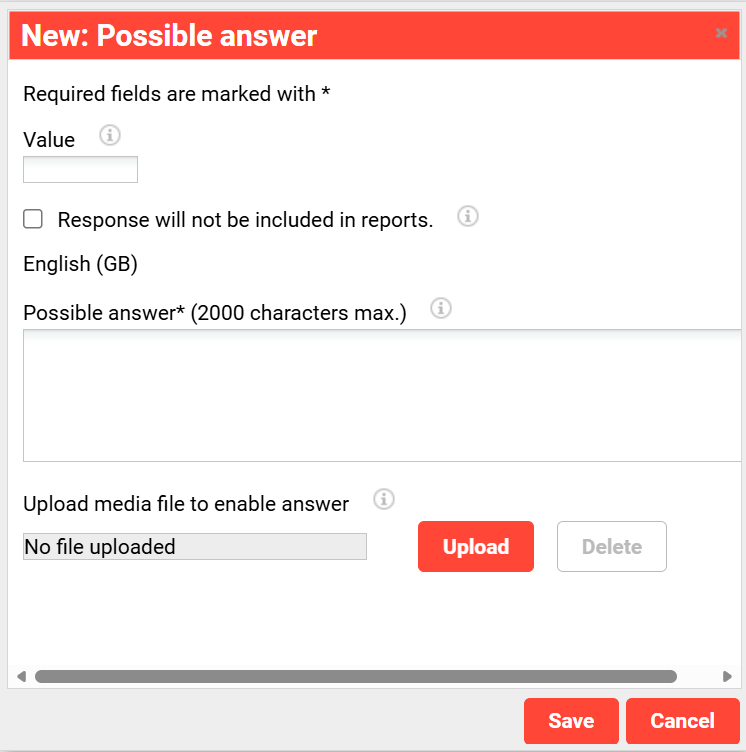
Holds the list of possible answers, from which one is selected.
|
Setting |
Description |
|---|---|
|
Value |
The value entered here is used to assess the question statistically.
|
|
Response will not be included in reports. |
This setting can be used to ignore the answer when carrying out statistical assessments. The field “value” will be automatically set to zero and cannot be edited in the future. |
|
Upload media file to enable answer |
The file selected here is displayed along with the answer option. The position can be determined in the “Display” register. |
Classifications
Applies classification categories to the question, supporting its selection and management within the wider feedback framework.
See Classifications
Arrangement
|
Setting |
Description |
|---|---|
|
Arrangement of Possible Answers |
Presents the possible answers as selectable option buttons (horizontal or vertical, default), as a list (recommended for a large number of possible answers, no media display possible), or as stars (no media display possible). |
|
Placement of Media Element Related to Question |
Positions the media element to the left of, right of, above, or below the question area. |
|
Placement of Media Element Related to Possible Answer |
Positions the media element above, to the left of, or below the possible answer; a comment field can optionally be shown in addition. |
Creating a Single Response Question
Any number of possible answers can be created, from which one is selected. An image (max. 110 × 70px) can be uploaded for each possible answer. For a large number of possible answers, the list display is recommended; alternatively, the answers can be displayed as stars.
Weighting and Reporting
A value can be entered for each possible answer to weight it for the eventual evaluation. Alternatively, a possible answer can be excluded from reporting via the "Excluded from Reports" setting.
Example
"How do you rate the available course contents in general?" with the possible answers "Very good", "good", "average", "poor".