
The Rich Text in‑page panel offers a versatile rich-text editor designed for a variety of content-creation needs. It enables users to format text, apply colors, create tables with up to six columns, and add interactive elements such as buttons and video links. In addition, the panel supports seamless image uploading directly in the Page Editor, making it a central tool for building informative, visually engaging pages.
Configuration
The Rich Text In‑Page Panel is created directly on a page using the first icon in the list.

Panel Settings
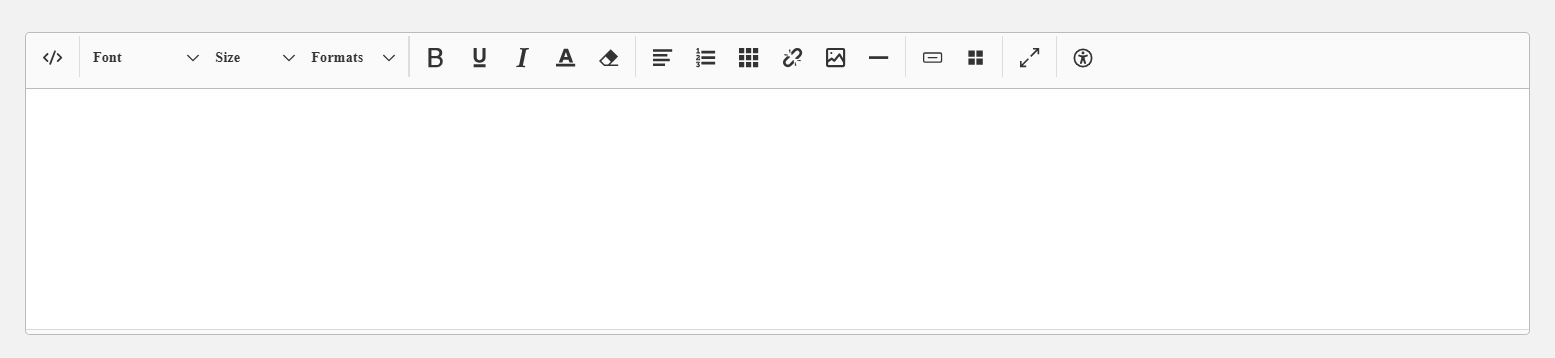
Main functionalities
The text editor provides a full set of formatting tools for styling content with fonts, sizes, formats, lists, tables, images, and more, including:
-
Font selection
-
Size selection
-
Color selection
-
Table creation (up to 6 columns)
-
Button creation
-
Video links (YouTube, Vimeo, etc.)
-
Image upload
-
Grid creation
Notes
-
Content is stored only on a specific page
-
Content cannot be reused or shared across pages
-
Client-defined font selection
-
For videos, only external URLs are supported, such as those from YouTube or Vimeo.
-
Images must be provided through a publicly accessible URL.
Related Functions