
Ticket confidentiality is a setting that restricts access to the content of a support ticket, including its description, comments, attachments, screenshots, log files, and other information provided within the ticket. When enabled, only the Scheer IMC Support team responsible for your region can view and process the ticket.
When submitting a ticket, please avoid including personal data or confidential information whenever possible.
In some cases, however, providing such information is necessary to investigate and resolve an issue (for example, when sharing import files, user information, or other data required for troubleshooting).
Important: The confidentiality setting applies only to the support ticket and the information provided within the ticket. It does not affect access to your learning management system (LMS) environment or data stored within the LMS.
How to Manage Confidentiality
At Ticket Submission – Set Ticket Confidentiality
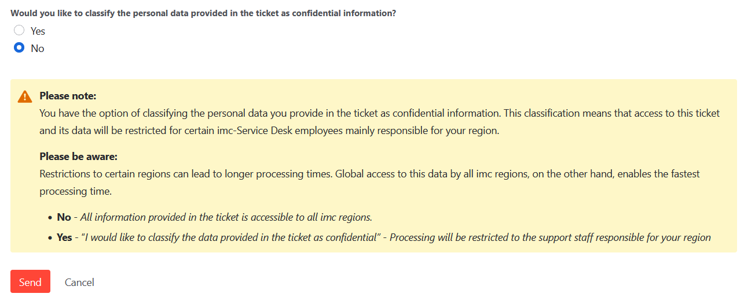
When creating a ticket within the Scheer IMC Service Desk portal, you have the option to flag the data contained in the ticket as confidential, while answering with “Yes” to the question: “Would you like to classify the personal data provided in the ticket as confidential information?”
You are provided with Yes and No tick boxes and a warning about the restrictions it poses:
Processing Impact and Reaction Time
-
Restricted access: Access to the ticket and its content is restricted to the Scheer IMC Support team responsible for your region.
-
Global Exclusion: The support agents responsible for other regions will have no visibility of the ticket content.
-
Longer processing times: Because access is limited to a smaller group of support specialists, confidential tickets may take longer to process than non-confidential tickets.
-
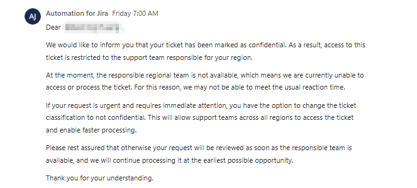
Automated alert: If a confidential ticket remains in Open status / unassigned for 30 minutes after submission, the system will automatically post a ticket comment to inform the creator of the ticket that the ticket is restricted to the regional team and that you have the option to remove confidentiality for a faster processing time.
Post Ticket Submission – Remove Confidentiality
If the fastest possible resolution is your priority and confidentiality is no longer required, you can remove the confidentiality setting at any time, directly from the ticket in the Scheer IMC Service Desk Portal.
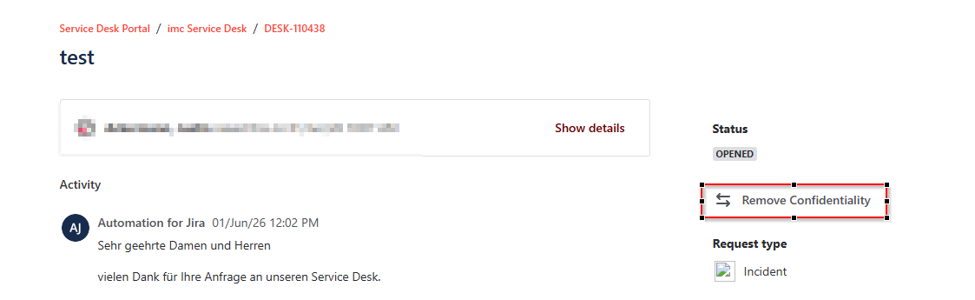
Once you remove confidentiality, you will receive an automated message that the change was performed and the ticket can be accessed by the wider support organization, which may help speed up investigation and resolution.