
SSL (Secure Sockets Layer)
SSL is a protocol that establishes a secure connection between a web server and a browser. It uses a small data file, known as an SSL certificate, which binds a cryptographic key to an organization's details.
This enables secure transactions, data transfers, and logins by encrypting the communication, ensuring that sensitive information remains confidential and protected from interception.
Note: SSL certificates have a limited validity period and must be updated regularly. Should the SSL certificate expire, the use of the LMS may be severely restricted for users.
How to Check SSL Expiration Date
You can check the SSL expiration date directly in the browser by clicking the icon before the website address - Connection is secure - Show certificate
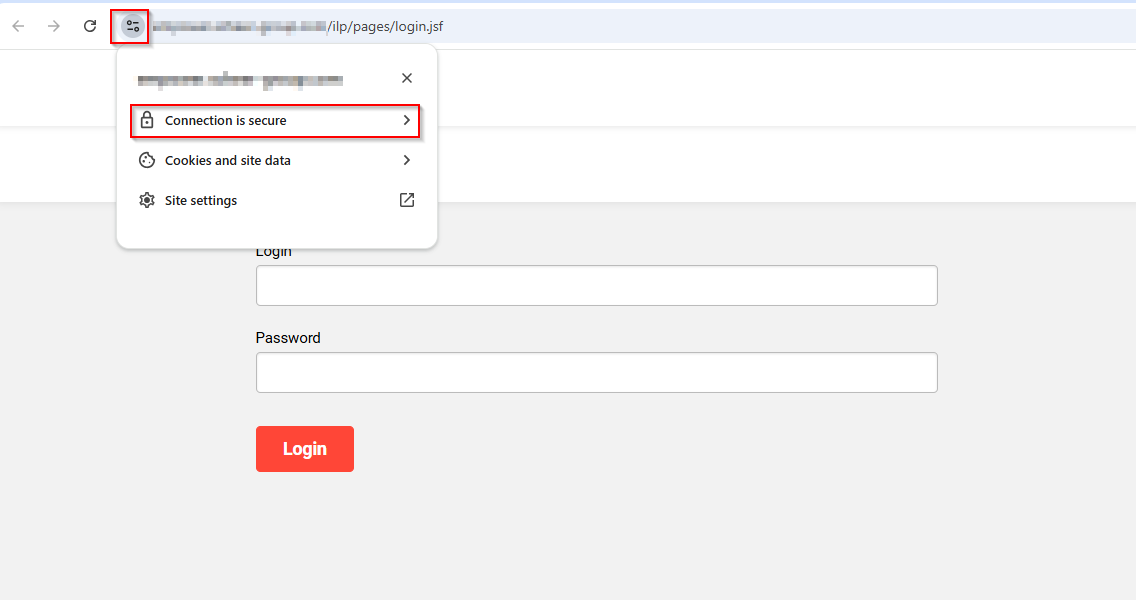
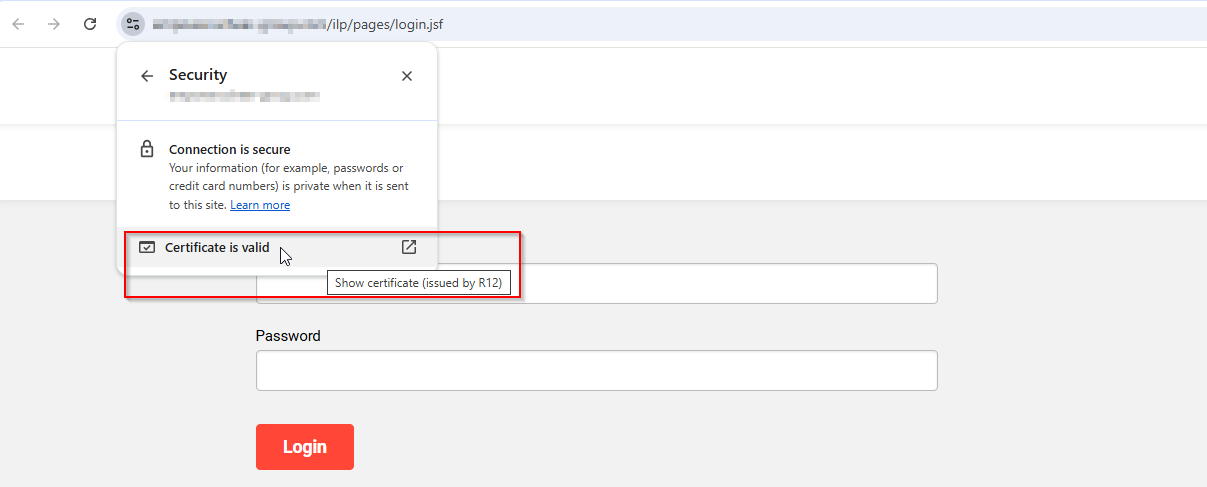
Here you can check the issue date and the expiration date of your certificate:
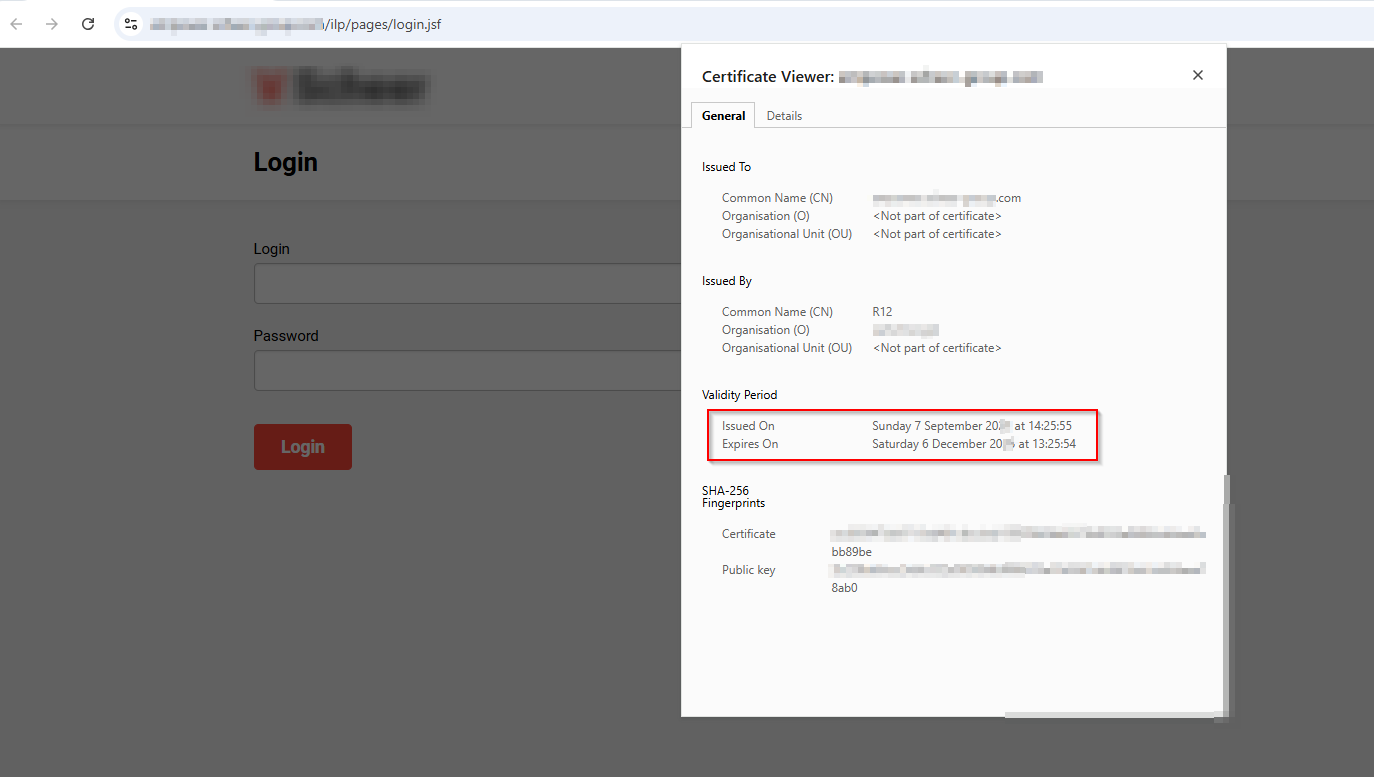
If your SSL-certificate has expired, the browser typically warns you that the website is not secure

SSL - Management & Responsibility
We would like to clarify the responsibilities concerning certificate management in our services.
There are two types of certificates in use:
-
Scheer IMC-owned certificates
-
Customer-owned certificates
For each type, the renewal responsibility lies with the respective owner. Certificate authorities typically notify the owner when a certificate is nearing expiration.
1. Scheer IMC-owned Certificates
At Scheer IMC, we run monitoring scripts that regularly check the validity status of IMC-owned certificates. These scripts help us identify, if a certificate is approaching its expiry and we start the renewal process.
Scheer IMC can only take full responsibility for the timely renewal and update of IMC-owned certificates.
Scheer IMC also offers the usage of IMC sub domains. If this is the case, then Scheer IMC is responsible for the SSL updates.
2. Customer-owned Certificates
For customer-owned certificates, we kindly ask customers to keep track of SSL expiration date and to proactively send renewed certificates to our support team at least one week in advance.
Without this, we cannot ensure a timely update on our systems and the browser will show a message that your website is not secure.
Scheer IMC does not issue SSL certificates, but updates them on servers, requiring you to generate and provide new certificates.
The SSL certificate is being issued for your domain(s). Your IT department or the person who manages the domain should have access to the tools that allow generating a new certificate.
Important note: In the on-premises operating model, the customer's IT is responsible for providing and updating a valid SSL certificate. Here, Scheer IMC cannot provide support for the creation of the certificate.
Ways of Providing Certificates to Scheer IMC
There are three common ways of providing certificates to Scheer IMC:
-
CSR file
Scheer IMC’s Hosting department can generate a CSR File on demand, that the customer can use for certificate generation. -
PFX (Personal Information Exchange) file
you can upload the certificate as one file in PFX-format (including a private key) or specifying a password -
Certificate files with private keys
you can provide a certificate with the private key (in .crt, .cer, .cert, .pem format)
It is important that the intermediate certificates (intermediates) are supplied.
Although the secure connection to the website can be established, the certificate is not classified as trustworthy in all web browsers
1. CSR (Certificate Signing Request) File
A CSR file is the file that’s being generated by Scheer IMC’s Hosting department. It provides all the information needed for a certificate generation on customer’s side.
For Scheer IMC to create a CSR, the following information is required:
-
Country (C) e.g., Germany
-
State or Province Name (ST) e.g., Bavaria
-
Locality (L) e.g., Munich
-
Organisational Unit: e.g., IT
-
Organisation Name (O) e.g., Customer Name
-
Common Name (CN) e.g., lms.customer.com
-
Root Length
-
Signature Algorithm
We are referring to the following fields that do not change if you simply updating the expired certificate:
|
Responsible |
Steps |
|---|---|
|
Customer |
|
|
Support |
|
|
Customer |
|
|
Support |
|
2. PFX (Personal Information Exchange) File
Providing a certificate in PFX format is another way of providing the updated certificate. This way of providing the certificate can be considered as faster because you do not need to contact Scheer IMC Support team that contacts Scheer IMC Hosting team in order to get a CSR file required for a certificate generation.
At the same time, it is less secure as you need to provide a password for PFX file.
You can simply provide a certificate in PFX format along with the password and our hosting team will update the certificate on the server.
Note: For security reasons it is important that the SSL certificate and the corresponding private
key are provided separately to the Scheer IMC.
It is recommended to use separate communication channels
-
SSL via Service Desk Request ticket
-
PW via mail at support@im-c.com with referral to the Desk Ticket
The PFX file should be generated by your IT administrator or appropriate person who manages domains/certificates in your organization.
Please make sure to specify for which System/domain the certificate is needed and provide appropriate links to them (STAGE, PROD, DEV, etc).
One certificate can be used for several systems, like for the domain/subdomains (wildcard certificate), or each system may require a separate certificate. It depends on initial setup of your systems.
3. Certificate Files with Private Keys (in .crt, .cer, .cert, .pem Format)
In this case the customer (customer’s IT department or appropriate person) provides certificate files with the private keys required for this certificate to the Scheer IMC Support team via Service Desk Request ticket.
After that the request is being forwarded to the hosting team, who´s responsible for the installation of updated certificates.
Typically, customers send several files in a zipped file. The structure/file names can be different, however at least one file should contain a certificate and another file should have a private key.
How to Request the Renewal of your SSL Certificate?
-
Please submit a Service Desk Ticket of type Request with the required SSL certificates (CSR File, PFX file with a password, or certificate files with private keys)
-
Scheer IMC Support Team will ask our Hosting department to update the certificates on the servers. This will be done directly and implies no downtime.
-
As soon as the certificates were updated, our Scheer IMC Support team will get back to you within the Service Desk Ticket and the Status of the ticket will be updated to “RESOLVED”.
For more information related to “Ways of Providing certificates to Scheer IMC” and “Typical issues with certificates” please check SSL Certificates.