
Overview
This article describes troubleshooting and resolving issues related to SCIM User Provisioning in the LMS. It is intended for support staff and administrators who need to diagnose and resolve SCIM-related issues.
What is SCIM User Provisioning?
In SCIM User Provisioning, the identity provider transmits user data via a REST interface to the LMS. Among other things, the following tasks are performed:
-
Create users
-
Update users
-
Deactivate users
-
Reactivate users
-
Transfer group or organisation assignments (if configured)
If a user is not created or updated correctly, the cause is usually due to incorrect attributes, wrong mappings, missing mandatory fields, authorisation issues, or an invalid SCIM request.
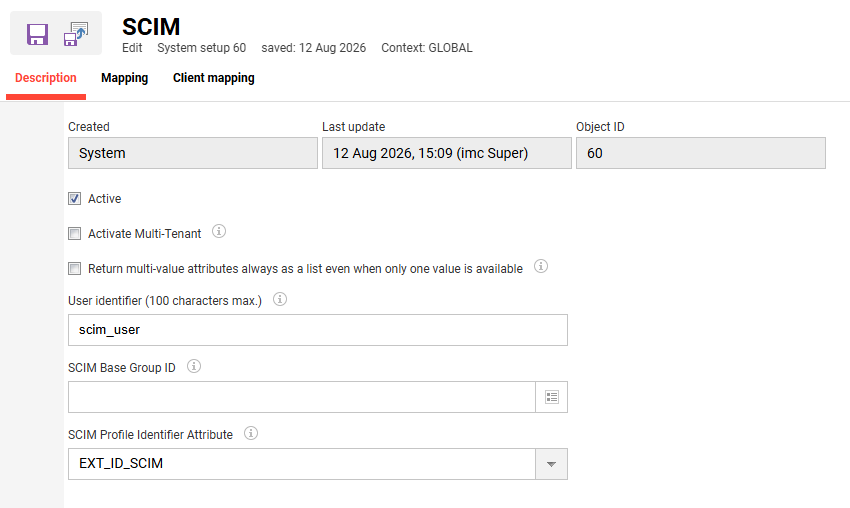
The configuration in the LMS is done in the Configuration function via the SCIM menu.
Swagger API Documentation
The available SCIM API calls can be viewed in the LMS's Swagger documentation:
The following SCIM endpoints, among others, are documented there:
Groups endpoints:
-
GET /lms/scim/Groups
-
POST /lms/scim/Groups
-
PUT /lms/scim/Groups
-
GET /lms/scim/Groups/{id}
-
PATCH /lms/scim/Groups/{id}
Users endpoints:
-
GET /lms/scim/Users
-
POST /lms/scim/Users
-
POST /lms/scim/Users/.search
-
GET /lms/scim/Users/{id}
-
PATCH /lms/scim/Users/{id}
-
PUT /lms/scim/Users/{id}
-
DELETE /lms/scim/Users/{id}
To verify the supported endpoints, request structures, and API parameters, refer to the Swagger documentation.
Important Attributes
The following attributes are central to SCIM communication and are common sources of errors.
EXT_ID_SCIM
The EXT_ID_SCIM is often used to establish a unique mapping between the identity provider and the LMS.
Example:
"EXT_ID_SCIM": "E00000238"
Important:
-
Should be unique
-
Should not change later on
-
Should not be empty
-
Should remain stable over the long term
userName
The userName is often used as a login name.
Example:
"userName": "E00000238"
Important:
-
Must be unique
-
Must not be empty
-
Must not contain unauthorised special characters
-
Must not conflict with existing users
emails.value
Email addresses are often used for notifications, logins, or user identification.
Example:
"emails": [
  {
    "value": "max.mustermann@example.com",
    "type": "work",
    "primary": true
  }
]
Important:
-
Must be valid
-
Must be unique if used as a login or unique field
-
Must not be empty if configured as a mandatory field
active
The Field active normally determines whether a user is active or inactive.
Example active:
"active": true
Example inactive:
"active": false
Common Errors
1. User is not created
Possible causes
-
Mandatory attributes are missing from the SCIM request
-
userNameorEXT_ID_SCIMis empty or not unique -
Email address is missing or invalid
-
Attribute mapping in the identity provider is incorrect
-
The user is not assigned to the provisioning app in the identity provider
-
SCIM endpoint or token is incorrect
-
A user with a different ID already exists in the LMS
Test
Search the log for the following terms:
SCIM
provisioning
User
EXT_ID_SCIM
userName
create
POST /Users
In addition, you should check the following:
PRS0126
LOGIN_REGISTRATION_LOGIN_FAILED_UNIQUENESS
duplicate
uniqueness
mandatory
required
validation
Typical Technical Cause
A common issue is that the login name already exists or is not unique. In that case, the user cannot be created.
Example:
LOGIN_REGISTRATION_LOGIN_FAILED_UNIQUENESS
Solution
-
Check whether
userNameis unique -
Check whether
EXT_ID_SCIMis set correctly -
Check whether the user already exists in the LMS
-
Check Attribute Mapping in the identity provider
-
Newly provisioning a single user on a trial basis
-
If necessary, resolve any existing duplicates or incorrect user assignments
2. User is not updated
Possible causes
-
EXT_ID_SCIMdoes not match the existing user. -
The identity provider sends a different user ID than the one used during the initial import.
-
The field used for unique identification was changed retrospectively.
-
The update request contains invalid or empty mandatory values.
-
The user is locked in the LMS or has a status that prevents updates.
-
This attribute is not intended for SCIM mapping in the LMS.
Test
Search the log for the following terms:
PUT /Users
PATCH /Users
EXT_ID_SCIM
userName
SCIM update
In particular, verify that the user is correctly identified using EXT_ID_SCIM, userName, or another configured unique ID.
Solution
-
Check which identifier is used for user mapping.
-
Make sure that
EXT_ID_SCIMhas not been changed retrospectively. -
Compare the mapping in the identity provider with the configuration of Scheer IMC.
-
Synchronize a single user again.
-
Check whether the respective attribute can be overwritten in the LMS.
3. The user is deactivated even though they are supposed to remain active
Possible Causes
-
The user has been deactivated in the identity provider.
-
The user has been removed from the provisioning group.
-
The scope of the provisioning app has been changed.
-
The identity provider sends
active = false. -
Group filters or assignments are configured wrong.
Test
Check the following in the SCIM payload:
{
  "active": false
}
Search the log for:
active
deactivate
disable
PATCH /Users
Solution
-
Check in the identity provider to see if the user is active.
-
Check whether the user is still assigned to the SCIM app.
-
Check the group and scope filters.
-
Check the provisioning logs in the identity provider.
-
Provision the user again after making the correction.
4. The user will not be deactivated
Possible Causes
-
The identity provider does not send a deactivation request.
-
Deactivation is not enabled in the SCIM configuration.
-
The user was deleted from the identity provider but not deactivated.
-
The identity provider handles deletion and deactivation differently.
-
The LMS does not interpret the request as a deactivation.
Test
Check to see if a request with the following content was sent:
{
  "active": false
}
Or whether a DELETE /Users request was used.
Search the log for:
DELETE /Users
active false
disable
deactivate
Solution
-
Check what action the identity provider takes when a user is removed.
-
Recommendation: Deactivate the user by setting
active = false. -
Check the provisioning configuration in the identity provider.
-
If necessary, adjust the mapping or the deactivation logic.
5. Errors due to missing mandatory fields
Possible Causes
-
userNameis missing. -
EXT_ID_SCIMis missing. -
Name, email, or other mandatory attributes are missing.
-
Mandatory fields are empty in the identity provider.
-
The attribute mapping refers to an empty field.
Example of an Invalid Payload
{
  "userName": "",
  "EXT_ID_SCIM": "E00000238",
  "name": {
    "familyName": "",
    "givenName": ""
  },
  "emails": [
    {
      "value": "",
      "type": "work",
      "primary": true
    }
  ]
}
Rating
This request is problematic because several important attributes are empty. The following are particularly critical:
-
userName -
emails.value -
name.familyName -
name.givenName
Depending on the IMC configuration, these fields may be mandatory.
Solution
-
Fill in the mandatory fields in the identity provider.
-
Check the mapping for first name, last name, login name, and email.
-
Make sure that no empty strings are transmitted.
-
Provision a test user with complete attributes.
Analysis and Diagnosis
Relevant Log Terms
If you're having SCIM issues, you should search for the following terms:
SCIM
Users
POST /Users
PUT /Users
PATCH /Users
DELETE /Users
EXT_ID_SCIM
userName
active
provisioning
PersonStoreProcessor
ProfileValidator
PRS0126
LOGIN_REGISTRATION_LOGIN_FAILED_UNIQUENESS
Typical Error Categories
|
Fault Pattern |
Possible Cause |
|---|---|
|
User will not be created |
A mandatory field is missing, or the login is not unique |
|
User is not being updated |
User cannot be found via |
|
User will be deactivated |
Identity Provider sends |
|
User will not be deactivated |
No valid deactivation request from the identity provider |
|
Login Error |
|
|
Empty user attributes |
Incorrect mapping in the identity provider |
|
HTTP 401 / 403 |
Incorrect token or authorisation |
|
HTTP 404 |
SCIM endpoint is incorrect |
|
HTTP 409 |
Conflict, usually a duplicate or a violation of uniqueness |
|
HTTP 500 |
Server-side error; further log analysis required |
Typical Solutions
Correcting Incorrect Mapping
If attributes are transmitted empty or incorrectly:
-
Check the mapping in the identity provider.
-
Assign mandatory attributes correctly.
-
Provision a test user again.
-
Check that the corrected payload is complete.
Remove Duplicates
If users are not created due to a uniqueness violation:
-
Search for the existing user with the same login.
-
Search for the existing user with the same email address.
-
Check whether the user already exists with another
EXT_ID_SCIM. -
Resolve the duplicate or correct the mapping.
Check Token or Endpoint
If you experience authentication issues:
-
Check the SCIM token.
-
Refresh the token.
-
Check the SCIM endpoint.
-
Check the permissions.
-
Perform a test connection in the identity provider.
Re-provisioning Users
After corrections:
-
Re-provision individual users in the identity provider.
-
Do not resynchronise all users straight away.
-
Check the result in the provisioning log.
-
Afterwards, check the IMC log against it.
Practical Examples
Example 1: Missing Mandatory Attributes
Request
{
  "schemas": [
    "urn:ietf:params:scim:schemas:core:2.0:User",
    "urn:ietf:params:scim:schemas:extension:enterprise:2.0:User"
  ],
  "id": "E00000238",
  "EXT_ID_SCIM": "E00000238",
  "userName": "E00000238",
  "name": {
    "familyName": "",
    "givenName": ""
  },
  "displayName": "",
  "emails": [
    {
      "value": "",
      "type": "work",
      "primary": true
    }
  ]
}
Rating
Although the request contains EXT_ID_SCIM and userName, but important user attributes are empty:
-
familyName -
givenName -
displayName -
emails.value
If these fields are marked as mandatory in the imc Learning Suite, the user cannot be created or updated correctly.
Solution
The identity provider must send complete values, for example:
{
  "EXT_ID_SCIM": "E00000238",
  "userName": "E00000238",
  "name": {
    "familyName": "Mustermann",
    "givenName": "Max"
  },
  "displayName": "Max Mustermann",
  "emails": [
    {
      "value": "max.mustermann@example.com",
      "type": "work",
      "primary": true
    }
  ],
  "active": true
}
Example 2: Unsupported Attribute
Request
{
  "schemas":
  ["urn:ietf:params:scim:schemas:core:2.0:User",
    "urn:ietf:params:scim:schemas:extension:enterprise:2.0:User"],
  "id": "EUSER0001",
  "externalId": "EUSER0001",
  "userName": "EUSER0001",
  "name": {
    "familyName": "Maxi",
    "givenName": "mum"
  },
  "displayName": "",
  "emails": [{
      "value": "",
      "type": "work",
      "primary": true
    }
  ],
  "addresses": [{
      "streetAddress": "",
      "locality": "",
      "region": "",
      "postalCode": "",
      "country": "",
      "type": "work",
      "primary": true
    }
  ],
  "ims": [{
      "value": "1",
      "type": "custom.sex"
    },
    {
      "value": "1",
      "type": "custom.auth_status"
    },
    {
      "value": "1030",
      "type": "custom.group_id"
    }
  ],
  "userType": "Employee",
  "jobCategory": "89",
  "title": "Dr.",
  "preferredLanguage": "",
  "timezone": "",
  "active": "1",
  "urn:ietf:params:scim:schemas:extension:enterprise:2.0:User": {
    "employeeNumber": "EUSER0001",
    "costCenter": "899",
    "organization": "IMC AG",
    "manager": {
      "value": ""
    }
  }
}
Rating
Error in the log:
02-06-2026 08:43:53.142 ERROR [http-nio-8080-exec-7] scim.SCIMUserResource [SCIMUserResource.java:248]: SCIM Error reading user Attribute jobCategory is not supported
de.imc.clix.control.exceptions.ClixException: Attribute jobCategory is not supported
Although the request contains jobCategory, however, this is not a supported standard SCIM attribute.
Solution
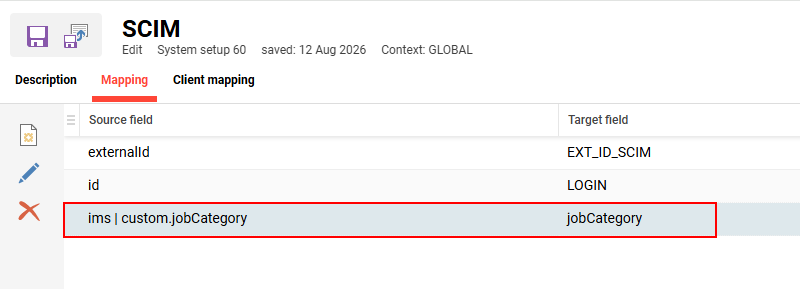
Define the attribute jobCategory in the request and in the mapping as a custom attribute.
{
  "schemas":
  ["urn:ietf:params:scim:schemas:core:2.0:User",
    "urn:ietf:params:scim:schemas:extension:enterprise:2.0:User"],
  "id": "EUSER0001",
  "externalId": "EUSER0001",
  "userName": "EUSER0001",
  "name": {
    "familyName": "Maxi",
    "givenName": "mum"
  },
  "displayName": "",
  "emails": [{
      "value": "",
      "type": "work",
      "primary": true
    }
  ],
  "addresses": [{
      "streetAddress": "",
      "locality": "",
      "region": "",
      "postalCode": "",
      "country": "",
      "type": "work",
      "primary": true
    }
  ],
  "ims": [{
      "value": "1",
      "type": "custom.sex"
    },
    {
      "value": "1",
      "type": "custom.auth_status"
    },
    {
      "value": "1030",
      "type": "custom.group_id"
    },
    {
      "value": "89",
      "type": "custom.jobCategory"
    }
  ],
  "userType": "Employee",
  "title": "Dr.",
  "preferredLanguage": "",
  "timezone": "",
  "active": "1",
  "urn:ietf:params:scim:schemas:extension:enterprise:2.0:User": {
    "employeeNumber": "EUSER0001",
    "costCenter": "899",
    "organization": "IMC AG",
    "manager": {
      "value": ""
    }
  }
Error Code Reference
The following table lists all relevant error codes and their meanings.
Relevant Error Codes and Their Meanings
|
ID |
Identifier |
Comment |
|
PRS0001 |
LOGIN_AUTHENTICATION_LOCKED_USER |
The user is marked as passive by the authentication mechanism |
|
PRS0002 |
LOGIN_AUTHENTICATION_MISSING_IDENTIFICATION |
Username and password are missing for authentication |
|
PRS0003 |
LOGIN_AUTHENTICATION_NO_MODULE |
No further module in the sequence; user not authenticated |
|
PRS0004 |
LOGIN_AUTHENTICATION_UNKNOWN_MODULEIDENTIFIER |
The identifier for the authentication module does not match any registered authentication module |
|
PRS0005 |
LOGIN_AUTHENTICATION_MODULECAST |
Casting exception when instantiating an authentication module; incorrect specification of classname |
|
PRS0006 |
LOGIN_FAILED_CONNECTION |
General connection error to authentication or profile data source |
|
PRS0010 |
LOGIN_REGISTRATION_MISSING_REQUIRED_PROFILE_ATTRIBUTES |
Not all mandatory profile details were provided during registration |
|
PRS0011 |
LOGIN_REGISTRATION_LICENSE_EXCEEDED |
Exceeding the permitted number of licenses |
|
PRS0033 |
LOGIN_REGISTRATION_LOGINNAME_UNKNOWN_TEMPLATEKEY |
In the template for LoginName, a key other than L, F or N is used |
|
PRS0038 |
LOGIN_AUTHENTICATION_NO_UNIQUE_IDENTIFICATION |
There are several users with the same login or the same login and password combination |
|
PRS0048 |
LOGIN_REGISTRATION_LOGINCOMPLEXITY_INSUFFICIENT_LENGTH |
The login is too short |
|
PRS0057 |
LOGIN_PASSWORD_COMPLEXITY_NOT_ALLOWED_SYMBOL |
The password contains invalid characters
|
|
PRS0063 |
LOGIN_REGISTRATION_LOGIN_MISSING_LOGIN |
No login name provided |
|
PRS0064 |
LOGIN_REGISTRATION_LOGIN_INVALID_CHAR |
Login name contains invalid characters when the template is missing
|
|
PRS0067 |
LOGIN_REGISTRATION_CSV_FILE_NOT_FOUND |
CSV file not found |
|
PRS0068 |
LOGIN_REGISTRATION_CSV_IO_EXCEPTION |
Error accessing CSV file |
|
PRS0069 |
LOGIN_REGISTRATION_CSV_INVALID_NUMBER_OF_RECORD_FIELDS |
The number of columns in a row does not match the header row |
|
PRS0070 |
LOGIN_REGISTRATION_CSV_NO_COLUMN_DEFINITION |
Values in the first row could not be identified via parameter mapping |
|
PRS0071 |
LOGIN_REGISTRATION_CSV_NO_IDENTIFIER |
Person identifier is missing from the column definition |
|
PRS0072 |
LOGIN_REGISTRATION_CSV_PERSON_NOT_FOUND |
The profile of the searched person was not found in the CSV file |
|
PRS0073 |
LOGIN_REGISTRATION_CSV_UNIQUE_KEY_VIOLATION |
The identifier of the searched person appears more than once in the CSV file |
|
PRS0074 |
LOGIN_REGISTRATION_CSV_MISSING_IDENTIFIER |
Identifier is missing from a CSV entry |
|
PRS0098 |
LOGIN_AUTHENTIFICATION_DENY_OF_SERVICE |
User blocked from logging in. Too many failed login attempts. |
|
PRS0099 |
LOGIN_AUTHENTICATION_NO_SELF-REGISTRATION |
Authenticated user cannot register himself due to configuration settings. |
|
PRS0100 |
LOGIN_REGISTRATION_NO_IMPORTSOURCE |
No ProfileDataSource during user import when isImportSource=true in config |
|
PRS0101 |
LOGIN_REGISTRATION_PROFILEDATASOURCE_MODULEIDENTIFIERID |
The ID for the profile data source does not match any registered profile data source |
|
PRS0102 |
LOGIN_REGISTRATION_RULES_CONFIG_FILETYPE |
Invalid file type for Rules configuration upload during user import |
|
PRS0104 |
LOGIN_REGISTRATION_CSV_CONFIG_FILETYPE |
Invalid file type for CSV configuration upload during user import |
|
PRS0105 |
LOGIN_REGISTRATION_CONTENT_FILETYPE |
Invalid file type for CSV upload during user import |
|
PRS0107 |
LOGIN_REGISTRATION_INVALID_CSV |
The uploaded file does not contain a valid CSV |
|
PRS0109 |
LOGIN_REGISTRATION_UNKNOWN_CLIXFIELD |
ClixField in AttributeMapping is not a valid person attribute |
|
PRS0116 |
LOGIN_REGISTRATION_EXCEEDED_ACTIVE_LICENSES |
No more licenses available |
|
PRS0117 |
LOGIN_AUTHENTICATION_UNKNOWN_MODULEID |
The ID for the authentication module does not match any registered authentication module |
|
PRS0118 |
LOGIN_AUTHENTICATION_INVALID_USERMODE |
AuthmodeId is identical to the ID of the user module |
|
PRS0119 |
LOGIN_REGISTRATION_PROFILEDATASOURCE_PROFILEIDENTIFIER |
The identifier for the profile data source does not match any registered profile data source |
|
PRS0124 |
LOGIN_REGISTRATION_CSV_DUPLICATE_COLUMN |
An identifier in a column definition appears multiple times in a CSV file |
|
PRS0127 |
LOGIN_REGISTRATION_MISSING_SOURCEFIELD |
The source field appearing in attribute mapping is not available in the import source |
|
PRS0128 |
LOGIN_REGISTRATION_INVALID_CLIENTID |
The ID of the master client does not appear in the list of assigned clients |
|
PRS0131 |
LOGIN_REGISTRATION_INVALID_PERSONIDENTIFIER |
One of the PersonIdentifiers specified in the config does not correspond to any field in the Person database |
|
PRS0132 |
LOGIN_REGISTRATION_IDENTIFICATION_FAILED_CLIX_UNIQUENESS |
User identification is not unique within CLIX based on the specified PersonIdentifier and search criteria |
|
PRS0134 |
LOGIN_REGISTRATION_EMPTY_LOGIN |
The registration form for a user to be saved is empty, and the associated login generator is disabled. |
|
PRS0137 |
LOGIN_CONFIGURATION_NO_PERSONIDENTIFIER |
There are no PersonIdentifiers in the profile data source for the person to be saved |
|
PRS0138 |
LOGIN_REGISTRATION_MISSING_PERSON_IDENTIFIER |
The person to be saved is missing a PersonIdentifier attribute that depends on profile data |
|
PRS0139 |
LOGIN_REGISTRATION_UPDATEONLY_RESTRICTION |
A new person cannot be created, as the configuration for this profile data source and this context only allows existing records to be updated |
|
PRS0140 |
LOGIN_REGISTRATION_INSERTONLY_RESTRICTION |
The existing person cannot be saved, as the configuration for this profile data source and this context only allows new persons to be created |
|
PRS0144 |
LOGIN_REGISTRATION_COULD_NOT_STORE_PERSON_WITHOUT_ID |
Internal program error: Cannot save a person without a person_id |
|
PRS0145 |
LOGIN_LDAP_LOGINNAME_FAILED_UNIQUENESS |
The login name to be authenticated is not unique in the LDAP system |
|
PRS0146 |
LOGIN_CONFIGURATION_INVALID_IMPORT_RESTRICTIONS |
The import restrictions are not clearly defined in the configuration file |
|
PRS0147 |
LOGIN_REGISTRATION_INVALID_EMAIL_ADDRESS |
The email address syntax is invalid |
|
PRS0148 |
LOGIN_REGISTRATION_UNIQUEIDGENERATION_FAILED |
The generation of a UniqueId for individuals has failed |
|
PRS0149 |
LOGIN_READ_DEFAULT_VALUES_FAILED |
Error initializing default values for individuals |
|
PRS0150 |
LOGIN_READ_REQUIRED_FIELDS_FAILED |
Error initializing required attributes for individuals |
|
PRS0151 |
LOGIN_REGISTRATION_NO_UNIQUE_IDENTIFIER |
The identifier attributes of the current data source are not unique |
|
PRS0152 |
LOGIN_AUTHENTICATION_CUSTOM_AUTHIMPL_FAILURE |
Unexpected error within a custom AuthenticationModule implementation |
|
PRS0153 |
LOGIN_REGISTRATION_LDAP_MISSING_IDENTIFIER |
An attribute required for LDAP identification is not included in the attribute mapping |
|
PRS0154 |
LOGIN_REGISTRATION_LDAP_EMPTY_IDENTIFIER |
An attribute required for the LDAP profile data source in the mapping is empty |
|
PRS0155 |
LOGIN_REGISTRATION_RESOURCE_SYNCHRONIZATION_FAILURE |
An error occurred while attempting to synchronize the mapped resource person |
|
PRS0156 |
LOGIN_REGISTRATION_USERID_FAILED_UNIQUENESS |
The user ID of the person to be saved is not unique |
|
PRS0159 |
LOGIN_MULTIPLE_RULES_VALID |
Multiple rules apply |
|
PRS0181 |
LOGIN_PERSON_MAP_ATTRIBUTE_VALUE |
Error assigning the value of an external attribute to a CLIX attribute |
|
PRS0187 |
LOGIN_NAME_MAPPING_IMPLCAST |
The implementation for LoginNameMapping cannot be instantiated |
|
PRS0188 |
LOGIN_NAME_MAPPING_EMPTY_NAME |
The implementation for LoginNameMapping returns NULL or an empty string |
|
PRS0189 |
LOGIN_NAME_MAPPING_GENERAL_EXCEPTION |
General error regarding use in the LoginNameMapping implementation |
|
PRS0190 |
LOGIN_NAME_MAPPING_TECHNICAL_PROBLEM |
Technical error from an external system, for use in the implementation of the LoginNameMapping interface |
|
PRS0191 |
LOGIN_NAME_MAPPING_TECHNICAL_PROBLEM_LEARNBASE |
Technical error from an external system: error message for Learnbase, for use in the implementation of the LoginNameMapping interface |
|
PRS0193 |
LOGIN_SECURITY_QUESTION_ANSWER |
No answer has been provided for the security question |
|
PRS0201 |
LOGIN_NO_CLIENT_ID_CHANGE_ALLOWED |
An attempt was made to change the value of client_id for an existing user |
|
PRS0202 |
LOGIN_INVALID_DATE_FORMAT |
A data field has an incorrect format |
|
PRS0203 |
LOGIN_REGISTRATION_MAPPING_MISSING_FILE |
The defined attribute mapping file is not available |
|
PRS0204 |
LOGIN_REGISTRATION_MAPPING_WRONG_FILE |
The defined attribute mapping file does not have valid content |
|
PRS0205 |
LOGIN_REGISTRATION_LOGINCOMPLEXITY_MISSING_EMAIL |
Email address missing from login |
|
PRS0206 |
LOGIN_REGISTRATION_INVALID_DATE_VALUE |
A date does not have a valid timestamp format |
|
PRS0207 |
LOGIN_REGISTRATION_INVALID_COST_CENTER_VALUE |
The value specified for costcenter_id does not exist in the system |
|
PRS0208 |
LOGIN_REGISTRATION_INVALID_USERTYPE_VALUE |
The specified type_id is not supported by the system |
|
PRS0209 |
LOGIN_REGISTRATION_INVALID_NUMBER_VALUE |
The value entered must be a positive integer |
|
PRS0210 |
LOGIN_REGISTRATION_INVALID_BOOLEAN_VALUE |
The value you entered is not valid for this field type |
|
PRS0211 |
LOGIN_REGISTRATION_INVALID_SELECT_VALUE |
The specified select_id does not exist in the system |
|
PRS0212 |
LOGIN_REGISTRATION_INVALID_ATTRIBUTE_LENGTH |
The value you entered is too long for this field |
|
PRS0213 |
LOGIN_REGISTRATION_UNIMPORTABLE_CLIXFIELD |
The import mapping contains attributes that must not be changed during the import |
|
PRS0214 |
LOGIN_USER_MARKED_AS_DELETED |
The user has already been flagged for deletion |
|
PRS0306 |
LOGIN_REGISTRATION_PHONE_NUMBER_INVALID |
The phone number syntax is invalid |
|
PRS0307 |
LOGIN_REGISTRATION_PHONE_NUMBER_MISSING_CODE |
Country code is missing |
|
PRS0308 |
LOGIN_REGISTRATION_PHONE_NUMBER_UNKNOWN_CODE |
Country code cannot be validated |
|
PRS0402 |
LOGIN_EXTERNAL_REGISTRATION_REQUIRED |
Exception if a user has to carry out self-registration using external data |
|
PRS403 |
LOGIN_AUTHENTIFICATION_NO_N_TIMES_NEW_PASSWORD |
Exception if a user changes the password to a value that has already been used within the last n changes (as defined in the client) |
|
PRS404 |
LOGIN_AUTHENTIFICATION_ERROR_WHEN_LOADING_PASSWORD_HISTORY |
Exception if an error occurs whilst reading the password history |
|
PRS410 |
LOGIN_FIRSTNAME_INVALID_CHAR |
The Firstname attribute contains invalid characters |
|
PRS411 |
LOGIN_LASTNAME_INVALID_CHAR |
The Lastname attribute contains invalid characters |
Information Required for a Service Desk Ticket
Please provide the following information:
-
Customer System / URL
-
SCIM User
-
Time of the error
-
Affected user
-
EXT_ID_SCIM
-
userName
-
Email address
-
Action: Create / Update / Deactivate / Delete
-
HTTP Status Code
-
SCIM Request Payload
-
SCIM Response Payload
-
Provisioning log from the identity provider
-
Relevant log excerpt
-
Expected behavior
-
Actual behavior