
In addition to the core updates that are accessible to all customers, there are also innovations and improvements to the licensed add-on modules. These updates are listed by their category below:
Certified Credit Management
Inactive Status Label for Certification and Certification Set Panels
Overview: A status label has been added to Certification tiles to indicate when a certification, or certification set, is no longer active for an employee. This indicator appears on the Certifications (ID 178) and Certification Set (ID 183) panels, clarifying if a continuing education obligation still exists for team members.
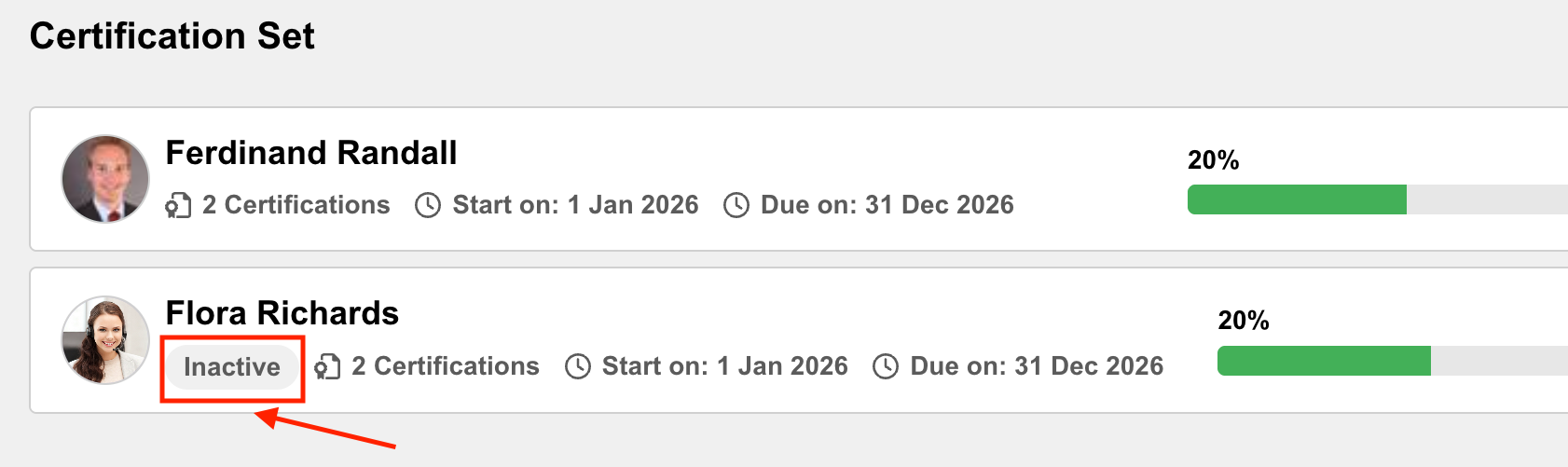
Benefits and Use Cases: Supervisors can easily identify their employees without active certification requirements. This eliminates confusion where certifications are purposely deactivated during a certification period and staff members no longer have training obligations.
Audience: Supervisors
Setup & Access: No configuration required. The change is automatically applied to the Certifications (ID 178) panel and Certification Set (ID 183) panel.
Considerations & Limitations: Requires the Certified Credit Management add-on licence. Changes are available only for panels with new design (React) opt-in.
Testing: Providing your system is licenced for Certified Credit Management, you can test by following these steps:
-
Ensure the dashboard page that the Certifications (ID 178) panel and/or Certification Set (ID 183) panel (or duplicates of) are assigned to, has the Opt-in for the new dashboard & panel design checkbox ticked.
-
In the Staff pool function, open the Competency view of a test user and assign a certification that is linked to the Certification panel.
-
Highlight the certification, click the Edit icon and select the Deactivate certification option. The certification will display with a red “Inactive” cross. Close the tab.
-
View the dashboard that contains the Certifications panel (ID 178) or duplicate of. The test user will be displayed with an Inactive status.
Risk rating: Low
Supervisor Self-visibility in Certification Panels
Overview: Supervisors can now view their own status within the Certification and Certification set panels. By adding themselves to the employee list, they can access their own details page and perform supervisor actions, such as enrolling, directly from their own view.
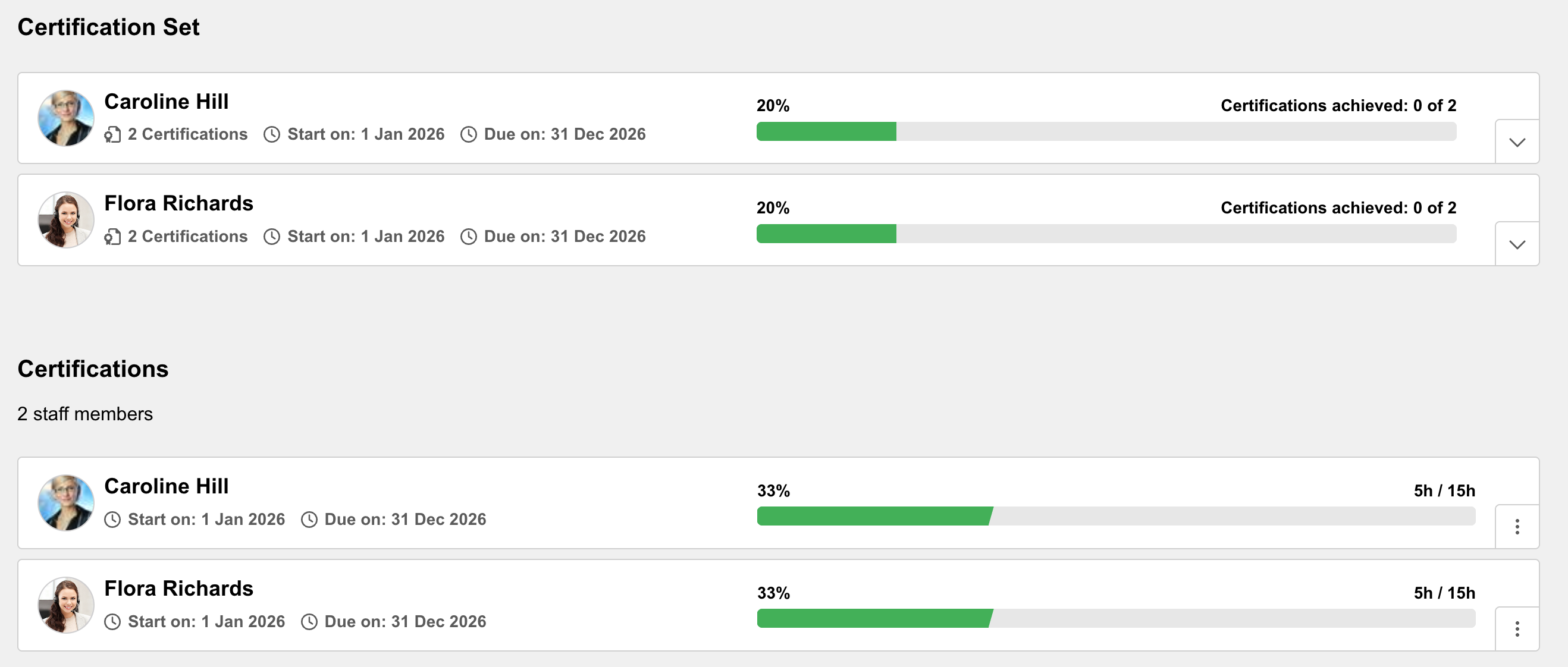
Benefits and Use Cases: This update provides supervisors with a complete overview of certification statuses within their team. The key benefits include:
-
More accurate reporting as their own data is included
-
Ensuring consistency between the My Staff view and certification panels
-
Simplifying self-management for supervisors who are also their own direct reports
Audience: Supervisors
Setup & Access: The change is automatically available and can be activated in Certification panels. Either edit or duplicate a Certification panel and set the Used for setting as Manager view. Next, in the Clients function click the Settings icon and open the Competence settings option. Here, tick the Supervisor, who is defined as his own supervisor can see himself in the certification panel and certification set panel checkbox.
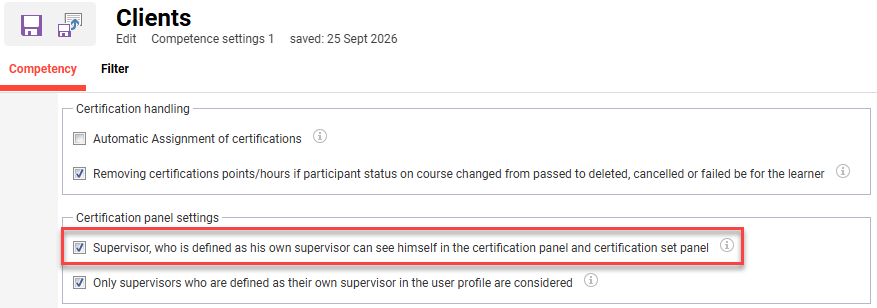
The Only supervisors who are defined as their own supervisor in the user profile are considered checkbox sub setting can be ticked if required.
Considerations & Limitations: Requires the Certified Credit Management add-on licence.
Testing: Providing that the Certified Credit Management add-on licence is active, you can test by:
-
Tick the Supervisor, who is defined as his own supervisor can see himself in the certification panel and certification set panel checkbox in the Clients function.
-
Assign a certification to your Supervisor record.
-
Log in as the Supervisor and view a dashboard containing either the Certification panel or Certification set panel. The Supervisor record will now be visible.
Risk rating: Low
Channels
Removal of Service Account Email from Configuration
Overview: A backend Channels configuration parameter required for the Channels plugin configuration for global search has been updated. The IDM has been extended to identify a user via User ID field, alongside email. The default configuration can now be overridden to set the Super user ID field as the default value found on most systems.
Benefits and Use Cases: Reduced likelihood of service authentication failure resulting in failed scheduled jobs. This could happen if the email address of the super user is not correct in the Channel plugin configuration.
-
More robust channel plugin configuration for global search
-
Out of the box with zero or minimal manual configuration
Audience: Scheer IMC Consultants and Technical administrators
Setup & Access: This is expected to work out of the box for most systems, only systems where the standard super user is not available, will require configuration. The configuration is performed in the Data Connector Configuration function in the Edit plugin configuration option.
Considerations & Limitations: This relates to the Channels plugin configuration for global search only and does not impact functionality.
Testing: Not required
Risk rating: Low
Automatic Unsubscription of Passive or Target Group-excluded Users from Channels
Overview: The system now automatically unsubscribes users from channels if they become passive or are removed from a target group. This ensures that subscriber counts on channel cards and in reports always reflect only those users who currently have valid access.
Benefits and Use Cases: Learners who become passive or excluded from a target group, will be automatically unsubscribed from Channel subscriptions.
-
Ensures accurate subscriber data in reports and on channel cards
-
Eliminates manual effort for cleaning up outdated subscriptions
-
Aligns channel memberships automatically with current user status and permissions
Audience: All users
Setup & Access: The change is automatically applied. Existing subscription data will be corrected automatically. Any user who currently has a subscription to a channel they no longer have access to will be unsubscribed; therefore past and future data is considered.
Considerations & Limitations: Requires the Channels add-on licence. Further limitations include:
-
There is no button to manually clean up subscriptions
-
A user manually unsubscribing is out of scope
-
Restoration of subscriptions that were ended by the user is out of scope
Testing: To test this update, you can subscribe a test user to a Channel. Then edit the user and change their authentication status from Active to Passive.
Risk rating: Low
General Improvements
Overview: Several minor improvements have been introduced to the existing Channels feature to enhance the overall experience of discovering, accessing and interacting with learning content.
The following improvements have been implemented:
-
Configuration for order of my feed/explore
-
Consider client specific languages
-
Correct default clearances
-
Purpose of media field no longer added per default
Benefits and Use Cases: These improvements provide a more intuitive and seamless user experience, making it easier for learners to engage with channel content and supporting the overall adoption and usability of Channels. Channel administrators also gain great control with language, clearance, and moderation configuration.
Audience: Channel administrators
Setup & Access: The configuration options for each update are described below:
-
Configuration for the order of My Feed / Explore Channels:
-
A new setting is available under Configuration function Channels menu to define the order of the tabs. The selected option determines which tab is displayed first and serves as the default landing page for Channels.
-
If My Feed is selected, the existing behavior remains unchanged. If Explore Channels is selected, it becomes the first tab and the default landing page.
-
-
Consider client-specific languages:
-
A client-specific subset of the available platform languages can be defined in the Clients function. Edit a client and go to the Languages tab to select desired languages.
-
If client-specific languages are configured, Channels will now respect these settings. If no client-specific languages are defined, the languages configured in Configuration function Platform languages menu will be used instead.
-
-
Correct default clearances:
No additional configuration is required beyond the existing settings under Configuration function in the Clearances menu. -
Purpose of media meta tag is no longer added by default to new channels
-
As this meta tag is intended specifically for Channels, and not all customers use Channels or the meta tag itself, it has been removed from the default meta tags.
-
For media created from now on, customers who wish to use this meta tag must add it manually.
-
Considerations & Limitations: Requires the Channels add-on licence and architecture. Further considerations of these updates include:
-
Configuration for order of my feed/explore has no immediate impact; the configuration needs to be changed manually.
-
Consider client-specific languages → If customers have configured client-specific languages, Channels previously ignored them. From now on, these languages will be respected.
-
Correct default clearances will be applied consistently when a new channel is created, as in other areas of the system.
-
The Purpose of the media field is no longer added per default. This affects newly created media, as the meta tag must now be added manually.
Testing: To test the changes, follow the setup instructions for each update.
Risk rating: Medium
AI Moderation Improvements
Overview: Some minor improvements have been introduced to the Channels AI moderation functionality introduced in IP 14.29. The AI review moderation enhancements include:
-
New notification for review administrators
-
New clearance type Manage reviews for review manager
-
New Prohibited words field to automatically flag words when found in comments
-
New Ollama service deployment check when enabling AI review moderation
Benefits and Use Cases: Moderation is important to ensure comments or feedback of Channel content adheres to expected standards. These updates improve the moderation experience via:
-
A more intuitive configuration
-
Greater access control
-
Better communication to moderators
-
More efficient AI review with pre-flagged prohibited words
Audience: Channel administrators and Moderators
Setup & Access: The configuration options for each update are described below:
-
New notification for review administrators
-
A new notification, Comment flagged for moderation, is available for administrators. It is sent when AI moderation flags a comment for review, provided that the recipient has the Manage Review permission for the respective channel.
-
A notification placeholder is available that, when included, lists multiple channels in which comments have recently been flagged for review.
-
Enable or disable the notification depending on whether you wish to use it.
-
-
Enhance AI review moderation – Manage reviews authorisation
In the Channels Manager function Clearances menu, there is a new authorisation type available. Only if a user/group/client has the new Manage reviews right, the reviews manager can be accessed. The previous Edit right is no longer enough. -
Prohibited words field is automatically available for all channels and defaulted blank. Multiple entries can be provided as a comma-separated list, e.g. word1, word2, word3.
Considerations & Limitations: Requires the Channels add-on licence and architecture. Further considerations of these updates include:
-
The new notification for review administrators needs to be enabled manually. Until activation, there is no impact.
-
The new clearance type Manage Reviews has immediate impact: In IP 14.29, the Edit permission determined whether a user could access manage reviews. The new Manage Reviews permission now must be used instead. Users who previously had specific authorisation to manage reviews through the Edit permission must now be granted the new Manage Reviews permission to retain access.
Testing: To test the changes, follow the setup instructions for each update.
Risk rating: Medium
Resource and Capacity Management
Resources APIs
Overview: New APIs have been implemented for the Resources module. These will enable the creation and assignment of new instructors, room resources and locations.
-
Implement APIs for creation / management of new instructor or room resources and locations
-
Implement an APIs to assign location and resources to courses
-
Migration tool using the APIs (reading CSV input and running the process)
Benefits and Use Cases: This update extends the resource management capability to enhance migration and enable external systems to create or assign resources via API.
Audience: Technical administrators and Scheer IMC technical consultants
Setup & Access: Not required. The APIs will automatically be made available and are documented in Swagger.
Considerations & Limitations: Requires the Resource and Capacity Management licence.
Testing: This is a technical enhancement requiring API experience. We recommend working with the Scheer IMC Technical Services to explore the suitability of these APIs for your scenarios.
Risk rating: Low
Task Management
Language Handling and Technical Improvements
Overview: The Task Management module has received several improvements including enhanced language handling for multilingual task lists and tasks. The system now respects the languages selected by users as well as any client-specific language configuration. Additional technical improvements have also been implemented. These improvements include:
-
Multi-language handling updates:
-
Matching the language handling of Channels in terms of offered languages and saving
-
Default language and further languages taken from Client if available, otherwise taken from the Configuration function Platform Languages menu settings.
-
If no further languages are selected, then only the default language is saved.
-
When opening a task list, only the populated languages are displayed as available.
-
If subsequently adding a further language after the initial save, the title and description for that new language are initially pre-filled with the content of the default language, and can then be individually overwritten.
-
-
Saving issue resolved where a task would not save when the platform language differed from the task creation language.
-
Rewrite of the TLM backend APIs to match other areas of the system.
-
Resolved an API query parameter error that prevented user selection in the Responsible and Deputy fields.
-
Update of Task List Clearances to include the Object ID column and to enable column sorting.
-
Update to the Due date logic of tasks within a Task template
-
Due date = Custom date (empty): If left blank, a warning message that time is invalid and save is not possible
-
Due date = Relative to course (empty): If left blank, a warning message that time is invalid and save is not possible
-
Due date = None: Task can be saved
-
-
Updated dashboard refresh logic after task completion to remain on last visited page.
Benefits and Use Cases: The Task Management module helps administrators and facilitators to deliver successful training by ensuring tasks are complete. These improvements ensure that task lists and tasks are maintained only in the intended languages, preventing unnecessary language versions from being created and automatically populated with default content. The additional technical improvements further enhance the overall reliability and consistency of Task Management.
Audience: Task administrators
Setup & Access: No new configuration required as all these changes are automatically applied. The Task Management module reads the existing configuration sources (Global: Platform Languages / Client: language subset). The default language in Task Management remains the platform language currently selected in the UI (unchanged). Client specific languages can be defined in the Clients function Languages tab.
Considerations & Limitations: Requires the Task Management licence and architecture.
Testing: If Task Management licence is enabled, you can test the following points:
-
For Multi-language verify that:
-
The displayed default language matches the platform language of the current session.
-
The optional languages match those available in the Client configuration.
-
If only the default language is populated, then no other languages are saved.
-
-
The Responsible field and Deputy field can be populated with users.
-
Verify that saving is possible when the selected default language is different than the active platform language.
-
Saving when leaving a task due date blank produces an error message.
-
Saving with Due date = None is possible.
-
When completing a task in the dashboard view, the page reloads to the same page location.
Risk rating: Low